Async Code in Node.js: Callbacks & Promises
1. The Problem: JavaScript Can Only Do One Thing at a Time
Imagine you're at a coffee shop. You order a latte, and the barista says: "Okay, stand here. Don't move, don't talk to anyone. I will make your coffee, and only after it's done, you can continue with your day."
That sounds ridiculous, right? But that's exactly how JavaScript works by default it does one task, finishes it, then moves to the next. This is called being single threaded.
For most things, this is fine. Adding two numbers? No problem. But reading a file from disk? Fetching data from the internet? Those things take time sometimes hundreds of milliseconds. And if JavaScript just sat and waited, your entire app would freeze. Nothing would work.
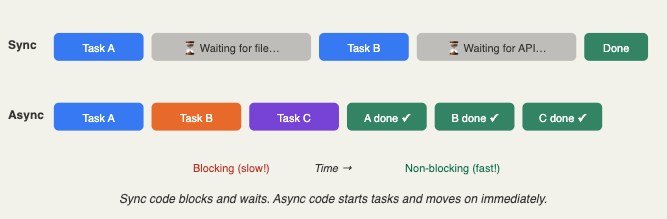
The core idea: Async code lets your program start a slow task, then move on and do other things, and come back to handle the result when it's ready just like a barista who takes your order, starts making it, and helps other customers while your coffee brews.
This is called asynchronous (async) execution, and it's the heart of how Node.js works. Node.js is built for this. It's designed to juggle many tasks at once without blocking. That's why it's so popular for web servers one Node.js server can handle thousands of requests simultaneously.
The First Solution: Callbacks
When async programming was new in JavaScript, developers used a simple idea: callbacks. A callback is just a function that you pass to another function, and that function calls it when the work is done.
Think of it like leaving your phone number at a restaurant. You don't wait by the host stand you go have a drink at the bar. When your table is ready, they call you. That "call you" part is the callback.
Let's say you want to read a file in Node.js. Here's how you'd do it with a callback:
const fs = require('fs');

// Step 1: Tell Node.js to read the file
fs.readFile('user.txt', 'utf8', function(error, data) {

  // Step 3: This runs AFTER the file is read
  if (error) {
    console.log('Something went wrong:', error);
    return;
  }

  console.log('File contents:', data);
});

// Step 2: This runs IMMEDIATELY (no waiting!)
console.log('Still reading the file...');
Notice something surprising? The last console.log at the bottom actually runs before the file is done reading. That's the whole point Node.js starts reading the file and immediately continues to the next line.
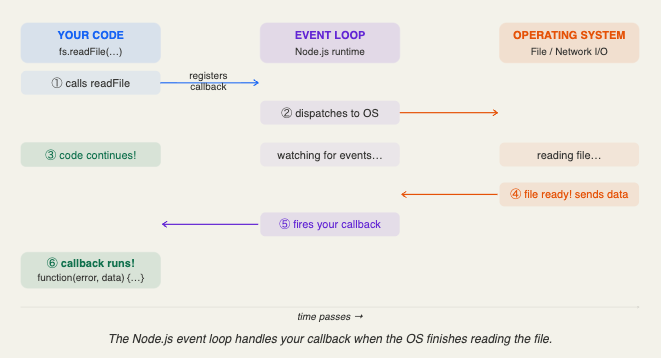
Let's break down exactly what happens step by step:
Node.js starts reading user.txt and hands the job off to the operating system. It does NOT wait.
Node.js runs the next line "Still reading the file..." is printed right away.
When the file is done, Node.js calls our callback function with either an error or the file data.
The Nightmare: Callback Hell
Callbacks work great for a single task. But real apps rarely do just one thing. What if you need to read a file, then use that data to query a database, then send the result to an API? You end up putting callbacks inside callbacks inside callbacks…
This is known as Callback Hell (or "the Pyramid of Doom"). Let's see what that looks like:
fs.readFile('user.txt', 'utf8', function(err, userId) {
  if (err) return console.log(err);

  db.getUser(userId, function(err, user) {
    if (err) return console.log(err);

    api.getProfile(user.email, function(err, profile) {
      if (err) return console.log(err);

      email.send(profile, function(err, result) {
        if (err) return console.log(err);

        console.log('Email sent! Finally...');
        // We're 5 levels deep. Please send help.
      });
    });
  });
});
Why this is a problem: Every time you add a new step, you have to go deeper. Your code drifts to the right. It becomes impossible to read, hard to debug, and a nightmare to add error handling. You check for errors at every level and if you forget even one, bugs sneak in silently.
The main problems with deeply nested callbacks are:
Hard to read you have to track indentation levels just to understand the flow of your code.
Hard to handle errors you must check if (err) at every single level. Miss one and your app crashes silently.
Hard to reuse all the logic is tangled together. You can't easily pull one piece out and use it elsewhere.
The Fix: Promises to the Rescue
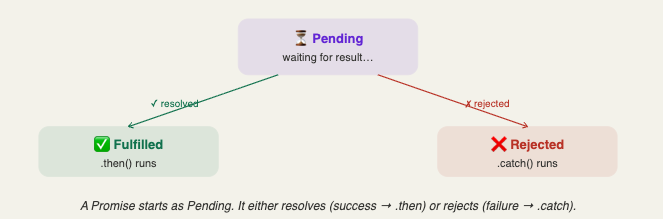
JavaScript developers were tired of callback hell. So in 2015, Promises were added to JavaScript. A Promise is exactly what it sounds like a promise that some value will be available in the future.
Think of it like ordering from Amazon. The moment you click "Buy", you get an order confirmation number. That number is a promise it represents a package that doesn't exist yet, but will arrive eventually. You can even plan ahead: "When the package arrives, I'll unbox it." And if delivery fails? You handle that separately.
A Promise always lives in one of three states:
Now let's rewrite the file-reading example using a Promise:
const fs = require('fs').promises;

fs.readFile('user.txt', 'utf8')
  .then(function(data) {
    console.log('File contents:', data);
  })
  .catch(function(error) {
    console.log('Error reading file:', error);
  });
Much cleaner! But the real power of Promises shows up when you chain multiple steps together. Remember that callback nightmare? Here's the same logic with Promises:
fs.readFile('user.txt', 'utf8')
  .then(userId => db.getUser(userId))
  .then(user   => api.getProfile(user.email))
  .then(profile => email.send(profile))
  .then(() => console.log('Email sent!'))
  .catch(error => console.log('Something failed:', error));
  // ONE catch handles ALL errors in the chain
That's the magic! Each .then() runs after the previous one finishes. If any step fails, the single .catch() at the bottom handles it. No more checking for errors at every level!
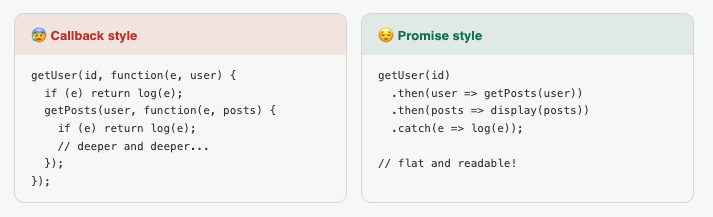
Callback vs Promise: Side by Side
Let's put them right next to each other so the difference really clicks:
Why Promises Are Better
Promises solve all three problems that callbacks had. Here's a quick summary:
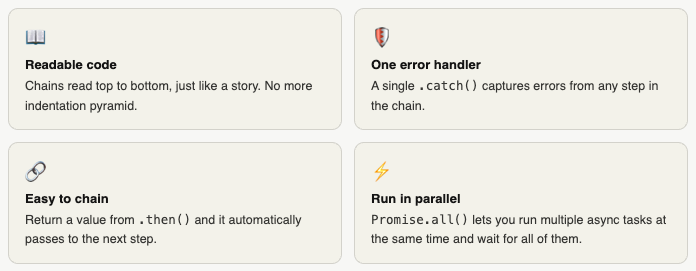
Here's that parallel power in action:
// Run three async tasks at the SAME TIME
Promise.all([
  fs.readFile('file1.txt', 'utf8'),
  fs.readFile('file2.txt', 'utf8'),
  fetch('https://api.example.com/data')
])
.then(([file1, file2, apiData]) => {
  console.log('All three done at once!');
})
.catch(err => console.log('One of them failed:', err));
The Modern Way: async / await
Promises are great. But JavaScript went one step further. Meet async/await built on top of Promises, but makes async code look almost exactly like regular, normal code.
async function sendEmailToUser() {
  try {
    const userId  = await fs.readFile('user.txt', 'utf8');
    const user    = await db.getUser(userId);
    const profile = await api.getProfile(user.email);
    await email.send(profile);
    console.log('Done!');
  } catch (error) {
    console.log('Error:', error);
  }
}

sendEmailToUser();
This is the same logic as the callback hell example but it reads like a step-by-step recipe. await pauses the function until the Promise resolves, without blocking the rest of Node.js. It's Promises under the hood, just dressed up beautifully.
Connecting All the Dots
Here's the full journey you just took:
JavaScript is single-threaded it needs async to avoid freezing when doing slow tasks like file reads or network calls.
Callbacks were the first solution pass a function, get called when the work is done. Simple but messy at scale.
Callback hell is real nested callbacks grow into unreadable pyramids with scattered error handling.
Promises fixed it flat chains, one error handler, and the ability to run tasks in parallel with Promise.all().
async/await is the cherry on top same Promises underneath, but reads like normal synchronous code.


