Blocking vs Non-Blocking Code in Node.js
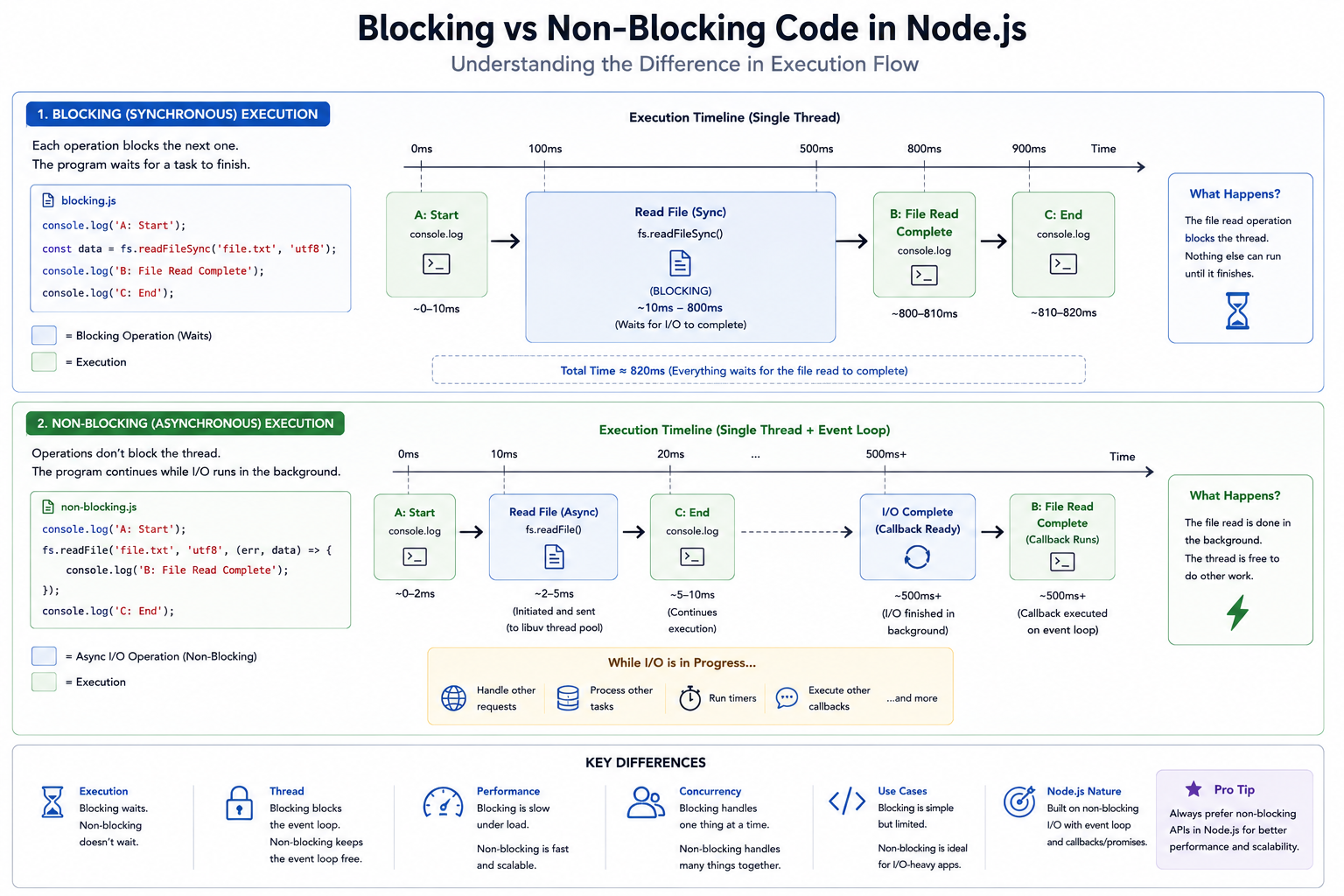
If you spend enough time building backend systems, you will inevitably write a piece of code that brings your entire application to its knees. The server doesn't crash, it just... stops. Requests pile up, API responses time out, and users are left staring at a spinning loading wheel.
More often than not, this isn't a memory leak or a hardware failure. It is a fundamental misunderstanding of blocking vs. non-blocking code.
Because Node.js operates on a single main thread, understanding how it executes code isn't just a nice-to-have theory it is the difference between a highly scalable microservice and a server that freezes under a tiny bit of traffic. Let's break down the mechanics of execution in Node.js and why keeping things asynchronous is the golden rule of backend development.
1. What is Blocking Code? (The Traffic Jam)
In programming, blocking refers to operations that execute synchronously. This means the Node.js process executes the code line by line, and it will absolutely not move to line 2 until line 1 is 100% finished.
If line 1 is simple math (2 + 2), it finishes in microseconds. But what if line 1 is an instruction to read a massive 5GB file from the hard drive? The CPU literally sits there, idling and waiting for the hard drive to spin up and fetch the data.
During this waiting period, the single Node.js thread is blocked. It cannot accept new incoming network requests, it cannot run other functions, and it cannot respond to users. It is stuck in a traffic jam of its own making.
The Analogy
Imagine a barista at a coffee shop taking an order for a highly complex, 10-minute pour-over coffee. In a blocking system, the barista takes the order, starts pouring the hot water, and completely ignores the line of 50 other customers out the door until that single cup is finished and handed off.
2. What is Non-Blocking Code? (The Fast Lane)
Non-blocking code executes asynchronously. When Node.js encounters a time-consuming I/O operation (like fetching data over a network or querying a database), it does not wait for it to finish.
Instead, it offloads that task to the background (specifically to the operating system or the Libuv thread pool) and immediately moves on to execute the next line of code. When the background task eventually finishes, it places the result in a queue, and the Node.js Event Loop picks it up to process the callback.
The Analogy
Back to the coffee shop: The barista takes the order for the 10-minute pour-over, hands the ticket to a background machine (or a second worker), and instantly turns back to the register to take the next customer's order for a quick black coffee. Everyone gets served efficiently.
3. The Danger: Why Blocking Code Kills Server Performance
To understand the catastrophic impact of blocking code, let's put it into a real-world perspective.
Imagine you are running a high-frequency trading platform. Thousands of microservices are communicating, and real-time market data is streaming in via WebSockets.
Suddenly, a user requests to generate and download a heavy PDF report of their yearly transaction history. If you use a blocking function to generate that PDF, the entire Node.js process stops to calculate and write that file. For those 3 seconds, your server is deaf. It stops processing incoming trades. It stops updating the live ticker. Every other user on the platform experiences a 3-second lag simply because one user asked for a PDF.
In a multi-threaded language (like Java), a blocking operation only freezes one thread; the server just spins up another thread for the next user. In Node.js, you only have one main thread. If you block it, you block the entire application for everyone.
4. Real-World Scenario: File Handling in Node.js
The standard Node.js fs (File System) module perfectly illustrates this concept by offering both blocking and non-blocking versions of its methods.
The Wrong Way: Synchronous (Blocking)
Notice the Sync at the end of the method name. This tells Node.js to halt everything until the file is read.
const fs = require('fs');

console.log("1. Starting application...");

// The thread stops here and waits. No other code can run.
const data = fs.readFileSync('/path/to/massive-file.txt', 'utf8');
console.log("2. File successfully read!");

console.log("3. Continuing with other tasks...");
Console Output Order: 1 -> 2 -> 3. (Strictly sequential, heavily bottlenecked).
The Right Way: Asynchronous (Non-Blocking)
Here, we use the standard asynchronous readFile. We pass it a callback function that will execute only when the file is ready.
const fs = require('fs');

console.log("1. Starting application...");

// Node offloads this to Libuv and immediately moves to the next line
fs.readFile('/path/to/massive-file.txt', 'utf8', (err, data) => {
    if (err) throw err;
    console.log("3. File successfully read (from the background)!");
});

console.log("2. Continuing with other tasks instantly...");
Console Output Order: 1 -> 2 -> 3. (The server continues running other tasks while the file is being read in the background).
5. The Golden Rule of Node.js
Modern JavaScript has evolved to make non-blocking code much easier to write and read using Promises and async/await. This syntax allows you to write asynchronous code that looks synchronous, avoiding the messy "callback hell" of older Node.js versions, while still keeping the main thread completely unblocked.
The takeaway is simple: Node.js is blazingly fast at routing traffic and delegating tasks. Its only weakness is heavy, synchronous computation. Keep your main thread light, offload your I/O operations (database queries, network requests, file handling) using non-blocking asynchronous methods, and your Express servers will scale beautifully.


