Any website that calls StudyDesk from a browser will be blocked until the API says it is allowed. Learn why, and fix it on the server side.
Where StudyDesk is now
src/studydesk/
├── __init__.py          ← full CRUD on /students
├── models.py
├── utils.py
└── data/students.json
By the end of this article, StudyDesk sends the right CORS headers so that a frontend team can build any browser app against it, and you can verify those headers with curl.
Part 1: The Frontend Team Reports a Bug
A frontend developer, Karan, starts building a web page for the admission office. He calls GET /students from JavaScript in the browser. The API terminal shows:
INFO: 127.0.0.1:52311 - "GET /students?limit=100 HTTP/1.1" 200 OK
Status 200. The API answered. But Karan sends a screenshot of his browser console:
Access to fetch at 'http://127.0.0.1:8000/students?limit=100' from origin
'http://127.0.0.1:5500' has been blocked by CORS policy: No
'Access-Control-Allow-Origin' header is present on the requested resource.
"Your API is broken," he says.
Aman checks /docs. Everything works. He runs a Python script with requests.get(...). Works. Only Karan's browser page fails.
Neha explains, "The API is not broken. The browser threw the response away. This is CORS, and it is the server's job to handle it. You will meet this bug on every API you ever build, so let's understand it properly."

Part 2: Who Calls the API, and From Where
StudyDesk's clients so far:
| Client | How it calls the API | Runs where |
|---|---|---|
Swagger /docs |
JavaScript in the browser, same address as the API | browser, port 8000 |
curl, Postman |
directly | not a browser |
Python scripts with requests |
directly | not a browser |
| Karan's web page | JavaScript in the browser, different address | browser, port 5500 |
Only the last one fails. Two things are true about it: it runs in a browser, and it lives at a different address than the API. Both conditions together trigger the rule.
Part 3: Origins and the Same-Origin Policy
What is an origin?
An origin is scheme + host + port.
| URL | Origin |
|---|---|
http://127.0.0.1:8000/students |
http://127.0.0.1:8000 |
http://127.0.0.1:5500/index.html |
http://127.0.0.1:5500 |
http://localhost:5500/index.html |
http://localhost:5500 |
https://studydesk.com/app |
https://studydesk.com |
Change any of the three parts and you have a different origin. 127.0.0.1:8000 and 127.0.0.1:5500 differ in port, so they are different origins. localhost and 127.0.0.1 are different hosts to the browser, even though they point to the same machine.
The rule
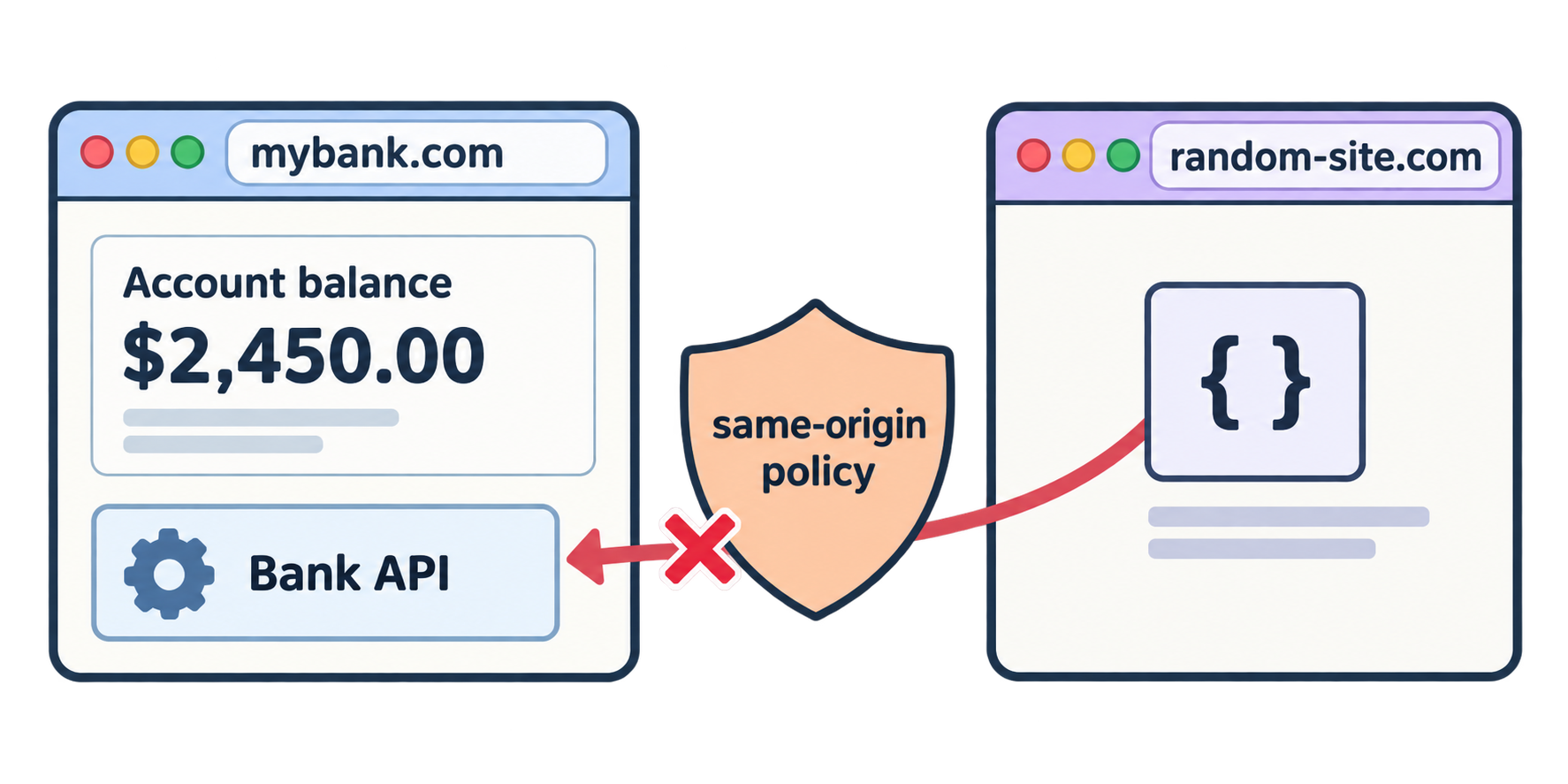
Browsers enforce the same-origin policy: JavaScript running on a page may freely read responses only from its own origin. When a page at origin A calls an API at origin B, that is a cross-origin request. The browser sends it, receives the response, and then hides the response from the script unless the server explicitly allows it.
Why browsers do this
Imagine you are logged into your bank in one tab. Without this rule, any website you open in another tab could run JavaScript that calls your bank's API, with your cookies attached, and read your balance. The same-origin policy stops that: the bank's responses are only readable by the bank's own pages, unless the bank says otherwise.
So the policy protects users, not APIs. It is a browser feature. curl, Python, and mobile apps are not browsers and ignore it completely.
Part 4: CORS — the Server's Permission Slip
CORS (Cross-Origin Resource Sharing) is the mechanism that lets a server opt in. The server adds a response header:
Access-Control-Allow-Origin: http://127.0.0.1:5500
When the browser sees this header and it matches the page's origin, it lets the script read the response. If the header is missing or does not match, the browser blocks it, which is exactly Karan's error.
Preflight
For simple requests like a plain GET, the browser sends the request and checks the header on the way back.
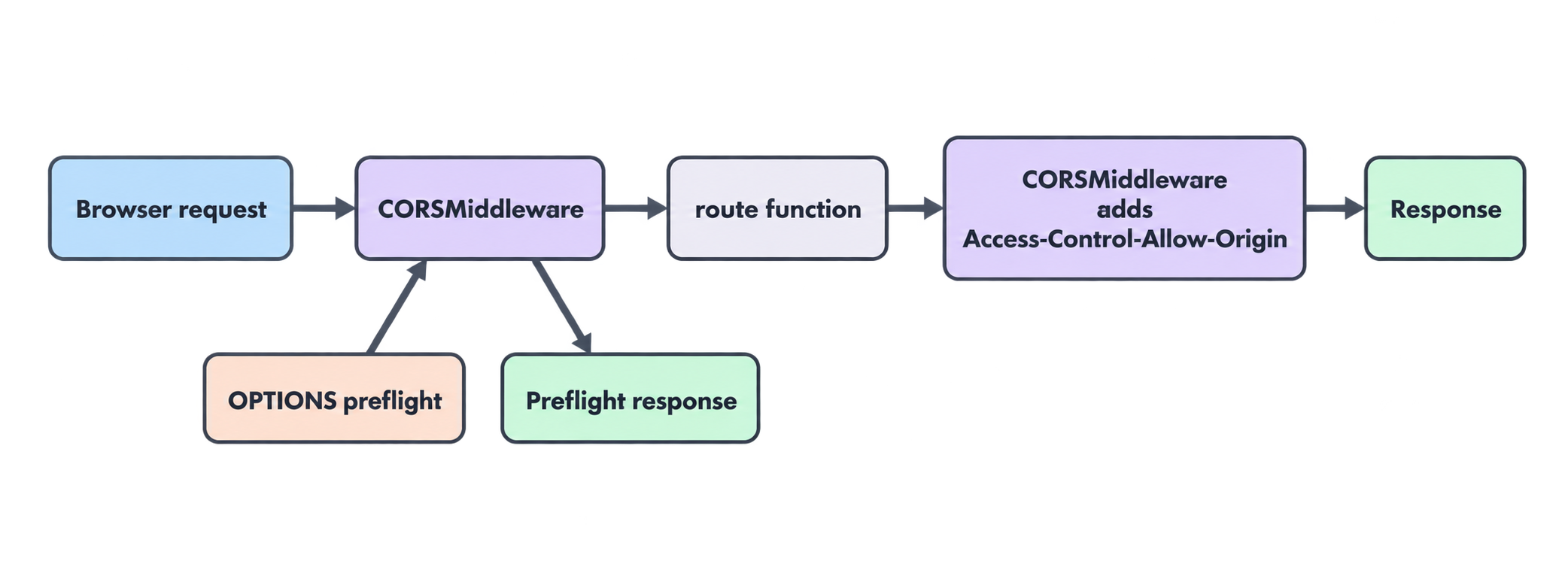
For "risky" requests, meaning PUT, DELETE, or anything with a JSON body like our POST /students, the browser is more careful. Before sending the real request, it sends a small preflight request with the OPTIONS method:
OPTIONS /students
Origin: http://127.0.0.1:5500
Access-Control-Request-Method: POST
Access-Control-Request-Headers: content-type
It is asking: "May a page from this origin send a POST with a Content-Type header?" The server must answer with the allow headers. Only then does the browser send the actual POST. If the server does not answer the OPTIONS request correctly, every POST, PUT, and DELETE from the browser fails, even though GET might work.
What the server must do
- Answer
OPTIONSpreflight requests with the right headers. - Add
Access-Control-Allow-Origin(and a few related headers) to every normal response.
Writing this by hand is error-prone. FastAPI includes a middleware that does both.
Part 5: Enabling CORS in FastAPI
What is middleware?
Middleware is code that wraps your whole app. It runs on every incoming request before it reaches any route, and on every outgoing response before it leaves. It is the right place for cross-cutting concerns: CORS, logging, timing, compression.
request ──▶ [middleware] ──▶ route function ──▶ [middleware] ──▶ response
The change
Only the top of __init__.py changes. Here is the full file.
src/studydesk/__init__.py
from typing import Annotated, Literal

import uvicorn
from fastapi import FastAPI, HTTPException, Path, Query, status
from fastapi.middleware.cors import CORSMiddleware

from .models import Student, StudentCreate, StudentUpdate
from .utils import email_exists, find_student, load_students, save_students

app = FastAPI(
    title="StudyDesk API",
    description="Student records API for a coaching institute.",
    version="0.1.0",
)

ALLOWED_ORIGINS = [
    "http://127.0.0.1:5500",
    "http://localhost:5500",
    "http://127.0.0.1:3000",
    "http://localhost:3000",
]

app.add_middleware(
    CORSMiddleware,
    allow_origins=ALLOWED_ORIGINS,
    allow_credentials=True,
    allow_methods=["*"],
    allow_headers=["*"],
)


@app.get("/", tags=["General"])
def home():
    return {"message": "Welcome to StudyDesk API"}


@app.get("/students", tags=["Students"], summary="Get all students")
def get_students(
    city: Annotated[
        str | None,
        Query(description="Filter by city (case-insensitive).", examples=["Ahmedabad"]),
    ] = None,
    grade: Annotated[
        str | None,
        Query(
            description="Filter by grade: A, B, C, or D.",
            pattern="^[ABCD]$",
            examples=["A"],
        ),
    ] = None,
    min_marks: Annotated[
        int | None,
        Query(description="Only students with marks >= this value.", ge=0, le=100),
    ] = None,
    sort_by: Annotated[
        Literal["id", "name", "age", "marks"],
        Query(description="Field to sort by."),
    ] = "id",
    order: Annotated[
        Literal["asc", "desc"],
        Query(description="Sort direction: asc or desc."),
    ] = "asc",
    offset: Annotated[
        int,
        Query(description="Number of students to skip.", ge=0),
    ] = 0,
    limit: Annotated[
        int,
        Query(description="Maximum number of students to return (1-100).", ge=1, le=100),
    ] = 10,
):
    students = load_students()

    # --- filtering ---
    if city:
        students = [s for s in students if s["city"].lower() == city.lower()]

    if grade:
        students = [s for s in students if s["grade"] == grade.upper()]

    if min_marks is not None:
        students = [s for s in students if s["marks"] >= min_marks]

    # --- sorting ---
    students = sorted(students, key=lambda s: s[sort_by], reverse=(order == "desc"))

    # --- pagination ---
    total = len(students)
    total_pages = (total + limit - 1) // limit if total > 0 else 0
    page = students[offset : offset + limit]

    return {
        "total": total,
        "total_pages": total_pages,
        "offset": offset,
        "limit": limit,
        "count": len(page),
        "students": page,
    }


@app.get("/students/{student_id}", tags=["Students"], summary="Get one student by ID")
def get_student(
    student_id: Annotated[
        int,
        Path(
            title="Student ID",
            description="The unique ID of the student. Must be a positive integer.",
            gt=0,
            examples=[1],
        ),
    ],
):
    students = load_students()
    student = find_student(students, student_id)
    if student is None:
        raise HTTPException(
            status_code=status.HTTP_404_NOT_FOUND,
            detail=f"Student with id {student_id} not found",
        )
    return student


@app.post(
    "/students",
    tags=["Students"],
    summary="Create a new student",
    status_code=status.HTTP_201_CREATED,
)
def create_student(payload: StudentCreate):
    students = load_students()

    if email_exists(students, payload.email):
        raise HTTPException(
            status_code=status.HTTP_409_CONFLICT,
            detail=f"A student with email {payload.email} already exists",
        )

    next_id = max((s["id"] for s in students), default=0) + 1
    new_student = Student(id=next_id, **payload.model_dump())

    students.append(new_student.model_dump())
    save_students(students)

    return new_student


@app.put("/students/{student_id}", tags=["Students"], summary="Update a student (partial)")
def update_student(
    student_id: Annotated[int, Path(title="Student ID", gt=0, examples=[1])],
    payload: StudentUpdate,
):
    students = load_students()
    student = find_student(students, student_id)
    if student is None:
        raise HTTPException(
            status_code=status.HTTP_404_NOT_FOUND,
            detail=f"Student with id {student_id} not found",
        )

    changes = payload.model_dump(exclude_unset=True)
    if not changes:
        raise HTTPException(
            status_code=status.HTTP_400_BAD_REQUEST,
            detail="No fields provided to update",
        )

    if "email" in changes and email_exists(students, changes["email"], exclude_id=student_id):
        raise HTTPException(
            status_code=status.HTTP_409_CONFLICT,
            detail=f"A student with email {changes['email']} already exists",
        )

    merged = student.copy()
    merged.update(changes)
    merged.pop("grade", None)
    updated_student = Student(**merged)

    for index, s in enumerate(students):
        if s["id"] == student_id:
            students[index] = updated_student.model_dump()
            break

    save_students(students)
    return updated_student


@app.delete(
    "/students/{student_id}",
    tags=["Students"],
    summary="Delete a student",
    status_code=status.HTTP_204_NO_CONTENT,
)
def delete_student(
    student_id: Annotated[int, Path(title="Student ID", gt=0, examples=[1])],
):
    students = load_students()
    student = find_student(students, student_id)
    if student is None:
        raise HTTPException(
            status_code=status.HTTP_404_NOT_FOUND,
            detail=f"Student with id {student_id} not found",
        )

    students = [s for s in students if s["id"] != student_id]
    save_students(students)


def main() -> None:
    """Start the development server."""
    uvicorn.run("studydesk:app", host="127.0.0.1", port=8000, reload=True)
Reading the new part
ALLOWED_ORIGINS The exact origins that may read our responses. Scheme, host, and port must all match, so we list both 127.0.0.1 and localhost. Ports 5500 and 3000 are the common defaults for local frontend dev servers (python -m http.server, Vite, React, Next.js). When StudyDesk goes live, the production domain will be added here. In Article 7 this list moves into .env, so it can differ between your laptop and the server.
app.add_middleware(CORSMiddleware, ...)
| Option | Meaning |
|---|---|
allow_origins |
Which origins get the allow header |
allow_credentials=True |
Allow the browser to send cookies and Authorization headers (needed in Article 10 for JWT) |
allow_methods=["*"] |
Allow every HTTP method, including the OPTIONS preflight |
allow_headers=["*"] |
Allow any request header, such as Content-Type: application/json and later Authorization |
Why not allow_origins=["*"]?
Many tutorials write ["*"], meaning "any website on the internet may call this API from a browser." For a public, read-only API that may be acceptable. For anything with logins or private data it is a bad idea, and it does not work together with allow_credentials=True (browsers refuse that combination). Always list the real frontends.
Order matters
add_middleware() must be called before the routes are used, which is why it sits right after app = FastAPI(...). Placing it at the bottom of the file still technically works at startup, but keep it at the top so it is obvious.
Part 6: Verifying CORS Without a Frontend
You do not need to write a web page to prove this works. curl can imitate what the browser does.
Test 1: a simple GET with an Origin header
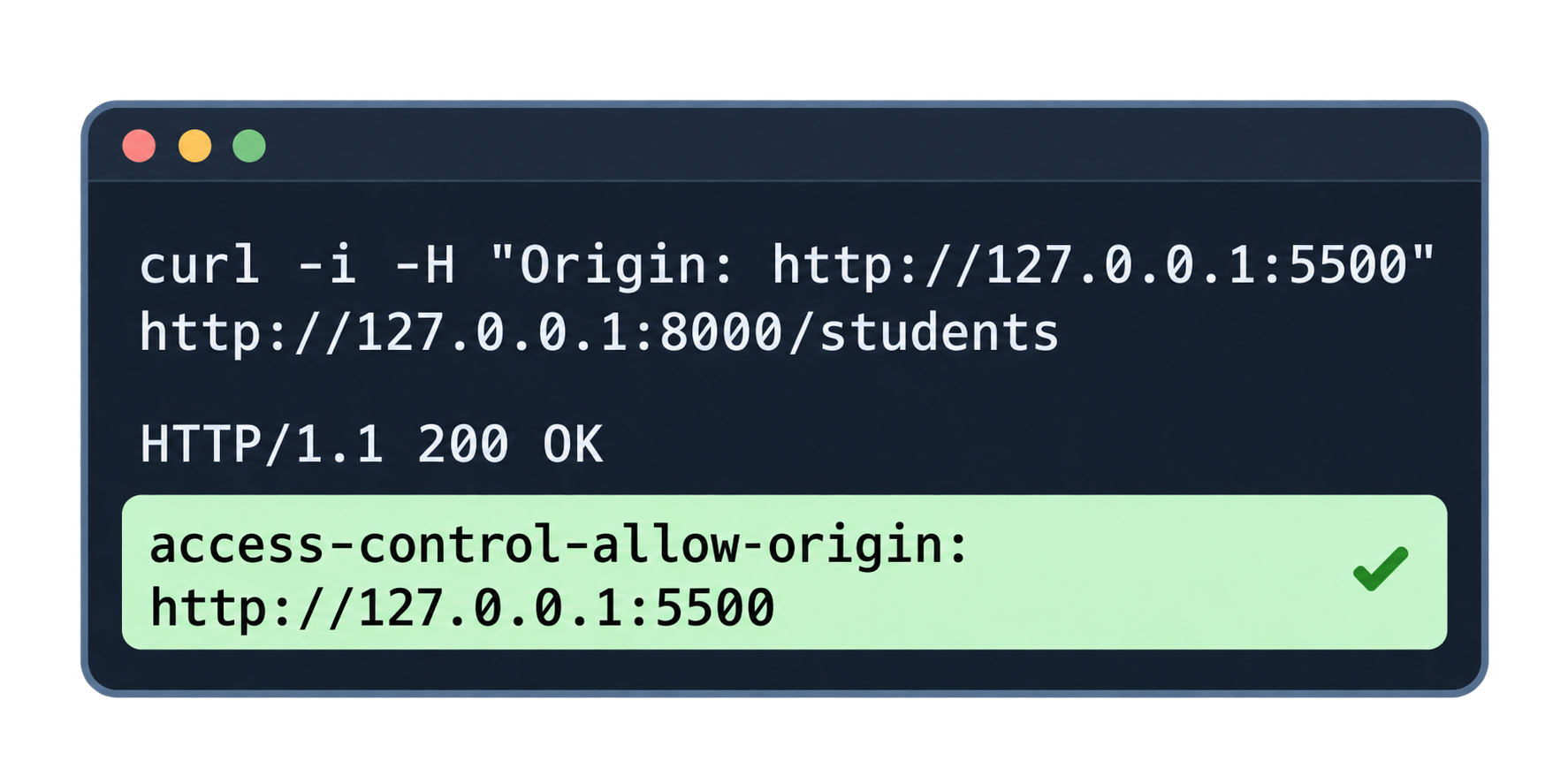
curl -i -H "Origin: http://127.0.0.1:5500" http://127.0.0.1:8000/students?limit=1
-i prints the response headers. -H "Origin: ..." adds the header a browser would send. Look for this line in the output:
access-control-allow-origin: http://127.0.0.1:5500
access-control-allow-credentials: true
That header is what Karan's browser was missing.
Test 2: an origin that is not allowed
curl -i -H "Origin: http://evil-site.com" http://127.0.0.1:8000/students?limit=1
The response still has status 200 and the student data (CORS does not block the request on the server side), but there is no access-control-allow-origin header. A browser on evil-site.com would block its script from reading this.
Test 3: a preflight for POST
curl -i -X OPTIONS http://127.0.0.1:8000/students \
  -H "Origin: http://127.0.0.1:5500" \
  -H "Access-Control-Request-Method: POST" \
  -H "Access-Control-Request-Headers: content-type"
Expected:
HTTP/1.1 200 OK
access-control-allow-origin: http://127.0.0.1:5500
access-control-allow-methods: DELETE, GET, HEAD, OPTIONS, PATCH, POST, PUT
access-control-allow-headers: content-type
access-control-allow-credentials: true
The middleware answered the preflight by itself. Your create_student function never ran. The browser would now go ahead and send the real POST.
Test 4: Swagger still works
Open /docs and try any route. Nothing changed. Swagger is served from 127.0.0.1:8000, the same origin as the API, so CORS never applied to it.
Karan reloads his page. The table fills. "Not broken after all," he admits.
Part 7: What CORS Is Not
Three common misunderstandings, cleared up:
CORS is not security for your API. It only controls which browser pages may read responses. Anyone with curl can still call every route. Test 2 proved it: the data came back; only the header was missing. Protecting the API itself is authentication, which arrives in Article 10.
CORS does not block the request. The request reaches the server and is fully processed. A DELETE from a disallowed origin still deletes. The browser only hides the response. This is one more reason CORS must never be your only protection.
CORS is not needed for server-to-server calls. A Python backend calling StudyDesk with requests, a cron job, a mobile app's native HTTP client: none of them are browsers, none of them care.
Where StudyDesk is after this article
studydesk/
└── src/
    └── studydesk/
        ├── __init__.py          ← CORSMiddleware with allowed origins
        ├── models.py
        ├── utils.py
        └── data/students.json
The API now answers:
| Request | Response header |
|---|---|
any request with Origin: http://127.0.0.1:5500 |
access-control-allow-origin: http://127.0.0.1:5500 |
| any request with an unlisted origin | no allow header (browser blocks) |
OPTIONS preflight from an allowed origin |
200 with allow-methods and allow-headers |
Concept Quiz
Answers are below. No coding needed.
Q1. What three parts make up an origin? Are http://localhost:5500 and http://127.0.0.1:5500 the same origin?
Q2. When Karan's page was blocked, did the request reach the API? Where exactly was it blocked?
Q3. What is the same-origin policy protecting, and from what?
Q4. Which header does the server send to allow a cross-origin page to read a response?
Q5. What is a preflight request, which method does it use, and which kinds of requests trigger it?
Q6. Why does /docs work without any CORS setup?
Q7. What is middleware, and where in the request flow does it run?
Q8. Why should you avoid allow_origins=["*"] on an API with logins?
Q9. A DELETE /students/3 is sent from a browser page whose origin is not in the allow list. Is the student deleted?
Q10. Does CORS protect StudyDesk from someone using curl? What does?
Answers
- Scheme + host + port. No: the hosts differ, so the browser treats them as different origins.
- Yes, it reached the API and got a 200. The browser blocked the script from reading the response because the
Access-Control-Allow-Originheader was missing. - Users. It stops a script on one site from reading responses from another site using the user's cookies or credentials.
Access-Control-Allow-Origin.- An automatic
OPTIONSrequest the browser sends before a "risky" cross-origin request (PUT, DELETE, or any request with a JSON body) to ask whether it is allowed. - Swagger is served by the API itself at the same origin (
127.0.0.1:8000), so its requests are same-origin and the rule does not apply. - Code that wraps the whole app, running on every request before the route and on every response after it. CORS middleware adds headers and answers preflights there.
- It allows any website to call the API from users' browsers, and it is incompatible with
allow_credentials=True, which login flows need. - Yes. The server processes the request fully; CORS only causes the browser to hide the response. This is why CORS is not security.
- No;
curlis not a browser and ignores CORS. Authentication (Article 10) protects the API from unwanted callers.
Epilogue
Karan's page loads. The API did not change what it does; it only started telling browsers who is allowed to read it.
Neha points at utils.py. "Every request still reads the whole JSON file and writes it back. Two clerks saving at the same second will lose each other's changes. With 300 students it is slow; with 30,000 it is unusable. Time for a real database."
In the next article: PostgreSQL and SQLAlchemy — a database URL in .env, an engine, table models, sessions through dependency injection, and Pydantic schemas that keep the API's shape unchanged while the storage underneath is replaced.
Comments
Join the discussionNo comments yet. Be the first to comment.