Python 14 - Containerizing StudyDesk with Docker and Docker Compose
Package the API and its database so that one command starts the whole system, identically, on any machine.
Where StudyDesk is now
studydesk/
├── .env
├── .env.example
├── pyproject.toml / uv.lock
└── src/studydesk/
    ├── __init__.py, config.py, database.py, models.py, schemas.py, crud.py, seed.py
    ├── routers/students.py
    └── data/students.json
It runs on Aman's laptop, with Aman's PostgreSQL, Aman's Python version, and Aman's .env. By the end of this article, docker compose up starts PostgreSQL and the API together on any computer that has Docker, with nothing else installed.
Part 1: "It Works on My Machine"
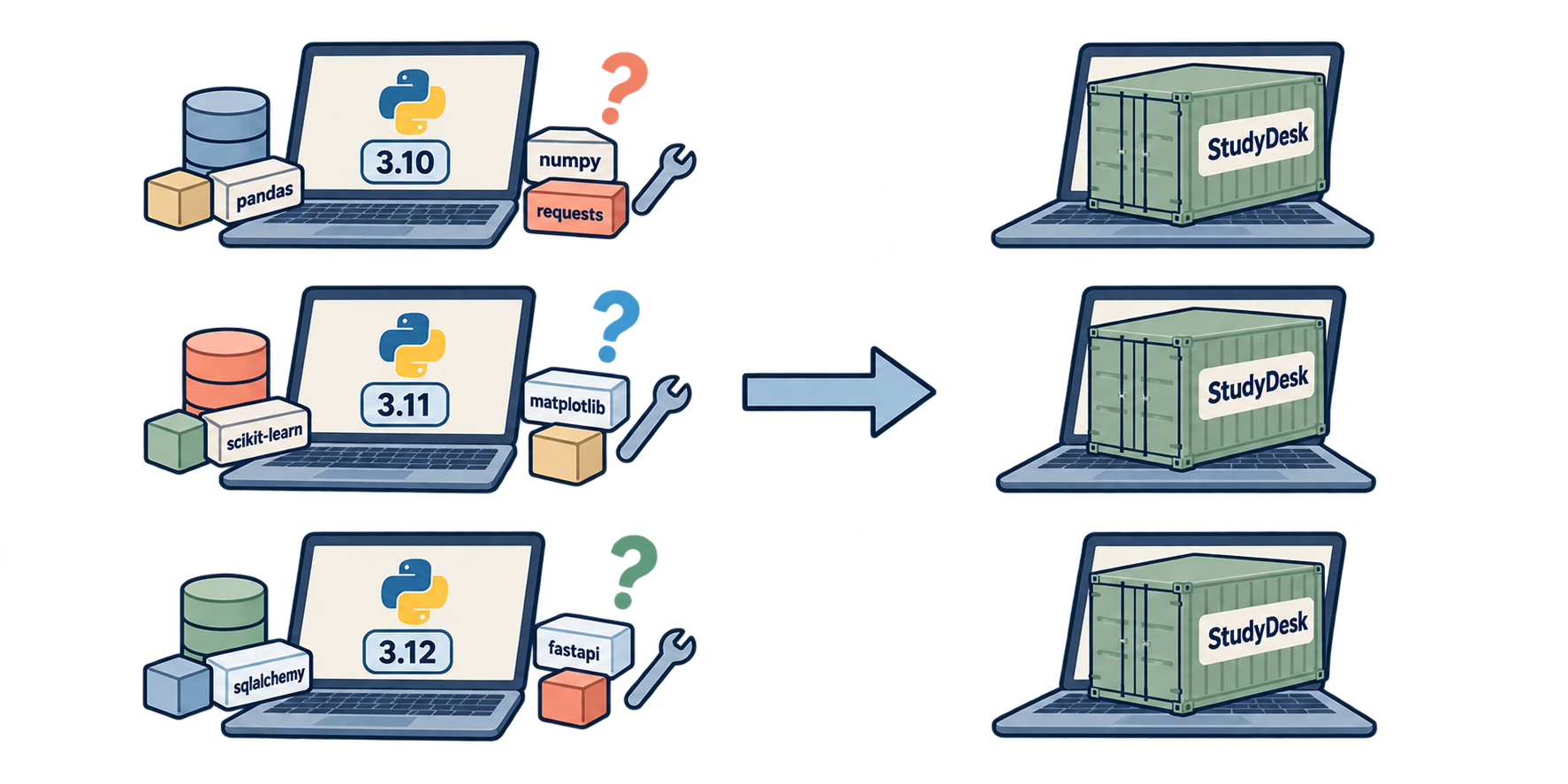
Karan clones the repository to run the API locally. It takes him an afternoon:
- his Python is 3.11, the project wants 3.12
- he has no PostgreSQL installed
- he installs it, but his
postgresuser has a different password psycopgneeds a system library his laptop does not have
Everything that was already set up on Aman's laptop has to be set up again on Karan's, and again on the production server, and again when a new developer joins.
Neha says, "You will not fix this by writing a longer README. You fix it by shipping the environment with the code. That is what Docker does."
Part 2: Docker in Five Words
| Word | Meaning | Everyday picture |
|---|---|---|
| Image | A frozen snapshot: an operating system layer, Python, your code, your dependencies. Read-only. | A recipe plus all ingredients, vacuum-sealed |
| Container | A running instance of an image. Isolated process with its own filesystem and network. | The dish being cooked from that recipe |
| Dockerfile | The text file with step-by-step instructions to build an image. | The written recipe |
| Volume | Storage that lives outside the container, so data survives when the container is deleted. | The fridge next to the kitchen |
| Compose | A YAML file that describes several containers and how they connect, started with one command. | The whole restaurant: kitchen, fridge, wiring |
Key fact: a container is disposable. You can delete it and start a fresh one from the image in a second. Anything you want to keep (the database data) must be in a volume.
Install Docker
Install Docker Desktop (Windows, macOS) or Docker Engine (Linux) from docker.com. Verify:
docker --version
docker compose version
If you ran PostgreSQL with docker run in Article 7, stop and remove that container now; Compose will manage the database from here on:
docker stop studydesk-db && docker rm studydesk-db
Part 3: One Small Change to the App
Inside a container, the API must listen on all network interfaces, not just 127.0.0.1. 127.0.0.1 means "only this machine", and inside a container "this machine" is the container itself, so nothing outside could reach it. The address for "all interfaces" is 0.0.0.0.
We make the host and port configurable through environment variables, with the old values as defaults for local development.
src/studydesk/config.py
import os
from pathlib import Path

from dotenv import load_dotenv

BASE_DIR = Path(__file__).resolve().parent.parent.parent  # project root
load_dotenv(BASE_DIR / ".env")

DATABASE_URL: str = os.environ["DATABASE_URL"]

ALLOWED_ORIGINS: list[str] = [
    origin.strip()
    for origin in os.getenv("ALLOWED_ORIGINS", "").split(",")
    if origin.strip()
]

HOST: str = os.getenv("HOST", "127.0.0.1")
PORT: int = int(os.getenv("PORT", "8000"))
RELOAD: bool = os.getenv("RELOAD", "true").lower() == "true"
src/studydesk/__init__.py
from contextlib import asynccontextmanager

import uvicorn
from fastapi import FastAPI
from fastapi.middleware.cors import CORSMiddleware
from sqlalchemy import func, select

from .config import ALLOWED_ORIGINS, HOST, PORT, RELOAD
from .database import Base, DbSession, engine
from .models import Student
from .routers import students


@asynccontextmanager
async def lifespan(app: FastAPI):
    Base.metadata.create_all(bind=engine)
    yield


app = FastAPI(
    title="StudyDesk API",
    description="Student records API for a coaching institute.",
    version="0.2.0",
    lifespan=lifespan,
)

app.add_middleware(
    CORSMiddleware,
    allow_origins=ALLOWED_ORIGINS,
    allow_credentials=True,
    allow_methods=["*"],
    allow_headers=["*"],
)

app.include_router(students.router)


@app.get("/", tags=["General"])
def home():
    return {"message": "Welcome to StudyDesk API"}


@app.get("/db-check", tags=["General"], summary="Check the database connection")
def db_check(db: DbSession):
    total = db.scalar(select(func.count()).select_from(Student))
    return {"database": "ok", "students_in_db": total}


def main() -> None:
    """Start the server. Host, port and reload come from the environment."""
    uvicorn.run("studydesk:app", host=HOST, port=PORT, reload=RELOAD)
On your laptop nothing changes: uv run studydesk still binds 127.0.0.1:8000 with reload on. In the container we will set HOST=0.0.0.0 and RELOAD=false.
Part 4: The Dockerfile
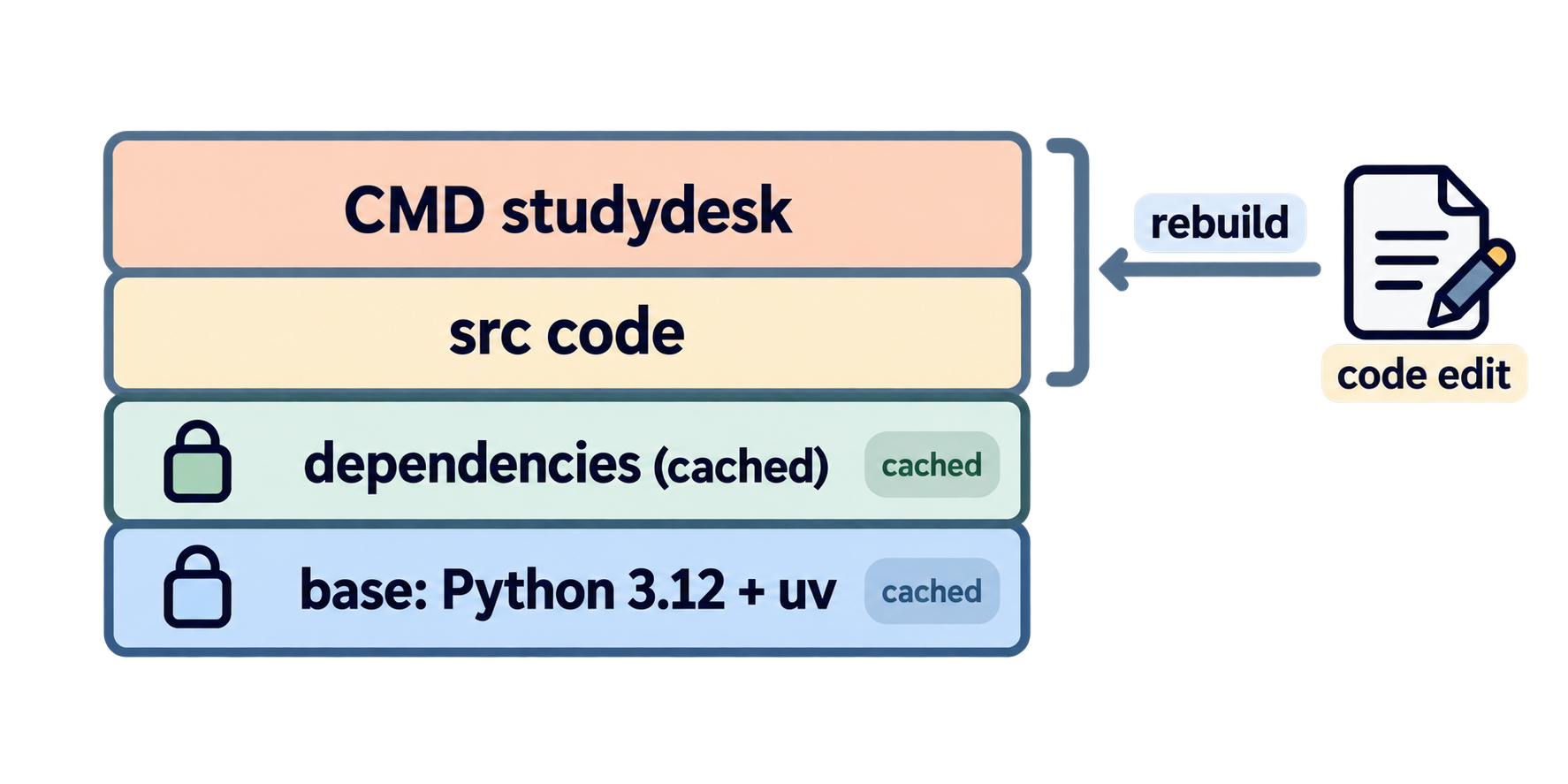
A Dockerfile is a recipe read top to bottom. Each instruction creates a layer, and Docker caches layers: if a step's inputs have not changed, it is reused instead of re-run. We order the steps so that the slow part (installing dependencies) is cached and only the fast part (copying code) re-runs when you edit a file.
Dockerfile (project root)
# 1. Start from an image that already has Python 3.12 and uv installed.
FROM ghcr.io/astral-sh/uv:python3.12-bookworm-slim

# 2. Work inside /app in the container.
WORKDIR /app

# 3. Tell uv to create .venv inside /app and never try to download Python.
ENV UV_PROJECT_ENVIRONMENT=/app/.venv \
    UV_PYTHON_DOWNLOADS=never \
    UV_COMPILE_BYTECODE=1

# 4. Copy only the files needed to resolve dependencies, then install them.
#    This layer is cached until pyproject.toml or uv.lock changes.
COPY pyproject.toml uv.lock README.md ./
RUN uv sync --frozen --no-dev --no-install-project

# 5. Now copy the source code and install our own package into the venv.
COPY src ./src
RUN uv sync --frozen --no-dev

# 6. Put the venv's bin folder on PATH so "uvicorn" and "studydesk" are found.
ENV PATH="/app/.venv/bin:$PATH"

# 7. Document the port (does not publish it; compose does that).
EXPOSE 8000

# 8. The command that runs when the container starts.
CMD ["studydesk"]
Reading it
FROM ghcr.io/astral-sh/uv:python3.12-bookworm-slim The base image, maintained by the uv team: Debian ("bookworm"), trimmed down ("slim"), with Python 3.12 and uv preinstalled. Starting from this is faster and smaller than installing uv ourselves.
WORKDIR /app All later paths are relative to /app inside the container.
ENV ... Environment variables baked into the image. UV_COMPILE_BYTECODE=1 precompiles .pyc files so the app starts faster.
COPY pyproject.toml uv.lock README.md ./ then uv sync --frozen --no-dev --no-install-project Copy only the dependency manifest and install third-party packages. --frozen means "use uv.lock exactly, do not re-resolve". --no-dev skips dev tools (ruff, pytest). --no-install-project installs the dependencies but not StudyDesk itself, because the source is not copied yet. README.md is needed because pyproject.toml references it.
Because this layer only depends on three files, editing Python code does not invalidate it. Rebuilds after a code change take seconds.
COPY src ./src then uv sync --frozen --no-dev Now copy the code and install the studydesk package into the venv (this is what makes the studydesk command and import studydesk exist).
ENV PATH=... Puts the venv first on PATH, so CMD ["studydesk"] finds our script without uv run.
CMD ["studydesk"] What runs at container start: the same main() entry point as on your laptop. Host, port, and reload will come from Compose.
.dockerignore
Like .gitignore, but for what goes into the image. Without it, COPY src ./src would happily include __pycache__ folders, and a careless COPY . . would ship your .env with real passwords into the image.
.dockerignore (project root)
.venv/
.git/
.env
__pycache__/
*.pyc
.pytest_cache/
.ruff_cache/
Build it
docker build -t studydesk-api .
-t studydesk-api tags the image with a name. The . is the build context: the folder Docker may copy from. The first build downloads the base image and installs packages (a minute or two). Run it again and you will see CACHED on most steps.
Part 5: Docker Compose — API and Database Together
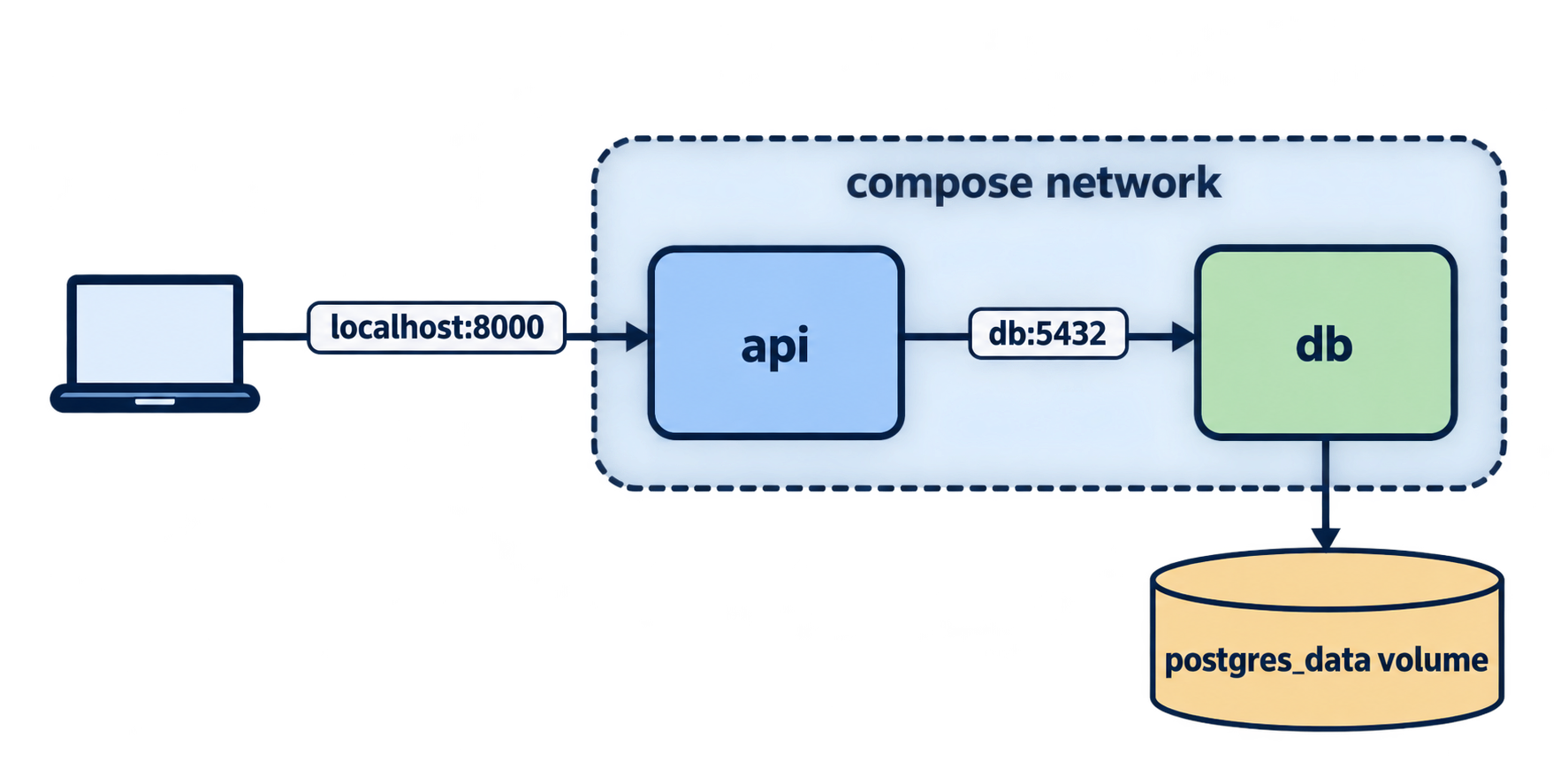
The image contains the API. It does not contain PostgreSQL, and it should not: databases hold data that must outlive any single container. So we run two containers and wire them together. That is Compose's job.
docker-compose.yml (project root)
services:
  db:
    image: postgres:16
    container_name: studydesk-db
    environment:
      POSTGRES_USER: postgres
      POSTGRES_PASSWORD: postgres
      POSTGRES_DB: studydesk
    volumes:
      - postgres_data:/var/lib/postgresql/data
    ports:
      - "5432:5432"
    healthcheck:
      test: ["CMD-SHELL", "pg_isready -U postgres -d studydesk"]
      interval: 5s
      timeout: 5s
      retries: 10

  api:
    build: .
    container_name: studydesk-api
    env_file:
      - .env
    environment:
      DATABASE_URL: postgresql+psycopg://postgres:postgres@db:5432/studydesk
      HOST: 0.0.0.0
      PORT: "8000"
      RELOAD: "false"
    ports:
      - "8000:8000"
    depends_on:
      db:
        condition: service_healthy

volumes:
  postgres_data:
Reading it
services: — each entry is one container.
db service
image: postgres:16— the official PostgreSQL image. No Dockerfile needed; we use it as-is.environment:— the three variables the Postgres image reads on first start to create a user, password, and database.volumes: postgres_data:/var/lib/postgresql/data— the folder where PostgreSQL keeps its files is mapped to a named volume. Delete the container, start a new one, and the students are still there.ports: "5432:5432"— publish the database port to your laptop so you can still usepsqllocally.host:container.healthcheck:— Compose runspg_isreadyevery 5 seconds. The service counts as healthy only when PostgreSQL is actually accepting connections, not merely when the process started.
api service
build: .— build the image from the Dockerfile in this folder.env_file: .env— load your local.env(soALLOWED_ORIGINSand anything else you add later come along).environment:— explicit values that overrideenv_file. The important one isDATABASE_URL: the host isdb, notlocalhost. Inside Compose's private network, every service is reachable by its service name. From the API container's point of view, "localhost" would be the API container itself, which has no database.HOST=0.0.0.0makes Uvicorn reachable from outside the container;RELOAD=falsebecause there is no code editing in production.ports: "8000:8000"— publish the API to your laptop atlocalhost:8000.depends_onwithcondition: service_healthy— start the API only after the database passes its health check. Without this, the API could boot first, fail to connect, and crash.
volumes: at the bottom declares the named volume used above.
How the containers talk
Part 6: Bring It Up
Start everything
docker compose up --build
--build rebuilds the API image if the Dockerfile or code changed. You will see both services' logs interleaved. Wait for:
studydesk-db   | database system is ready to accept connections
studydesk-api  | INFO:     Uvicorn running on http://0.0.0.0:8000
studydesk-api  | INFO:     Application startup complete.
Open http://localhost:8000/docs. Same API. GET /db-check returns "students_in_db": 0: this is a brand-new database inside the volume, separate from your local PostgreSQL.
Seed it
Run the seed script inside the running API container:
docker compose exec api python -m studydesk.seed
exec api runs a command in the api container. python resolves to the venv's Python because of the PATH we set. Output: Inserted 10 students. Now GET /students returns ten.
Run in the background
Press Ctrl+C to stop. To run detached:
docker compose up -d
docker compose logs -f api      # follow the API logs
docker compose ps               # what is running
Stop and clean up
docker compose down           # stop and remove containers; the volume stays
docker compose down -v        # also delete the volume (all data!)
The daily cycle
| You changed… | Run |
|---|---|
| Python code | docker compose up --build |
pyproject.toml / uv.lock |
docker compose up --build (dependency layer rebuilds) |
docker-compose.yml or .env |
docker compose up |
| nothing, just restarting | docker compose up |
For everyday development you can keep using uv run studydesk against your local PostgreSQL, and use Compose when you want to check that the packaged version works exactly like production.
Part 7: What Changed for Karan
Karan pulls the repository, copies .env.example to .env, and runs:
docker compose up --build
docker compose exec api python -m studydesk.seed
Two commands. No Python install, no PostgreSQL install, no password mismatch. The same two commands will work on the production server, on a CI runner, and on the next developer's laptop. The environment travels with the code.
Two things to remember
Compose is for development and small deployments. Larger production setups use the same image with an orchestrator such as Kubernetes, but the Dockerfile you wrote is exactly what they would run.
The image does not contain .env. .dockerignore keeps it out. Secrets reach the container at run time through env_file and environment, never at build time. Anyone who gets a copy of the image gets code, not passwords.
Where StudyDesk is after this article
studydesk/
├── Dockerfile               ← builds the API image
├── .dockerignore
├── docker-compose.yml       ← api + db + volume
├── .env / .env.example
├── pyproject.toml / uv.lock
└── src/studydesk/
    ├── __init__.py          ← main() reads HOST, PORT, RELOAD
    ├── config.py            ← HOST, PORT, RELOAD added
    └── ... (unchanged)
| Command | Result |
|---|---|
docker compose up --build |
PostgreSQL + API running, API at localhost:8000 |
docker compose exec api python -m studydesk.seed |
10 students inserted |
docker compose down |
everything stopped, data kept in the volume |
Concept Quiz
Answers are below. No coding needed.
Q1. What is the difference between an image and a container?
Q2. Why does the Dockerfile copy pyproject.toml and uv.lock and run uv sync before copying src?
Q3. What does --no-install-project do in the first uv sync, and why is it needed there?
Q4. Why must the API listen on 0.0.0.0 inside the container instead of 127.0.0.1?
Q5. In the Compose DATABASE_URL, why is the host db and not localhost?
Q6. What happens to the students if you run docker compose down and then docker compose up? And with down -v?
Q7. What does the healthcheck on db combined with depends_on: condition: service_healthy prevent?
Q8. Why is .env listed in .dockerignore, and how do its values still reach the container?
Q9. What does docker compose exec api python -m studydesk.seed do, step by step?
Q10. After editing a Python file, which Dockerfile layers rebuild and which are cached?
Answers
- An image is a frozen, read-only snapshot (OS layer, Python, code, dependencies). A container is a running, disposable instance of an image with its own filesystem and network.
- Layer caching. Dependencies change rarely, code changes often. Installing dependencies first means code edits only rebuild the cheap final layers; the slow install layer is reused.
- It installs third-party packages but not StudyDesk itself. Needed because
srchas not been copied yet, so the project cannot be installed at that point. 127.0.0.1means "this machine only", and inside the container that is the container itself.0.0.0.0listens on all interfaces, so traffic published throughportscan reach it.- Inside the Compose network each service is reachable by its name.
localhostfrom the API container would mean the API container, which has no database. downthenup: students are still there, because PostgreSQL's data lives in the named volume.down -vdeletes the volume, so the database starts empty.- The API starting before PostgreSQL is ready to accept connections, which would make the API crash at startup when
create_alltries to connect. - To keep real secrets out of the image, where anyone with a copy could read them. The values are injected at run time through Compose's
env_fileandenvironment. exec apiopens a command in the running API container;pythonis the venv's Python (viaPATH);-m studydesk.seedruns the seed module, which connects todband inserts the ten students.- The dependency layers (
COPY pyproject.toml ...and the firstuv sync) are cached.COPY srcand the seconduv syncrebuild.
Epilogue
Karan runs two commands and has the full system on his laptop. The production server will get the same two commands.
Neha opens /docs from a different machine on the office network, finds DELETE /students/3, and deletes Sneha. No login, no question asked. "Anyone who can reach this URL can delete every student," she says. "CORS was never security, remember? Now we need the real thing."
In the next article: authentication and authorization — password hashing, a users table, POST /auth/register and /auth/login, JWT tokens, a get_current_user dependency, and admin-only routes.
Comments
Join the discussionNo comments yet. Be the first to comment.