Where StudyDesk is now
src/studydesk/
├── __init__.py          ← GET /, GET /students (filter/sort/paginate), GET /students/{id}
├── utils.py             ← load_students()
└── data/students.json   ← 10 students
By the end of this article, StudyDesk has a Student model that checks every field, validates emails, cleans up names, and calculates the grade automatically. The JSON file is validated through it every time it is loaded.
Part 1: Neha Breaks the Data
Neha opens students.json in her editor and changes one record:
{
  "id": 3,
  "name": "   sneha patel ",
  "email": "not-an-email",
  "age": -16,
  "city": "Ahmedabad",
  "marks": 950,
  "grade": "A"
}
She saves it and calls GET /students/3. The API returns it, happily, with status 200.
"Your API believes anything the file says," she tells Aman. "Next week we add a create route. Then the clients will send data, and some of them will send garbage. Negative ages. Marks of 950. Emails without an @. Where is the code that says no?"
Aman starts writing if marks < 0 or marks > 100: raise ... for every field, in every route.
"Stop," says Neha. "You don't write that. Pydantic does."

Part 2: Pydantic Fundamentals and the Need for Data Validation
What is Pydantic?
Pydantic is a Python library for defining the shape of data and checking that real data matches it. You describe your data as a class with type hints. Pydantic does the rest:
- checks every field has the right type
- converts when it safely can (
"88"→88) - rejects when it cannot (
"eighty"→ error) - gives a clear, structured error message saying exactly which field failed and why
FastAPI is built on Pydantic. Every 422 error you have already seen came from Pydantic. Now we use it directly.
The idea in one picture
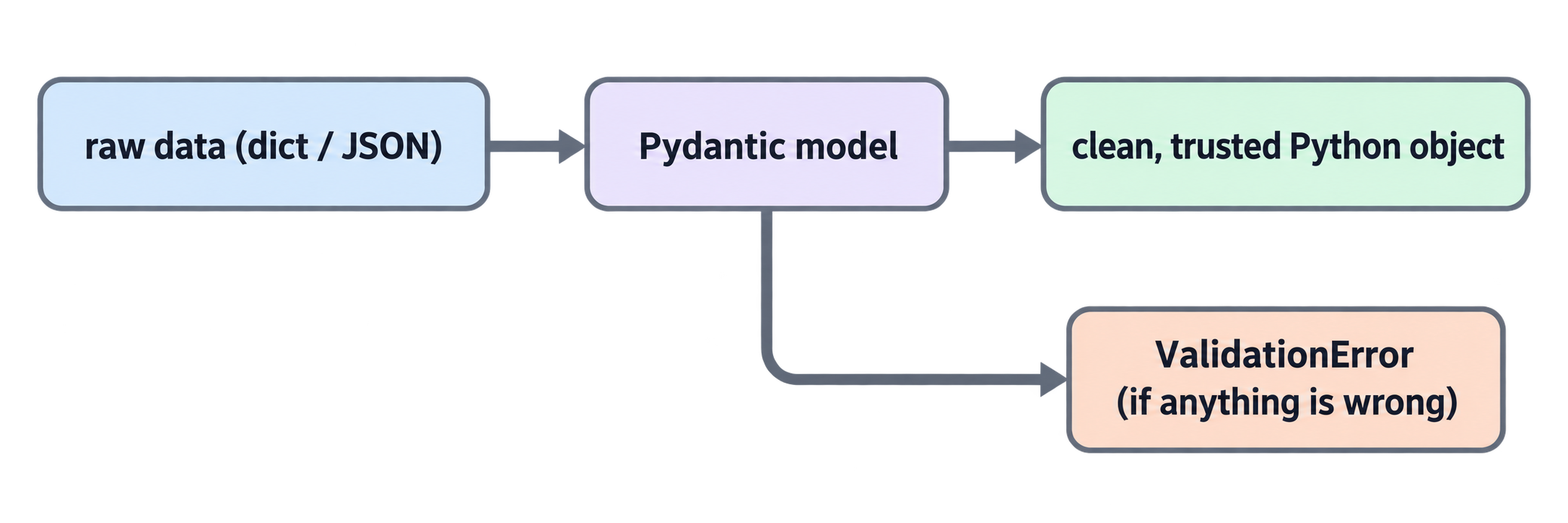
Data enters dirty. It leaves clean, or it does not leave at all.
Why not just write if checks?
if checks in every route |
Pydantic model |
|---|---|
| Repeated in every route | Written once |
| Easy to forget one | Impossible to skip |
| Error messages are ad-hoc | Error messages are structured and consistent |
Not shown in /docs |
Shown in /docs automatically |
| No type conversion | Converts safely |
A playground file
To learn Pydantic without touching the API, create a scratch file at the project root. We will delete it at the end of the article.
playground.py (at the project root, next to pyproject.toml)
from pydantic import BaseModel


class Student(BaseModel):
    id: int
    name: str
    email: str
    age: int
    city: str
    marks: int


s = Student(id=1, name="Priya Sharma", email="priya@example.com", age=17, city="Ahmedabad", marks=88)
print(s)
print(s.name)
print(s.marks + 10)
Run it:
uv run python playground.py
Output:
id=1 name='Priya Sharma' email='priya@example.com' age=17 city='Ahmedabad' marks=88
Priya Sharma
98
That is a Pydantic model. Let's understand it.
Part 3: Creating Pydantic Base Models and Type Hints
BaseModel
Every Pydantic model is a class that inherits from BaseModel (inheritance from the Python series). That inheritance is what gives the class its validation powers.
Fields are type hints
class Student(BaseModel):
    id: int
    name: str
    marks: int
Each line is field_name: type. There is no __init__; Pydantic writes it for you from these hints. You create an object with keyword arguments: Student(id=1, name="...", marks=88).
Type hints are rules now
In plain Python, a type hint is only a note. In Pydantic, it is enforced. Add this to the playground and run it:
bad = Student(id=1, name="Priya", email="x", age="seventeen", city="Ahmedabad", marks=88)
pydantic_core._pydantic_core.ValidationError: 1 validation error for Student
age
  Input should be a valid integer, unable to parse string as an integer
  [type=int_parsing, input_value='seventeen', input_type=str]
Pydantic refused. It names the field (age), explains the problem, and shows what it received.
Safe conversion
Pydantic converts when the conversion is obvious and lossless:
s = Student(id="1", name="Priya", email="x", age="17", city="Ahmedabad", marks="88")
print(s.id, s.age, s.marks)   # 1 17 88  ← all converted to int
Strings that look like numbers become numbers. This matters for APIs, because everything that arrives over HTTP is text.
Optional fields and defaults
class Student(BaseModel):
    id: int
    name: str
    email: str
    age: int
    city: str = "Unknown"      # default: optional, falls back to "Unknown"
    marks: int = 0             # default: optional, falls back to 0
    phone: str | None = None   # optional, may be missing entirely
A field with a default is optional. A field without one is required; leaving it out raises a ValidationError.
Missing fields are errors
Student(id=1, name="Priya")
ValidationError: 3 validation errors for Student
email
  Field required
age
  Field required
...
All problems are reported together, not one at a time. The client can fix everything in one go.
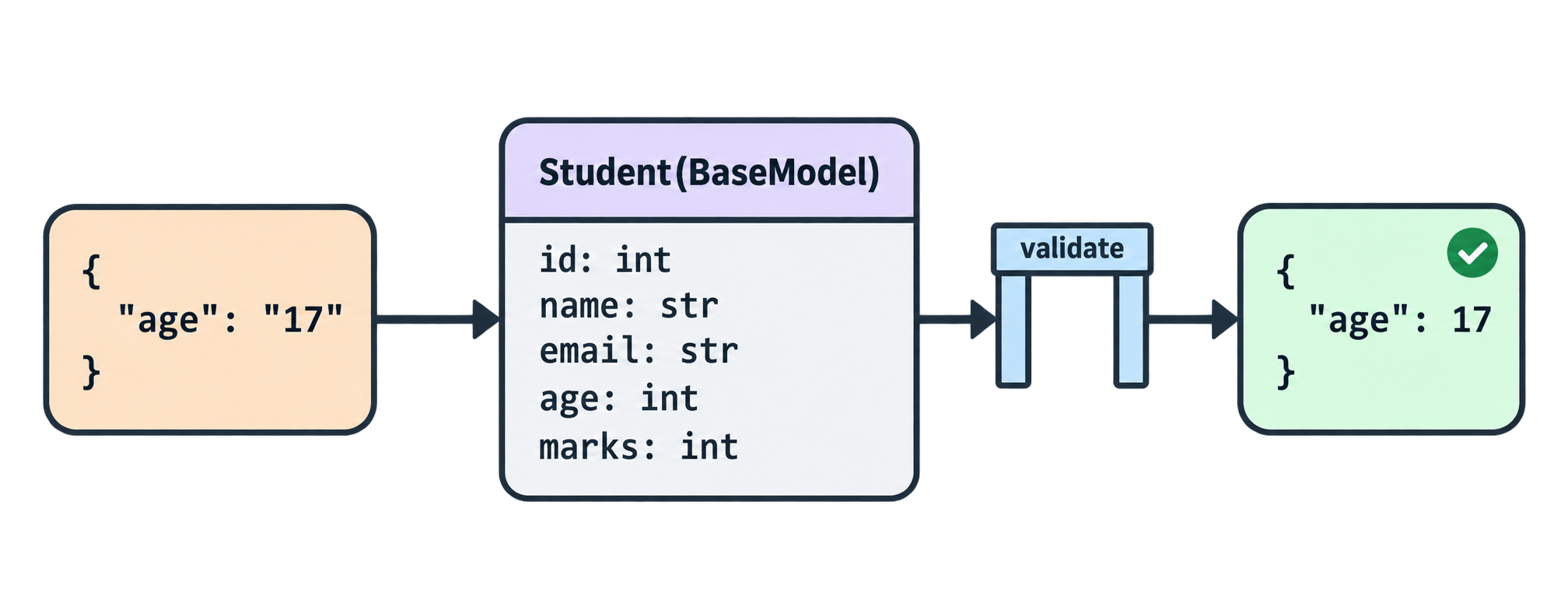
Part 4: Adding Field Constraints (gt, lt, min_length)
Type is not enough. age: int accepts -16. marks: int accepts 950. We need constraints, and Field() provides them — the same options you already used with Path() and Query().
playground.py
from pydantic import BaseModel, Field


class Student(BaseModel):
    id: int = Field(gt=0, description="Unique student ID")
    name: str = Field(min_length=2, max_length=50, description="Full name")
    email: str
    age: int = Field(ge=5, le=100, description="Age in years")
    city: str = Field(min_length=2, max_length=50)
    marks: int = Field(ge=0, le=100, description="Marks out of 100")


ok = Student(id=1, name="Priya Sharma", email="priya@example.com", age=17, city="Ahmedabad", marks=88)
print(ok)

bad = Student(id=0, name="P", email="priya@example.com", age=-16, city="Ahmedabad", marks=950)
Output:
id=1 name='Priya Sharma' email='priya@example.com' age=17 city='Ahmedabad' marks=88
pydantic_core._pydantic_core.ValidationError: 4 validation errors for Student
id
  Input should be greater than 0 [type=greater_than, input_value=0, input_type=int]
name
  String should have at least 2 characters [type=string_too_short, input_value='P', input_type=str]
age
  Input should be greater than or equal to 5 [type=greater_than_equal, input_value=-16, input_type=int]
marks
  Input should be less than or equal to 100 [type=less_than_equal, input_value=950, input_type=int]
The constraint options
| Option | Meaning | Works on |
|---|---|---|
gt / ge |
greater than / greater than or equal | numbers |
lt / le |
less than / less than or equal | numbers |
min_length / max_length |
string length limits | strings, lists |
pattern |
must match a regex | strings |
description |
shown in /docs |
anything |
examples |
shown in /docs |
anything |
Required field with constraints
Notice id: int = Field(gt=0) has an = but no default value. Field(...) with no default= keeps the field required. It only adds rules. If you want a default too, write Field(default=0, ge=0).
Part 5: Email Validation with EmailStr
email: str accepts "not-an-email". We could write a regex, but email rules are surprisingly complicated. Pydantic ships a ready-made type: EmailStr.
It needs the email-validator package. fastapi[standard] already installed it in Article 1, so nothing to add.
playground.py
from pydantic import BaseModel, EmailStr, Field


class Student(BaseModel):
    id: int = Field(gt=0, description="Unique student ID")
    name: str = Field(min_length=2, max_length=50, description="Full name")
    email: EmailStr
    age: int = Field(ge=5, le=100, description="Age in years")
    city: str = Field(min_length=2, max_length=50)
    marks: int = Field(ge=0, le=100, description="Marks out of 100")


ok = Student(id=1, name="Priya Sharma", email="priya@example.com", age=17, city="Ahmedabad", marks=88)
print(ok.email)

bad = Student(id=1, name="Priya Sharma", email="not-an-email", age=17, city="Ahmedabad", marks=88)
Output:
priya@example.com
pydantic_core._pydantic_core.ValidationError: 1 validation error for Student
email
  value is not a valid email address: An email address must have an @-sign.
  [type=value_error, input_value='not-an-email', input_type=str]
One word changed, str → EmailStr, and a real email check is in place. EmailStr also normalises the domain to lowercase (Priya@EXAMPLE.com → Priya@example.com).
Pydantic has other ready-made types you may meet later: HttpUrl, PositiveInt, SecretStr, UUID.
Part 6: Custom Validation with @field_validator
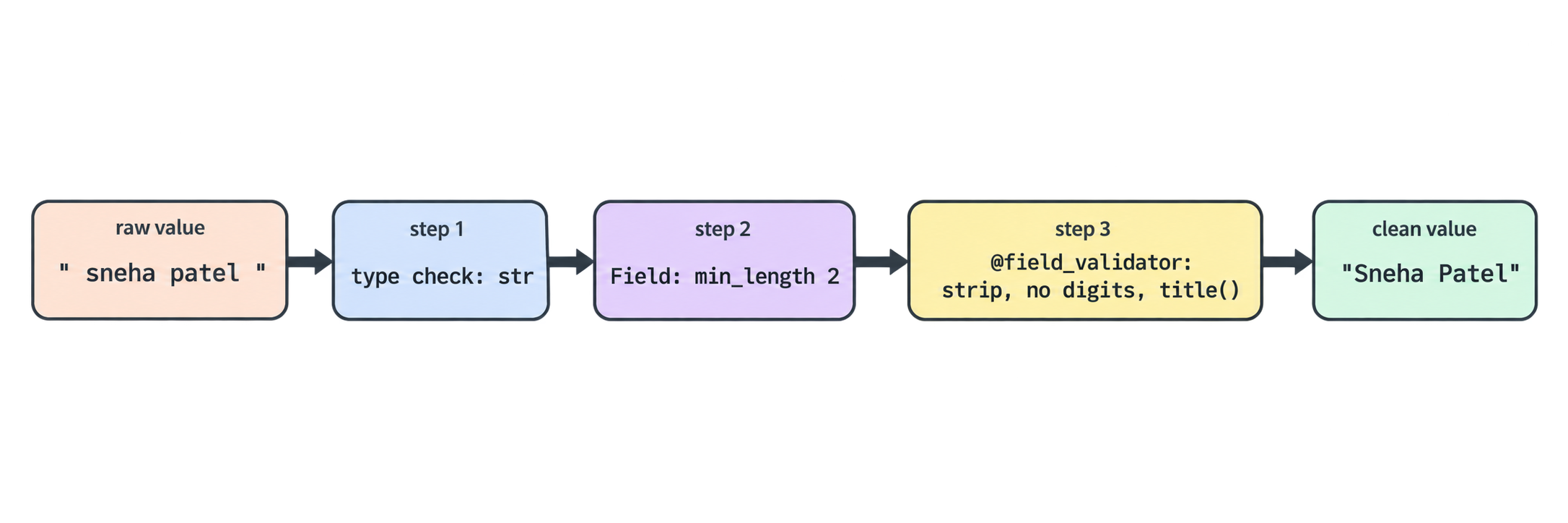
Some rules cannot be written with Field(). Neha's broken record had name: " sneha patel ": extra spaces, lowercase. We want to clean it to "Sneha Patel" and reject names that contain digits.
For custom logic, Pydantic gives you @field_validator.
playground.py
from pydantic import BaseModel, EmailStr, Field, field_validator


class Student(BaseModel):
    id: int = Field(gt=0, description="Unique student ID")
    name: str = Field(min_length=2, max_length=50, description="Full name")
    email: EmailStr
    age: int = Field(ge=5, le=100, description="Age in years")
    city: str = Field(min_length=2, max_length=50)
    marks: int = Field(ge=0, le=100, description="Marks out of 100")

    @field_validator("name", "city")
    @classmethod
    def clean_text(cls, value: str) -> str:
        value = value.strip()
        if any(char.isdigit() for char in value):
            raise ValueError("must not contain digits")
        return value.title()


s = Student(id=3, name="   sneha patel ", email="sneha@example.com", age=16, city="  ahmedabad", marks=95)
print(s.name)   # Sneha Patel
print(s.city)   # Ahmedabad

bad = Student(id=3, name="Sneha 123", email="sneha@example.com", age=16, city="Ahmedabad", marks=95)
Output:
Sneha Patel
Ahmedabad
pydantic_core._pydantic_core.ValidationError: 1 validation error for Student
name
  Value error, must not contain digits [type=value_error, input_value='Sneha 123', input_type=str]
Reading the validator
@field_validator("name", "city") Run this method for the name field and the city field. You can list one field or many.
@classmethod Required by Pydantic. The method belongs to the class, not to one object, because the object does not fully exist yet while validation is running. Always put @classmethod under @field_validator, in that order.
def clean_text(cls, value: str) -> str: cls is the class (like self, but for the class). value is the raw incoming value for the field.
value.strip() Remove spaces at both ends.
any(char.isdigit() for char in value) any() returns True if at least one item is True. char.isdigit() for char in value checks each character. So: "is there any digit in the string?"
raise ValueError("...") To reject, raise a ValueError. Pydantic catches it and turns it into a ValidationError with your message. Do not raise HTTPException here; Pydantic models know nothing about HTTP.
return value.title() To accept, return the value. Whatever you return becomes the field's final value. .title() capitalises each word. This is how a validator cleans data, not just checks it.
When validators run
Pydantic runs type conversion and Field() constraints first, then your @field_validator. So inside clean_text, value is already guaranteed to be a string of 2–50 characters.
Part 7: Dynamic Grade Calculation with @computed_field
The JSON file stores grade next to marks. That is a problem: if someone updates marks to 95 but forgets grade, the record says grade B with 95 marks. Two fields that can disagree.
Rule: never store what you can calculate. Grade depends only on marks, so grade should be computed, not stored.
Pydantic's @computed_field does exactly this.
playground.py
from pydantic import BaseModel, EmailStr, Field, computed_field, field_validator


class Student(BaseModel):
    id: int = Field(gt=0, description="Unique student ID")
    name: str = Field(min_length=2, max_length=50, description="Full name")
    email: EmailStr
    age: int = Field(ge=5, le=100, description="Age in years")
    city: str = Field(min_length=2, max_length=50)
    marks: int = Field(ge=0, le=100, description="Marks out of 100")

    @field_validator("name", "city")
    @classmethod
    def clean_text(cls, value: str) -> str:
        value = value.strip()
        if any(char.isdigit() for char in value):
            raise ValueError("must not contain digits")
        return value.title()

    @computed_field
    @property
    def grade(self) -> str:
        if self.marks >= 85:
            return "A"
        if self.marks >= 70:
            return "B"
        if self.marks >= 50:
            return "C"
        return "D"


s = Student(id=3, name="Sneha Patel", email="sneha@example.com", age=16, city="Ahmedabad", marks=95)
print(s.grade)    # A

s.marks = 60
print(s.grade)    # C
Reading it
@computed_field above @property @property is plain Python: it lets you call s.grade without brackets, as if it were an attribute, while actually running the method. @computed_field tells Pydantic: "include this in the model's output (dict, JSON, /docs), even though nobody passes it in."
def grade(self) -> str: This is a normal method with self, because the object exists now. It reads self.marks and returns a letter. The return type hint -> str is required so Pydantic can document it.
It is always correct Change marks, and grade changes with it. There is no second field to forget.
The cutoffs
| Marks | Grade |
|---|---|
| 85–100 | A |
| 70–84 | B |
| 50–69 | C |
| 0–49 | D |
These match the data file from Article 2.
Part 8: Converting Models to Dict with .model_dump()
Our routes return dictionaries, and json.dump() (for saving, next article) also needs dictionaries. A Pydantic model is an object, not a dict. .model_dump() converts it.
playground.py (add at the bottom)
s = Student(id=3, name="Sneha Patel", email="sneha@example.com", age=16, city="Ahmedabad", marks=95)

as_dict = s.model_dump()
print(type(as_dict))   # <class 'dict'>
print(as_dict)

as_json = s.model_dump_json(indent=2)
print(as_json)
Output:
<class 'dict'>
{'id': 3, 'name': 'Sneha Patel', 'email': 'sneha@example.com', 'age': 16, 'city': 'Ahmedabad', 'marks': 95, 'grade': 'A'}
{
  "id": 3,
  "name": "Sneha Patel",
  "email": "sneha@example.com",
  "age": 16,
  "city": "Ahmedabad",
  "marks": 95,
  "grade": "A"
}
Notice grade is there. Computed fields are included in the output automatically.
Useful options
s.model_dump(exclude={"email"})           # leave out some fields
s.model_dump(include={"id", "name"})      # keep only some fields
s.model_dump(exclude_unset=True)          # only fields the caller actually sent (important for partial updates in Article 5)
The reverse: dict → model
record = {"id": 3, "name": "Sneha Patel", "email": "sneha@example.com", "age": 16, "city": "Ahmedabad", "marks": 95}

s = Student(**record)                 # unpack the dict as keyword arguments
s = Student.model_validate(record)    # same thing, Pydantic's own method
**record is new. The two stars unpack a dictionary into keyword arguments. Student(**record) is exactly the same as Student(id=3, name="Sneha Patel", email=..., age=16, ...). It is the standard way to turn a dict into a model.
Rounding up
| Direction | Method |
|---|---|
| dict → model | Student(**d) or Student.model_validate(d) |
| model → dict | s.model_dump() |
| model → JSON string | s.model_dump_json() |
| JSON string → model | Student.model_validate_json(text) |

Part 9: Putting the Model into StudyDesk
Playground over. Time to move the model into the project and use it.
Step 1: The model file
src/studydesk/models.py
from pydantic import BaseModel, EmailStr, Field, computed_field, field_validator


class Student(BaseModel):
    """A validated student record."""

    id: int = Field(gt=0, description="Unique student ID", examples=[1])
    name: str = Field(min_length=2, max_length=50, description="Full name", examples=["Priya Sharma"])
    email: EmailStr = Field(description="Email address", examples=["priya@example.com"])
    age: int = Field(ge=5, le=100, description="Age in years", examples=[17])
    city: str = Field(min_length=2, max_length=50, description="City", examples=["Ahmedabad"])
    marks: int = Field(ge=0, le=100, description="Marks out of 100", examples=[88])

    @field_validator("name", "city")
    @classmethod
    def clean_text(cls, value: str) -> str:
        value = value.strip()
        if any(char.isdigit() for char in value):
            raise ValueError("must not contain digits")
        return value.title()

    @computed_field
    @property
    def grade(self) -> str:
        """Letter grade calculated from marks."""
        if self.marks >= 85:
            return "A"
        if self.marks >= 70:
            return "B"
        if self.marks >= 50:
            return "C"
        return "D"
Step 2: Remove grade from the data file
Grade is computed now, so it should not be stored.
src/studydesk/data/students.json
[
  {"id": 1, "name": "Priya Sharma", "email": "priya@example.com", "age": 17, "city": "Ahmedabad", "marks": 88},
  {"id": 2, "name": "Rahul Verma", "email": "rahul@example.com", "age": 18, "city": "Surat", "marks": 72},
  {"id": 3, "name": "Sneha Patel", "email": "sneha@example.com", "age": 16, "city": "Ahmedabad", "marks": 95},
  {"id": 4, "name": "Arjun Mehta", "email": "arjun@example.com", "age": 17, "city": "Vadodara", "marks": 58},
  {"id": 5, "name": "Kavya Nair", "email": "kavya@example.com", "age": 18, "city": "Rajkot", "marks": 81},
  {"id": 6, "name": "Dev Joshi", "email": "dev@example.com", "age": 16, "city": "Surat", "marks": 45},
  {"id": 7, "name": "Ananya Desai", "email": "ananya@example.com", "age": 17, "city": "Ahmedabad", "marks": 90},
  {"id": 8, "name": "Rohan Shah", "email": "rohan@example.com", "age": 18, "city": "Vadodara", "marks": 67},
  {"id": 9, "name": "Meera Iyer", "email": "meera@example.com", "age": 17, "city": "Rajkot", "marks": 76},
  {"id": 10, "name": "Yash Trivedi", "email": "yash@example.com", "age": 16, "city": "Surat", "marks": 84}
]
Step 3: Validate on load
Every record passes through the model when the file is read. If the file is ever corrupted, the API fails loudly at load time instead of serving garbage.
src/studydesk/utils.py
import json
from pathlib import Path

from .models import Student

DATA_FILE = Path(__file__).parent / "data" / "students.json"


def load_students() -> list[dict]:
    """Read all students from the JSON file, validated through the Student model."""
    with open(DATA_FILE, "r", encoding="utf-8") as f:
        raw_records = json.load(f)
    return [Student(**record).model_dump() for record in raw_records]
[Student(**record).model_dump() for record in raw_records] For each raw dict: unpack it into the model (validation happens here, including the grade calculation), then dump it back to a dict. The result is a list of clean dicts that now include grade. The routes in __init__.py still work exactly as before, because they expect dicts with a grade key.
Step 4: No changes needed in __init__.py
Routes still receive list[dict] with a grade key, so filtering by s["grade"] and sorting by s[sort_by] are unchanged. This is the payoff of keeping file logic in utils.py.
Step 5: Delete the playground
rm playground.py
Test it
uv run studydesk
GET /students/3 returns Sneha with "grade": "A" even though the file no longer has a grade field.
Now repeat Neha's experiment. Edit students.json and set student 3's marks to 950. Call GET /students/3:
pydantic_core._pydantic_core.ValidationError: 1 validation error for Student
marks
  Input should be less than or equal to 100
Status 500, and the terminal shows exactly which field is wrong. The API refuses to serve the bad record. Put 95 back and it works again.
(A 500 is correct here: a corrupted file is a server-side problem. When clients send bad data in the next article, FastAPI will turn the same validation into a 422 automatically.)
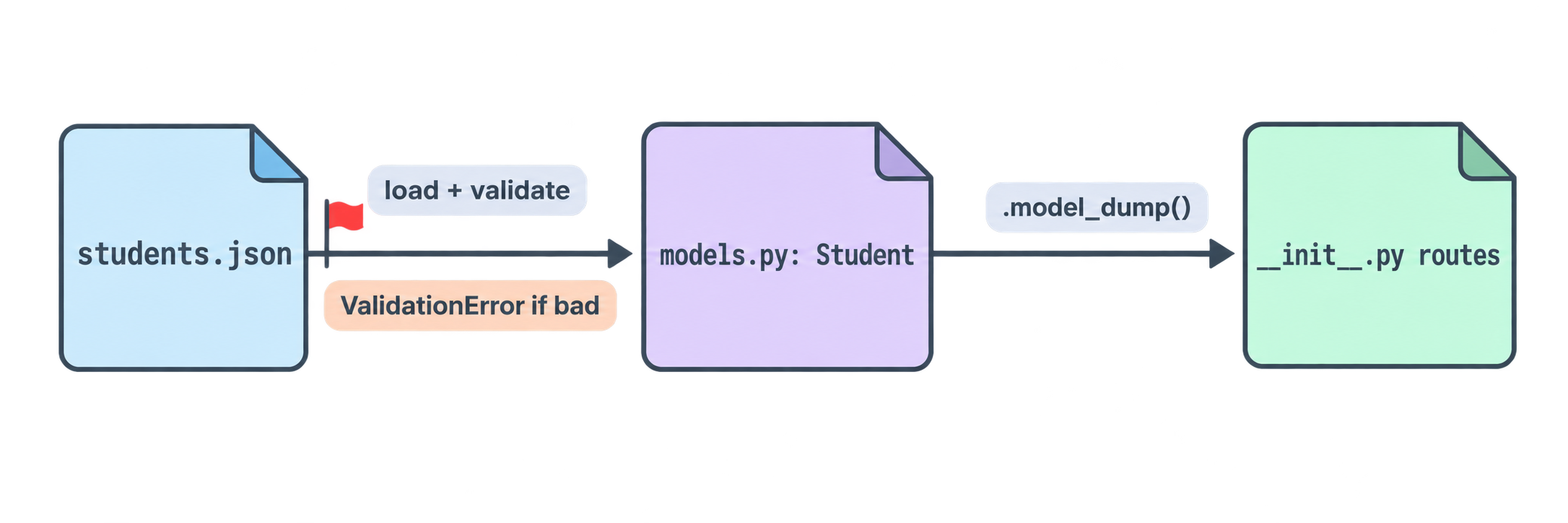
Where StudyDesk is after this article
studydesk/
└── src/
    └── studydesk/
        ├── __init__.py          ← unchanged
        ├── models.py            ← Student model (new)
        ├── utils.py             ← load_students() validates through Student
        └── data/students.json   ← grade removed (computed now)
The Student model enforces:
| Field | Rules |
|---|---|
id |
int, > 0 |
name |
str, 2–50 chars, no digits, cleaned to Title Case |
email |
valid email address |
age |
int, 5–100 |
city |
str, 2–50 chars, no digits, cleaned to Title Case |
marks |
int, 0–100 |
grade |
computed from marks, never stored |
Concept Quiz
Answers are below. No coding needed.
Q1. What does Pydantic do when it receives age="17" for a field declared age: int? And for age="seventeen"?
Q2. In id: int = Field(gt=0), is id required or optional? Why?
Q3. Why use EmailStr instead of writing your own regex?
Q4. In a @field_validator, how do you reject a value, and how do you accept (and possibly change) it?
Q5. Why must @classmethod be used with @field_validator?
Q6. What problem does @computed_field solve for grade?
Q7. Does .model_dump() include computed fields?
Q8. What does Student(**record) do? Write the equivalent long form for {"id": 1, "name": "Priya"}.
Q9. Why did we remove grade from students.json?
Q10. If the JSON file contains an invalid record, what happens now when the API loads it, and why is that better than before?
Answers
"17"is safely converted to the integer17."seventeen"cannot be converted, so Pydantic raises aValidationErrornaming theagefield.- Required.
Field()without adefault=only adds rules; it does not supply a default value. - Email rules are complex and easy to get wrong.
EmailStruses a tested validator and also normalises the domain. - Reject by raising
ValueError("message"). Accept by returning the value; whatever you return becomes the final value, so you can clean it (strip, title-case) before returning. - Validation runs while the object is still being built, so there is no
selfyet. The method must belong to the class, henceclsand@classmethod. - It prevents
gradeandmarksfrom disagreeing. Grade is calculated from marks every time, so it can never be stale or forgotten. - Yes. Computed fields appear in
.model_dump(),.model_dump_json(), and in/docs. - It unpacks the dict into keyword arguments. Equivalent:
Student(id=1, name="Priya"). - Because it is now computed from marks. Storing it would create a second copy that could go out of sync.
- Loading raises a
ValidationErrorand the request fails with a 500. Before, the API silently served the bad record with a 200. Failing loudly makes corruption visible immediately.
Epilogue
Neha tries her broken record again. The API refuses it and tells her, field by field, what is wrong. She sets the marks to 95 and the name back to lowercase with extra spaces. The API serves it as "Sneha Patel", grade A, without her fixing the file.
"Now," she says, "let clients send students. The model is ready to catch whatever they throw at it."
In the next article: CRUD — POST to create a student from a request body, PUT with partial updates, and DELETE, all saving back to the JSON file with the right status codes.
Comments
Join the discussionNo comments yet. Be the first to comment.