What is Node.js? JavaScript on the Server Explained
For a long time, JavaScript was the web's quirky little sidekick. If you were building a website in the late 90s or early 2000s, you used HTML for structure, CSS for styling, and JavaScript for the "fun" stuff making a button flash, animating a dropdown menu, or validating a form before it was submitted.
JavaScript was strictly confined to the web browser. It was kept in a heavily restricted sandbox, completely unable to touch the computer's file system, communicate with databases, or act as a server. If you wanted to do the heavy lifting of backend development, you had to switch contexts and write in PHP, Java, Ruby, or Python.
Then, in 2009, a developer named Ryan Dahl asked a radical question: What if we took JavaScript out of the browser?
The answer to that question was Node.js, a technology that fundamentally reshaped how the modern web is built. Let's break down exactly what Node.js is, how it works, and why it became an industry juggernaut.
1. The Great Escape: Language vs. Runtime
To understand Node.js, you first have to understand the difference between a programming language and a runtime environment.
JavaScript is just a language—a set of syntax rules and vocabulary. By itself, JavaScript can't do anything. It needs an environment to read that code and execute it.
For years, the only environments capable of running JavaScript were web browsers. Chrome, Firefox, and Safari all have built-in "engines" that read JS and translate it into machine code your computer understands.
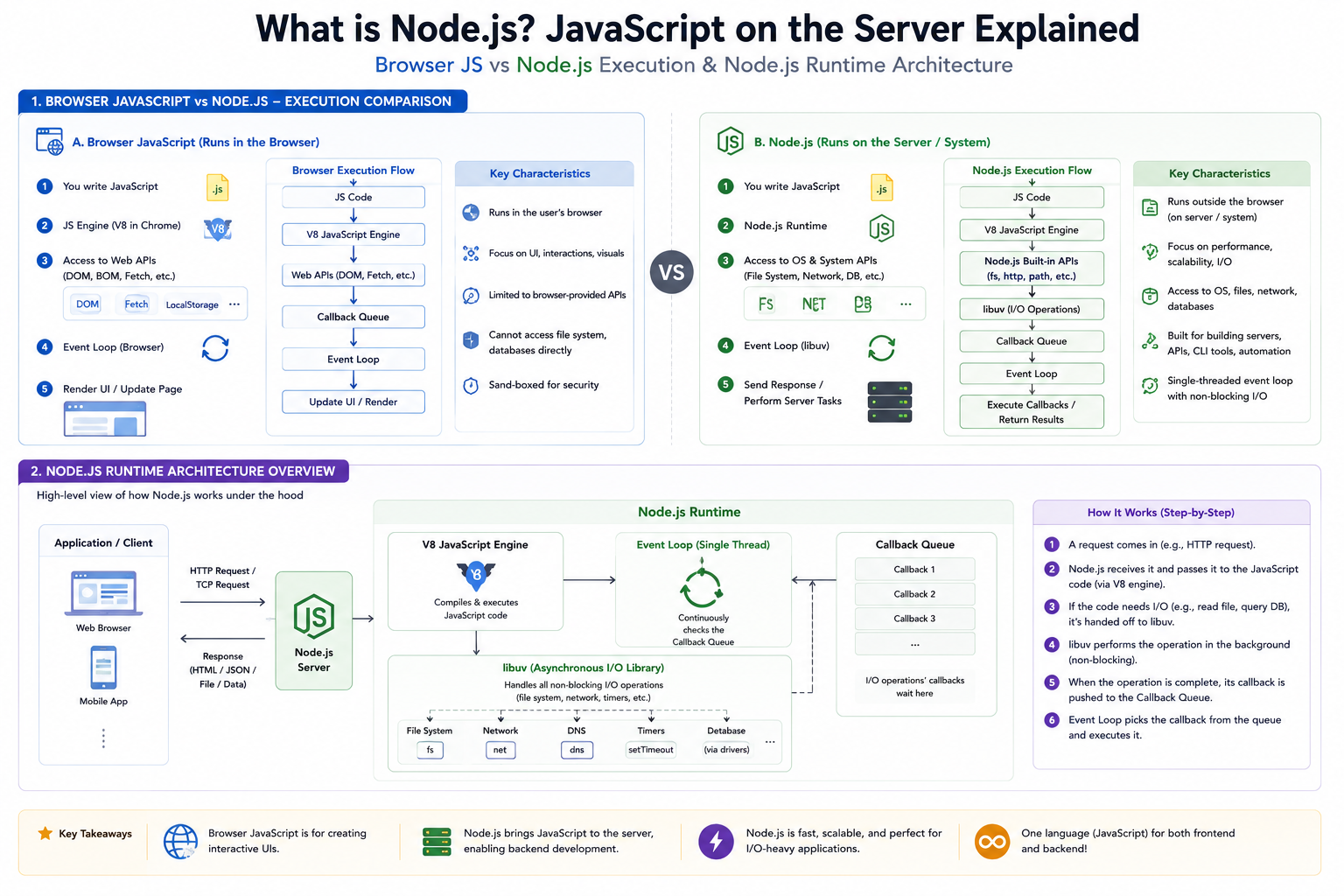
Node.js is not a new programming language. It is a runtime environment. It is a piece of software you install on your computer (or a server) that allows JavaScript to run completely independent of a web browser.
The Analogy: The Interior Decorator vs. The Architect
Browser JavaScript is like an interior decorator. It operates entirely inside the house (the browser). It can paint the walls (change the UI), move furniture around (manipulate the DOM), and react when you flip a light switch (click events).
Server JavaScript (Node.js) is the architect and the plumber. It builds the foundation, routes the water (data), reads and writes files to the hard drive, and talks directly to the database.
2. Under the Hood: The V8 Engine
If browsers were the only things that understood JavaScript, how did Node.js learn to read it? It borrowed Chrome's brain.
Google Chrome uses an incredibly powerful, open-source JavaScript engine called V8. The magic of V8 is that it compiles JavaScript directly into native machine code just before executing it, making it blazingly fast.
The creators of Node.js took the V8 engine, ripped it out of the Chrome browser, and wrapped it in a C++ program. They stripped away browser-specific concepts like the window or document (since a server doesn't have a screen or a web page to render). In their place, they added server-specific modules, giving JavaScript the superpower to interact with the operating system, handle network requests, and manage file streams.
3. Why Node.js Beat the Heavyweights (Event-Driven Architecture)
Being able to write backend code in JavaScript was cool, but it wasn't enough to dethrone established giants like Java or PHP. Node.js gained massive adoption because of how it handles server traffic.
Traditional backend languages (like PHP running on an Apache server) traditionally use a multi-threaded approach. Every time a new user visits a website, the server creates a brand new "thread" (a dedicated worker process) specifically for that user. If the user asks for data from a database, that thread stands completely still, doing nothing, until the database responds. If 10,000 users log on at once, the server spawns 10,000 threads, eating up massive amounts of RAM and potentially crashing.
Node.js flipped this model on its head using an Event-Driven, Non-Blocking architecture.
Instead of thousands of workers, Node.js uses a single, highly efficient thread equipped with an "Event Loop." When a request comes in that requires a slow task (like reading a database), Node.js doesn't wait around. It offloads that task to the background and immediately moves on to serve the next user. Once the background task is finished, it fires an "event," and Node.js sends the data back to the original user.
This makes Node.js incredibly lightweight and capable of handling massive amounts of simultaneous connections without devouring server memory.
4. Real-World Use Cases: Where Node.js Shines
Because of its unique architecture, Node.js isn't the best tool for everything (it struggles with heavy, CPU-intensive math calculations), but it is the absolute best tool for handling lots of fast, concurrent data.
Here is where Node.js dominates the industry:
Real-Time Applications: Because it handles concurrent connections effortlessly, Node is the go-to choice for chat applications (like Discord or Slack), live multiplayer browser games, and collaborative tools (like Google Docs).
Streaming Services: Companies like Netflix utilize Node.js to stream massive amounts of video data smoothly.
Single Page Applications (SPAs): If your frontend is built with React, Angular, or Vue, pairing it with a Node.js backend creates a seamless, fast experience.
Microservices and APIs: Node is incredibly fast at taking a network request, grabbing a tiny piece of JSON data from a database, and spitting it back out. It is the perfect engine for building lightweight REST APIs.
5. The "JavaScript Everywhere" Paradigm
Ultimately, the biggest reason developers adopted Node.js was unification.
Before Node, a team needed frontend developers who knew JavaScript and backend developers who knew Java or PHP. With Node.js, the barrier disappeared. A developer could write a React frontend, a Node.js backend, and query a MongoDB database—all using the exact same JavaScript syntax, logic, and data structures.
Node.js didn't just bring JavaScript to the server; it created the modern Full-Stack developer.


