Python 2 - Your First Python Project: From Empty Folder to Working Code
Part 1: Aman Starts a Real Project
In the last article, Aman learned how Python works inside. Now he wants to build something. He opens his laptop, creates a file on the desktop called test.py, and starts typing.
Neha stops him. "No. Not on the desktop. Not a random file. If you want to build AI apps later, you must learn to work like a professional from day one. Projects, environments, packages. Let's do it properly."
Aman sighs. "Is it a lot of work?"
"Ten minutes," says Neha. "And you will never be confused again."
This article covers:
- Creating your first project folder and VS Code workspace
- Writing and running
hello.py - Python environments,
venv,pip, andimport - Comments
- Numbers, strings, f-strings, and string methods
- Booleans and operators
if / elif / elseforloops andrange()- Lists, dictionaries, tuples, and sets

Part 2: Creating Your First Project
A project is just a folder. But it is a folder with a purpose: everything for one piece of work lives inside it.
Step 1: Make a folder
Neha tells Aman to create a folder called python-course somewhere sensible, for example:
- Windows:
C:\Users\Aman\projects\python-course - Mac/Linux:
/Users/aman/projects/python-course
Keep the name simple. Use lowercase. Use hyphens (-) or underscores (_) instead of spaces. Spaces in folder names cause problems in the terminal later.
Step 2: Open the folder in VS Code
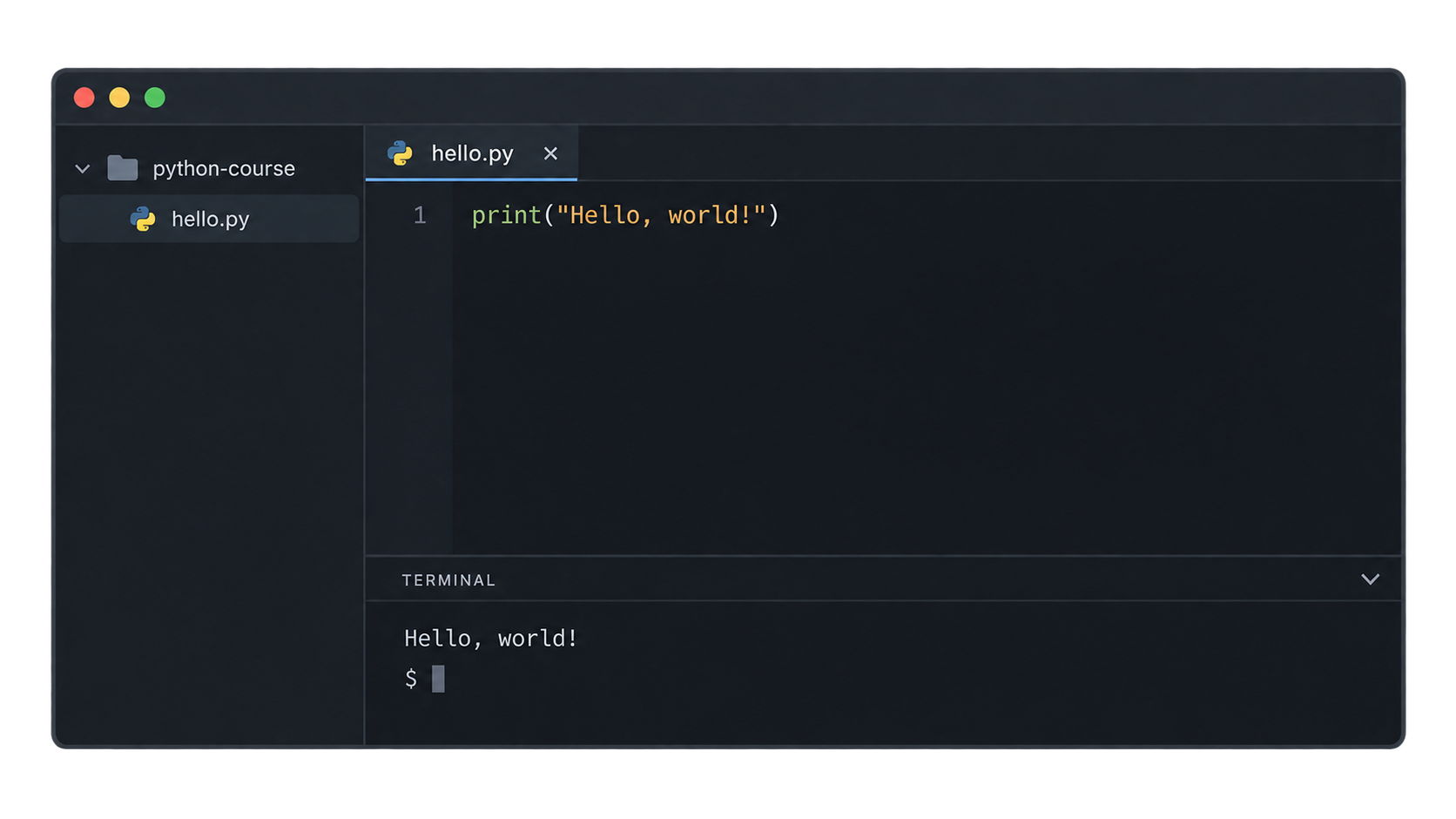
Open VS Code. Go to File → Open Folder and choose python-course.
Now VS Code treats this folder as your workspace. The left sidebar (the Explorer) shows your files. The built-in terminal opens inside this folder. Everything you do stays in one place.
Step 3: Save the workspace (optional but useful)
VS Code can save your folder as a workspace file. Go to File → Save Workspace As… and save it inside the folder. Next time, you can open this workspace with one click.
Neha's rule: One project = one folder = one VS Code window.
Part 3: Your First Python File (hello.py)
In the VS Code Explorer, Aman clicks New File and names it hello.py.
Two things matter here:
- The name should be lowercase (
hello.py, notHello.py). - The extension must be
.py. This tells VS Code and Python that this is a Python file.
Inside the file, he writes:
print("Hello, world!")
That is a complete Python program. One line.
What is print()?
print() is a function. A function is a reusable piece of code that does a job. The job of print() is to show something on the screen. The thing inside the brackets is what it shows.
Part 4: Running Python Code
There are three ways to run this file. Aman should know all three.
Way 1: The terminal
Open the VS Code terminal (View → Terminal, or Ctrl + `). Type:
python hello.py
On Mac/Linux you may need python3 hello.py.
Output:
Hello, world!
Way 2: The Run button
In the top-right corner of VS Code there is a ▶ Run button. Click it. VS Code runs the file in the terminal for you.
Way 3: Interactive (line by line)
Select a line of code and press Shift + Enter. VS Code sends that line to an interactive Python window. This is useful when you want to test small pieces without running the whole file.
Which one should I use?
| Way | Use when |
|---|---|
| Terminal | You want to understand what really happens |
| Run button | You want speed |
| Shift + Enter | You want to test one line at a time |
Neha says: "Use the terminal at first. When you type python hello.py yourself, you learn that Python is just a program that reads your file. That is the real mental model."
Practice
- Create a folder, open it in VS Code, and make a file
hello.pythat prints your name. - Run it in three ways: terminal, Run button, and Shift + Enter.
- Why should the file name end with
.py?
Part 5: Understanding Python Environments
Aman's program works. Now Neha introduces the idea that confuses most beginners: environments.
The problem
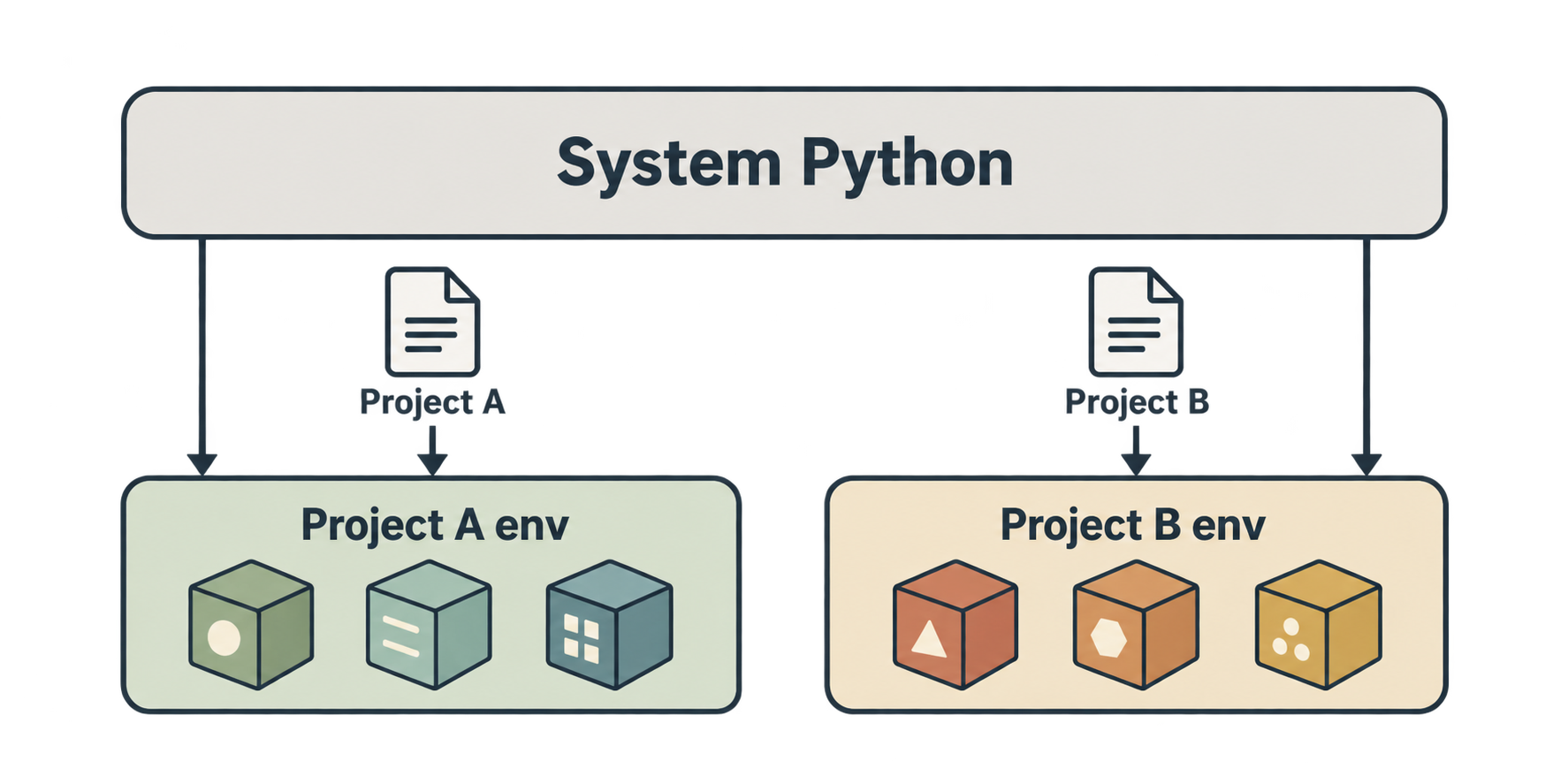
Imagine Aman works on two projects:
- Project A needs an old version of a library, say
pandas 1.5. - Project B needs the new version,
pandas 2.2.
If both projects share one Python installation, they fight. Installing one breaks the other.
The solution
Give each project its own private Python environment. Each environment has its own copy of installed packages. Project A gets its pandas 1.5. Project B gets its pandas 2.2. They never touch each other.
What is a package? What is pip?
A package (or library) is code written by someone else that you can use in your project. For example:
requests→ talk to websites and APIspandas→ work with tables of dataopenai→ talk to AI models
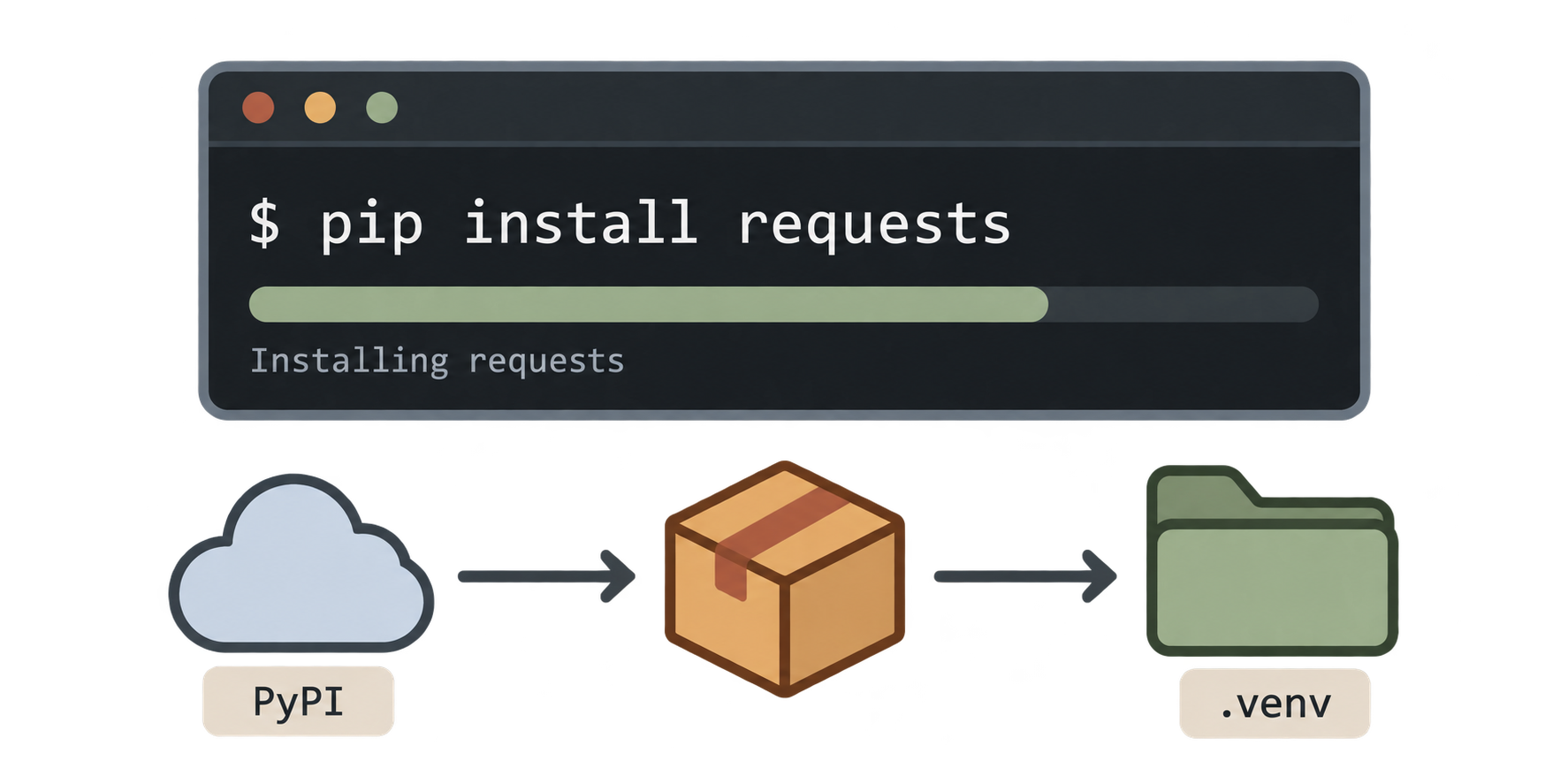
pip is Python's package installer. It downloads packages from the internet (from a site called PyPI, the Python Package Index) and installs them.
Think of pip like an app store for Python code.
Part 6: Creating a Virtual Environment (venv)
A virtual environment is the private environment we just talked about. Python has a built-in tool for this called venv.
Step 1: Create it
In the VS Code terminal, inside your project folder, run:
python -m venv .venv
Let's read this:
python -m venv→ run thevenvmodule.venv→ the name of the folder to create
A new folder called .venv appears in your project. It contains a fresh copy of Python with no extra packages. The dot at the start makes it a "hidden" folder on Mac/Linux, which keeps things tidy.
Step 2: Activate it
Creating the environment is not enough. You must activate it so the terminal uses it.
Windows (PowerShell):
.venv\Scripts\activate
Mac/Linux:
source .venv/bin/activate
After this, your terminal prompt shows (.venv) at the start. That is the sign that the environment is active.
(.venv) C:\Users\Aman\projects\python-course>
Deactivate
To leave the environment:
deactivate
Practice
- Create a virtual environment named
.venvin your project. - Activate it. What do you see at the start of your terminal prompt?
- Why do we need a separate environment for each project?
Part 7: Installing Python Packages (pip install)
With the environment active, Aman installs his first package:
pip install requests
pip downloads requests and all the packages it depends on, and installs them inside .venv. Nothing is installed on the system Python.
Check what is installed
pip list
This prints every package in the current environment with its version.
Install a specific version
pip install requests==2.31.0
Uninstall
pip uninstall requests
Save your package list
Professionals keep a file called requirements.txt that lists all packages. Then anyone can install them with one command:
pip freeze > requirements.txt     # save the list
pip install -r requirements.txt   # install from the list
We will use this more in a future article.
Part 8: Using Python Packages (import)
Installing is step one. Using it is step two. To use a package in your code, you import it.
import requests

response = requests.get("https://api.github.com")
print(response.status_code)
Output:
200
200 means "OK, the request worked." In one line, Aman talked to GitHub's servers. That is the power of packages.
Different ways to import
import math                 # import the whole module
print(math.sqrt(16))        # 4.0

from math import sqrt       # import only one thing
print(sqrt(16))             # 4.0

import pandas as pd         # import with a short nickname
The as pd form is very common in data and AI work.
Built-in vs installed
Some modules come with Python already. You do not need pip install for them. Examples: math, os, random, json, datetime. These are the standard library.
Packages like requests, pandas, and openai are third-party. You must install them first.
Practice
- Install
requestsand run the GitHub example above. What status code do you get? - What is the difference between
import mathandfrom math import sqrt? - Do you need to
pip installtherandommodule? Why or why not?
Part 9: Comments
Before learning data types, one small but important tool: comments.
A comment is text in your code that Python ignores. It is for humans.
# This line is a comment. Python skips it.
print("Hello")  # This is a comment at the end of a line
Everything after # on a line is a comment.
For longer notes, use triple quotes:
"""
This is a multi-line text.
Python does not run it.
People often use it to describe a file or a function.
"""
Good comments vs bad comments
Bad (just repeats the code):
x = x + 1 # add 1 to x
Good (explains why):
x = x + 1 # move to the next page of results
Neha's tip: "Write comments for your future self. In three months, you will not remember why you wrote that line."
Also, comments are a quick way to disable a line while testing. In VS Code, select lines and press Ctrl + / to comment or uncomment them.
Part 10: Numbers (Integers and Floats)
Python has two main number types.
Integers (int) — whole numbers
age = 25
year = 2026
temperature = -5
Floats — numbers with a decimal point
price = 99.99
pi = 3.14159
half = 0.5
Basic maths
print(10 + 3)    # 13
print(10 - 3)    # 7
print(10 * 3)    # 30
print(10 / 3)    # 3.3333333333333335  (division always gives a float)
print(10 // 3)   # 3   (floor division: drop the decimal)
print(10 % 3)    # 1   (modulo: the remainder)
print(10 ** 3)   # 1000 (power)
Two surprises for beginners:
/always returns a float, even10 / 2gives5.0.//and%are very useful.%tells you if a number is even:n % 2 == 0.
Check the type
print(type(25))      # <class 'int'>
print(type(25.0))    # <class 'float'>
Convert between them
int(3.9)      # 3  (cuts off the decimal, does NOT round)
float(7)      # 7.0
round(3.7)    # 4
Practice
- What does
7 / 2give? And7 // 2? And7 % 2? - What is
type(10 / 2)? - What does
int(9.99)give?
Part 11: Strings
A string is text. It goes inside quotes.
name = "Aman"
drink = 'chai'
Single or double quotes both work. Pick one style and stay consistent. Use the other when you need a quote inside:
sentence = "It's a nice day"
Joining strings
first = "Aman"
last = "Sharma"
full = first + " " + last
print(full)   # Aman Sharma
This is called concatenation.
Length and indexing
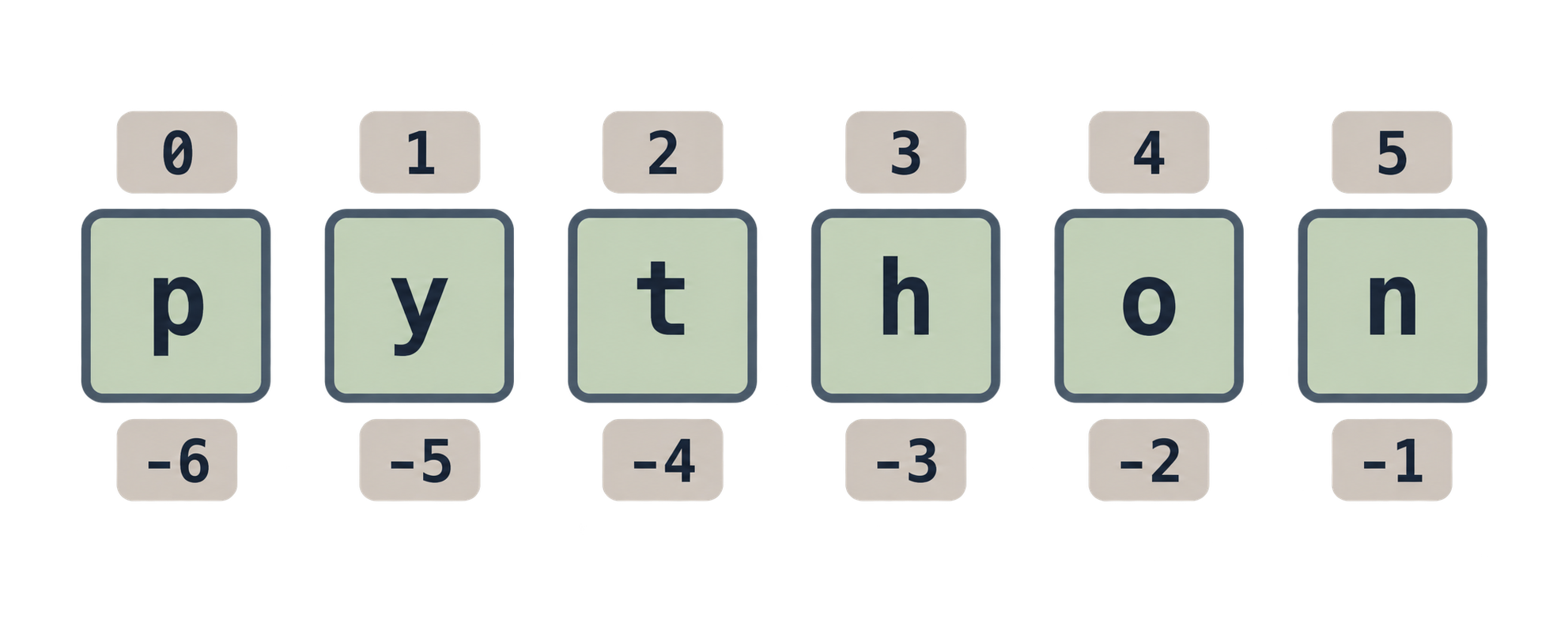
word = "python"
print(len(word))    # 6
print(word[0])      # p   (first character; counting starts at 0)
print(word[-1])     # n   (last character)
print(word[0:3])    # pyt (slice: from 0 up to, but not including, 3)
Multi-line strings
message = """Dear Aman,
Your order is ready.
Thank you!"""
Mixing numbers and strings
This is a common error:
age = 25
print("I am " + age)   # TypeError!
Python cannot join a string and a number. You must convert:
print("I am " + str(age)) # works
But there is a better way, coming next.
Part 12: String Formatting (f-strings)
An f-string lets you put variables inside a string easily. Put f before the opening quote and use {} for variables.
name = "Aman"
age = 25
print(f"My name is {name} and I am {age} years old.")
Output:
My name is Aman and I am 25 years old.
No str(). No +. Just clean text.
You can even do maths inside:
price = 50
qty = 3
print(f"Total: {price * qty} rupees")   # Total: 150 rupees
And control decimals:
pi = 3.14159
print(f"Pi is about {pi:.2f}")   # Pi is about 3.14
Neha says: "Use f-strings. Always. They are the modern way."
Practice
- Write an f-string that prints:
Hello, <your name>! You are <age> years old. - What is wrong with
print("Score: " + 95)? Fix it in two ways. - Use an f-string to print
19.99rounded to one decimal place.
Part 13: String Methods
A method is a function that belongs to an object. You call it with a dot. Strings have many useful methods.
text = "  Chai aur Code  "

print(text.upper())      # "  CHAI AUR CODE  "
print(text.lower())      # "  chai aur code  "
print(text.strip())      # "Chai aur Code"   (remove spaces at both ends)
print(text.title())      # "  Chai Aur Code  "
email = "aman@example.com"

print(email.startswith("aman"))   # True
print(email.endswith(".com"))     # True
print(email.replace("aman", "neha"))   # neha@example.com
print(email.split("@"))           # ['aman', 'example.com']
sentence = "python is fun"
print(sentence.count("n"))   # 2
print(sentence.find("is"))   # 7  (index where "is" starts)
print("fun" in sentence)     # True
Important: strings are immutable
Remember from the last article: strings cannot be changed. So text.upper() does not change text. It returns a new string.
name = "aman"
name.upper()
print(name)          # aman   (unchanged!)

name = name.upper()  # save the result
print(name)          # AMAN
This mistake is extremely common. Always save the result.
Discover methods yourself
In VS Code, type text. and wait. A list of all methods appears. Or in the Python shell, type dir("").
Practice
Take the string
" Hello World ". Remove the spaces and make it all lowercase.Split
"a,b,c,d"into a list usingsplit().Why does this print
helloand notHELLO?s = "hello" s.upper() print(s)
Part 14: Booleans
A boolean has only two values: True or False. (Note the capital first letter.)
is_logged_in = True
has_paid = False
Booleans usually come from comparisons:
age = 25
print(age > 18) # True
print(age == 30) # False
Truthy and falsy
Python can treat other values as True or False:
| Value | Treated as |
|---|---|
0, 0.0 |
False |
"" (empty string) |
False |
[], {}, () (empty collections) |
False |
None |
False |
| Everything else | True |
print(bool(0)) # False
print(bool(42)) # True
print(bool("")) # False
print(bool("chai")) # True
This is useful for checks like if name: which means "if name is not empty".
Part 15: Operators
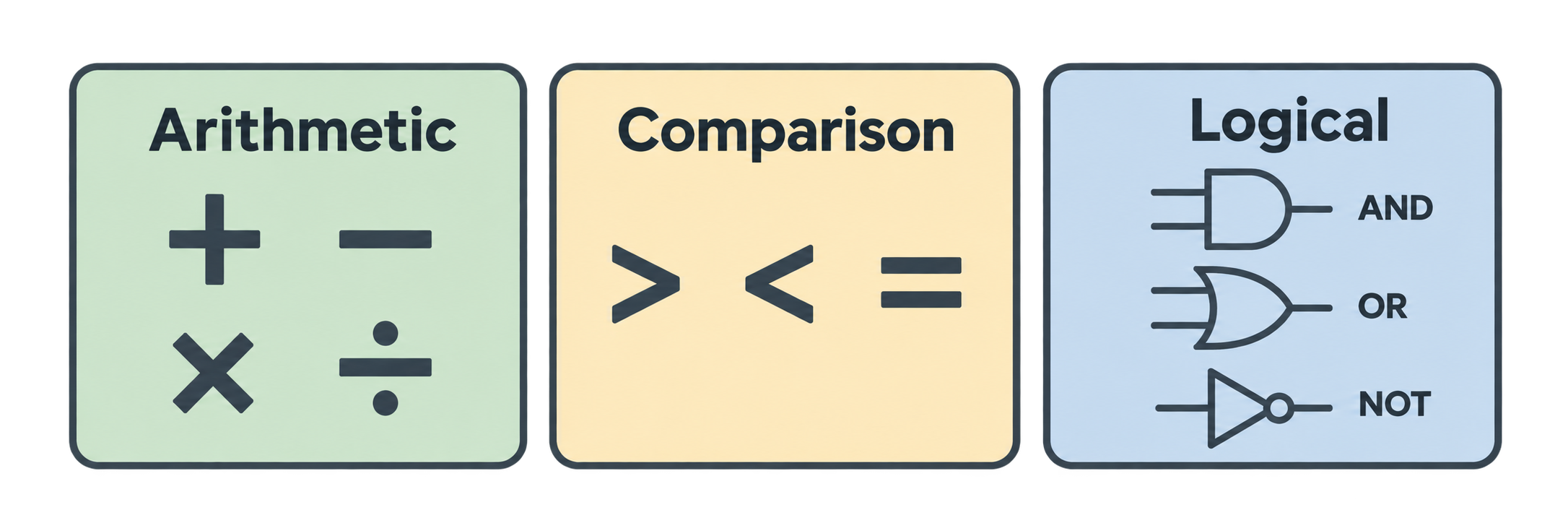
An operator is a symbol that does something with values. Python has three main groups.
Arithmetic (maths)
| Operator | Meaning | Example | Result |
|---|---|---|---|
+ |
add | 5 + 2 |
7 |
- |
subtract | 5 - 2 |
3 |
* |
multiply | 5 * 2 |
10 |
/ |
divide | 5 / 2 |
2.5 |
// |
floor divide | 5 // 2 |
2 |
% |
remainder | 5 % 2 |
1 |
** |
power | 5 ** 2 |
25 |
Membership (in / not in)
beginners often miss: membership operators. They check if a value is inside a collection.
| Operator | Meaning | Example | Result |
|---|---|---|---|
in |
is it inside? | "a" in "chai" |
True |
not in |
is it NOT inside? | "x" in "chai" |
False |
They work with strings, lists, tuples, sets, and dictionaries.
In a string (checks for a substring):
sentence = "python is fun"
print("fun" in sentence) # True
print("java" in sentence) # False
In a list:
drinks = ["chai", "coffee", "lassi"]
print("chai" in drinks) # True
print("juice" not in drinks) # True
In a dictionary (checks the keys, not the values):
person = {"name": "Aman", "age": 25}
print("name" in person) # True
print("Aman" in person) # False ← "Aman" is a value, not a key
In an if:
email = "aman@example.com"
if "@" in email:
print("Looks like an email")
else:
print("Missing @")
Membership operators always return a boolean, so you can combine them with and, or, and not:
is_valid = "@" in email and "." in email
Comparison (gives True/False)
| Operator | Meaning | Example | Result |
|---|---|---|---|
== |
equal | 5 == 5 |
True |
!= |
not equal | 5 != 3 |
True |
> |
greater | 5 > 3 |
True |
< |
less | 5 < 3 |
False |
>= |
greater or equal | 5 >= 5 |
True |
<= |
less or equal | 5 <= 4 |
False |
Careful: = assigns a value. == compares. Mixing them is a classic beginner bug.
Logical (combine True/False)
| Operator | Meaning | Example | Result |
|---|---|---|---|
and |
both must be True | True and False |
False |
or |
at least one True | True or False |
True |
not |
flip it | not True |
False |
age = 25
has_ticket = True
can_enter = age >= 18 and has_ticket
print(can_enter) # True
Part 16: Shortcut Assignments (+=)
This is very common:
count = 0
count = count + 1
Python has a shortcut:
count += 1 # same as count = count + 1
It works for other operators too:
total -= 5 # total = total - 5
price *= 2 # price = price * 2
score /= 4 # score = score / 4
And for strings:
msg = "Hello"
msg += " World"
print(msg) # Hello World
Practice
What does
7 % 3give? What does2 ** 4give?What is the result of
not (5 > 3)?What is
xafter this?x = 10 x += 5 x *= 2Is
age = 18the same asage == 18? Explain.
Part 17: Control Flow — Conditional Statements
So far, Aman's programs run line by line from top to bottom. Control flow lets the program make decisions and repeat things.
if
temperature = 35
if temperature > 30:
print("It is hot. Make cold coffee.")
Three rules:
- The condition comes after
if. - A colon
:ends the line. - The code inside is indented (4 spaces). Indentation is not optional in Python. It is how Python knows what belongs to the
if.
if / else
if temperature > 30:
print("Cold coffee")
else:
print("Hot chai")
if / elif / else
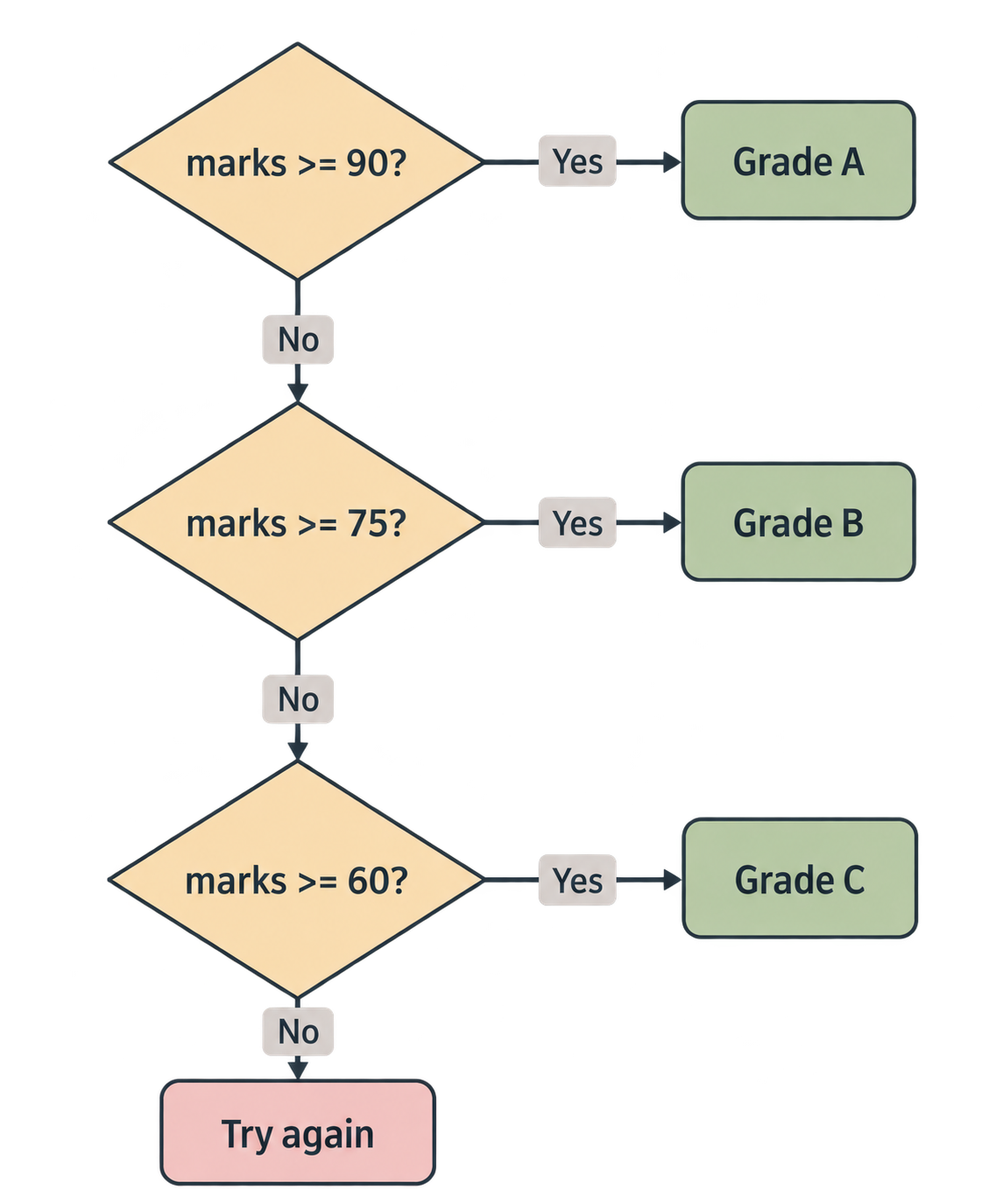
elif means "else if". Use it for more than two choices.
marks = 72
if marks >= 90:
print("Grade A")
elif marks >= 75:
print("Grade B")
elif marks >= 60:
print("Grade C")
else:
print("Try again")
Output: Grade C
Python checks each condition from the top. The first one that is True runs. The rest are skipped. If none is True, else runs.
Combining conditions
age = 20
is_member = True
if age >= 18 and is_member:
print("Welcome!")
Practice
Write a program that checks if a number is even or odd. (Hint: use
%.)What will this print?
x = 50 if x > 100: print("Big") elif x > 10: print("Medium") else: print("Small")What happens if you forget the indentation inside an
if?
Part 18: Loops (for loops and range())
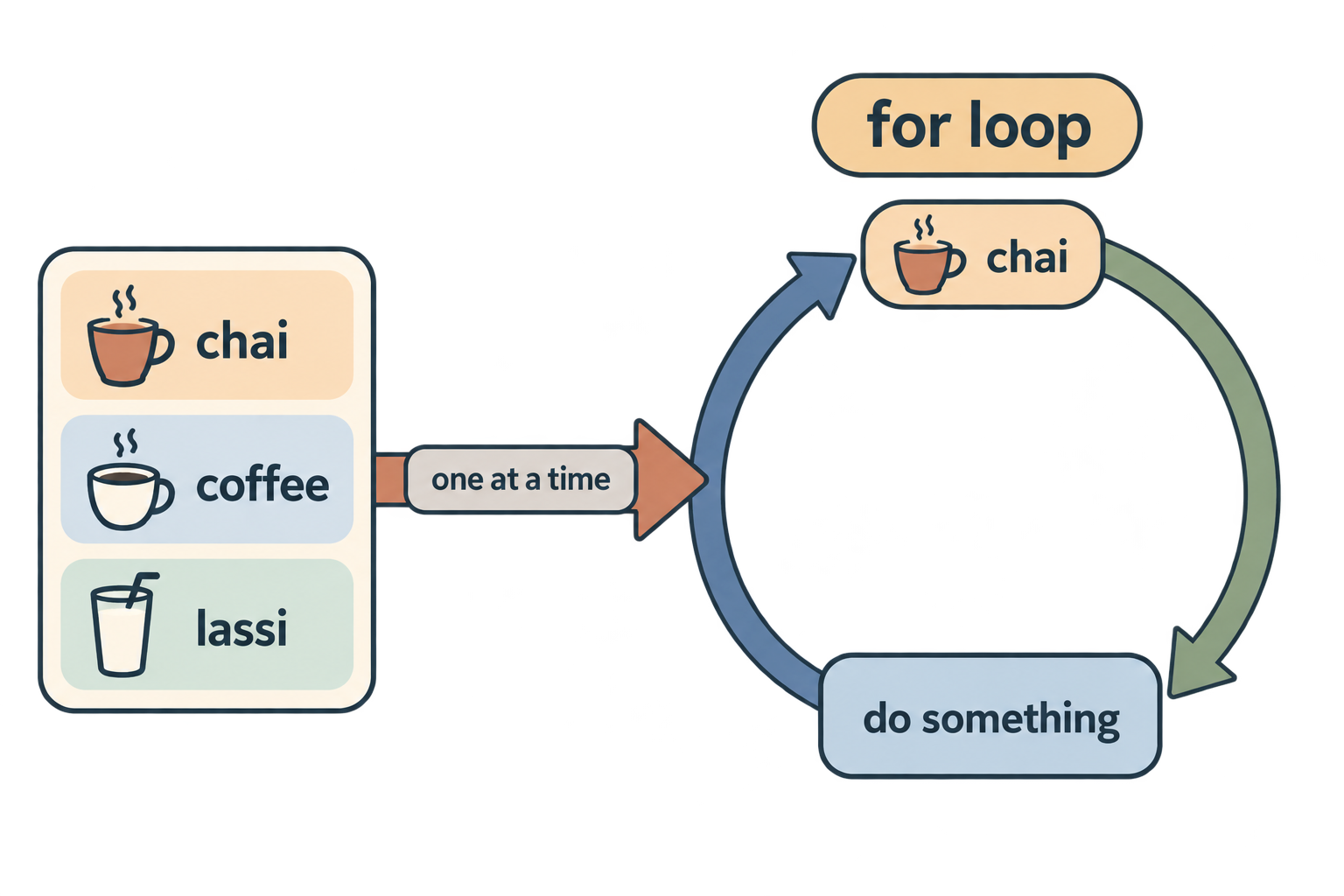
A loop repeats code. The most common loop in Python is the for loop.
Looping over a list
drinks = ["chai", "coffee", "lassi"]
for drink in drinks:
print(drink)
Output:
chai
coffee
lassi
Read it as: "For each drink in drinks, do this."
drink is a variable that Python creates for you. Each time through the loop, it holds the next item.
Looping over a string
for letter in "abc":
print(letter)
Looping a fixed number of times: range()
range() makes a sequence of numbers.
for i in range(5):
print(i)
Output:
0
1
2
3
4
Note: range(5) gives 0 to 4. It starts at 0 and stops before 5.
Other forms:
range(1, 6) # 1, 2, 3, 4, 5
range(0, 10, 2) # 0, 2, 4, 6, 8 (step of 2)
Loop with a counter
total = 0
for n in range(1, 11):
total += n
print(total) # 55
break and continue
for n in range(10):
if n == 3:
continue # skip this one, go to next
if n == 6:
break # stop the loop completely
print(n)
Output: 0 1 2 4 5
Practice
Print numbers from 1 to 10 using
range().Print all even numbers between 0 and 20.
What does this print?
for i in range(2, 8, 3): print(i)Add up all numbers from 1 to 100 using a loop.
Part 19: Data Structures — Introduction
A data structure is a way to store many values together. Python has four built-in ones that you will use every day:
| Structure | Symbol | Ordered? | Can change? | Duplicates? |
|---|---|---|---|---|
| List | [ ] |
Yes | Yes | Yes |
| Dictionary | {key: value} |
Yes (by insertion) | Yes | Keys no |
| Tuple | ( ) |
Yes | No | Yes |
| Set | { } |
No | Yes | No |
Let's look at each one.
Part 20: Lists
A list is an ordered collection. You can add, remove, and change items.
drinks = ["chai", "coffee", "lassi"]
Access items
print(drinks[0]) # chai
print(drinks[-1]) # lassi
print(drinks[0:2]) # ['chai', 'coffee']
print(len(drinks)) # 3
Change items
drinks[1] = "tea"
print(drinks) # ['chai', 'tea', 'lassi']
Add items
drinks.append("juice") # add to the end
drinks.insert(0, "water") # add at position 0
Remove items
drinks.remove("lassi") # remove by value
drinks.pop() # remove and return the last item
drinks.pop(0) # remove and return item at index 0
Other useful things
numbers = [5, 2, 9, 1]
numbers.sort() # [1, 2, 5, 9]
print(max(numbers)) # 9
print(min(numbers)) # 1
print(sum(numbers)) # 17
print(9 in numbers) # True
Lists can hold anything
mixed = [1, "two", 3.0, True, [4, 5]]
Even other lists.
Loop over a list with index
for i, drink in enumerate(drinks):
print(i, drink)
Part 21: Dictionaries
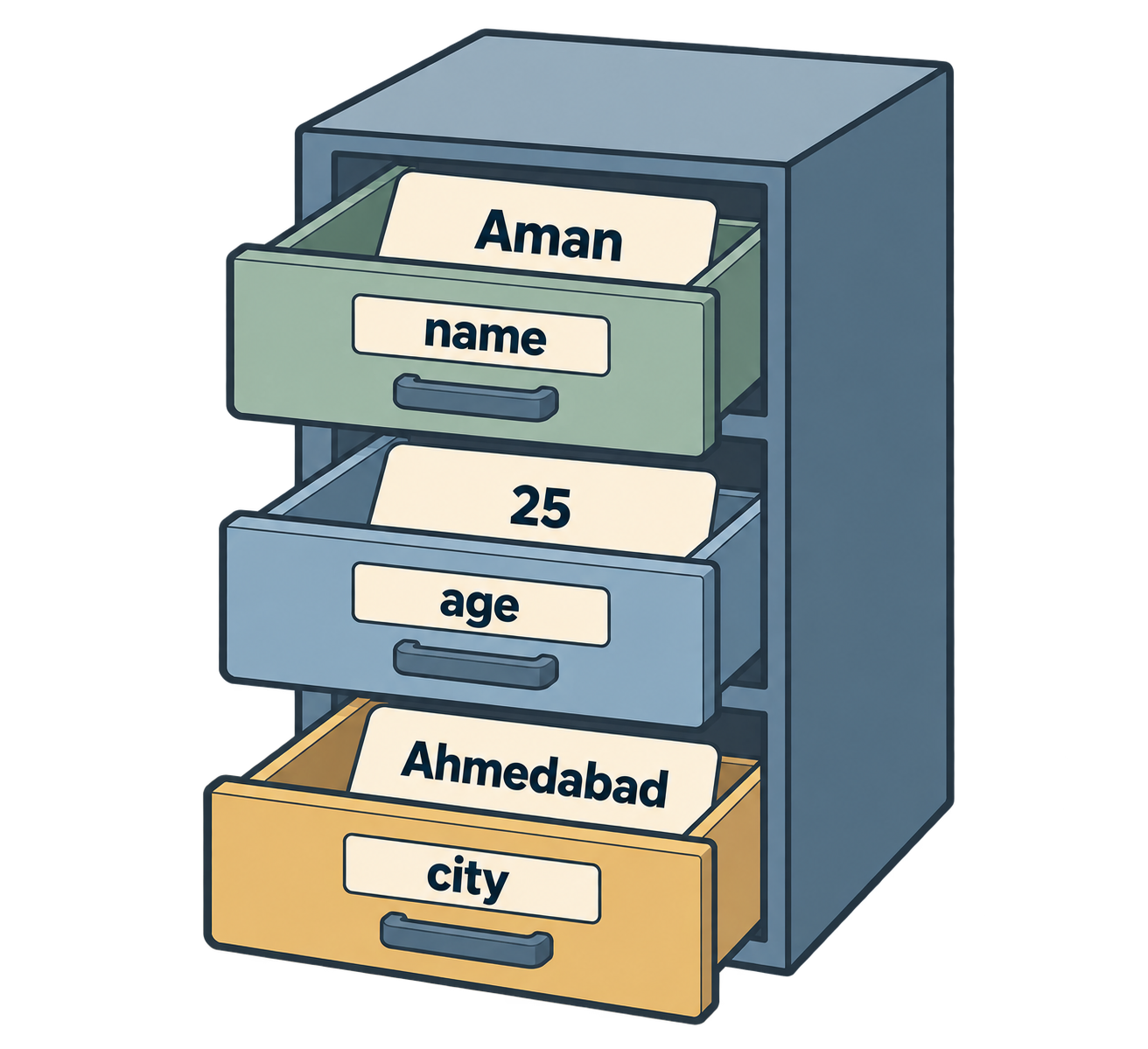
A dictionary stores key → value pairs. Think of a real dictionary: word → meaning.
person = {
"name": "Aman",
"age": 25,
"city": "Ahmedabad"
}
Access by key
print(person["name"]) # Aman
print(person.get("age")) # 25
person["email"] would crash because the key does not exist. person.get("email") returns None instead. Use .get() when you are not sure the key exists.
Add or change
person["email"] = "aman@example.com" # add
person["age"] = 26 # change
Remove
del person["city"]
Loop
for key, value in person.items():
print(f"{key}: {value}")
Useful methods
person.keys() # all keys
person.values() # all values
"name" in person # True
Dictionaries are everywhere in AI work. API responses, JSON data, and model settings are almost always dictionaries.
Part 22: Tuples
A tuple is like a list, but immutable. Once created, it cannot change.
point = (3, 4)
colors = ("red", "green", "blue")
Access
print(point[0]) # 3
print(len(colors)) # 3
Cannot change
point[0] = 10 # TypeError!
Why use a tuple?
- When the data should not change (coordinates, RGB colors, days of the week).
- They are slightly faster and use less memory than lists.
- They can be used as dictionary keys. Lists cannot.
Unpacking
x, y = point
print(x) # 3
print(y) # 4
This is very common with functions that return multiple values.
Part 23: Sets
A set is a collection with no duplicates and no order.
tags = {"python", "ai", "python", "code"}
print(tags) # {'python', 'ai', 'code'} — duplicate removed
Remove duplicates from a list
The number-one use of a set:
numbers = [1, 2, 2, 3, 3, 3]
unique = set(numbers)
print(unique) # {1, 2, 3}
print(list(unique)) # back to a list
Add and remove
tags.add("ml")
tags.remove("code")
Set maths
a = {1, 2, 3}
b = {3, 4, 5}
print(a | b) # union: {1, 2, 3, 4, 5}
print(a & b) # intersection: {3}
print(a - b) # difference: {1, 2}
Careful: empty set
{} is an empty dictionary, not an empty set. For an empty set, write set().
Practice (Data Structures)
- Make a list of 5 numbers. Print the largest, the smallest, and the sum.
- Make a dictionary with keys
title,author,yearfor your favourite book. Print each key and value using a loop. - Why would you use a tuple instead of a list for
(latitude, longitude)? - Remove duplicates from
[“a”, “b”, “a”, “c”, “b”]and print the result. - What is the difference between
person["email"]andperson.get("email")when the key does not exist?
Part 24: Final Quiz
Try these without looking back. Answers are at the end.
Q1. What command creates a virtual environment called .venv?
Q2. After activating a virtual environment, what appears at the start of your terminal prompt?
Q3. What does pip install requests do, and where does it install the package?
Q4. Which of these needs pip install before use: math, requests, random, pandas?
Q5. What does this print?
name = "Neha"
print(f"Hi {name.upper()}, you have {3 * 4} messages")
Q6. What does 10 // 3 give? What does 10 % 3 give?
Q7. What does this print?
for i in range(1, 10, 3):
print(i)
Q8. What is the output?
x = 7
if x % 2 == 0:
print("even")
else:
print("odd")
Q9. Which data structure would you use for each?
- A shopping cart where items can be added and removed
- A fixed pair of (width, height)
- Storing a user's name, email, and age
- A list of unique visitor IDs
Q10. What is wrong here?
s = "hello"
s.upper()
print(s) # expected HELLO
Answers
Part 4:
- Your own file.
- Done in your editor.
- The
.pyextension tells Python and VS Code that the file contains Python code.
Part 6:
python -m venv .venv(.venv)- So each project has its own packages and versions, and projects do not break each other.
Part 8:
200import mathbrings the whole module (usemath.sqrt);from math import sqrtbrings onlysqrt(usesqrtdirectly).- No.
randomis part of the standard library and comes with Python.
Part 10:
3.5,3,1<class 'float'>(division always gives a float)9
Part 12:
- Example:
print(f"Hello, {name}! You are {age} years old.") - You cannot add a string and an int. Fix:
print("Score: " + str(95))orprint(f"Score: {95}"). print(f"{19.99:.1f}")→20.0
Part 13:
" Hello World ".strip().lower()→hello world"a,b,c,d".split(",")→['a', 'b', 'c', 'd']- Strings are immutable.
s.upper()returns a new string, but it was not saved.sis unchanged.
Part 16:
1,16False30- No.
=assigns 18 toage.==checks ifageequals 18 and givesTrue/False.
Part 17: 1.
n = 7
if n % 2 == 0:
    print("even")
else:
    print("odd")
Medium- Python gives an
IndentationError.
Part 18:
for i in range(1, 11): print(i)for i in range(0, 21, 2): print(i)2,5
total = 0
for n in range(1, 101):
    total += n
print(total)   # 5050
Part 23 (Data Structures):
- Use
max(),min(),sum(). - Use
for key, value in book.items(): print(f"{key}: {value}") - Because the coordinates should not change by accident, and a tuple makes that clear.
list(set(["a", "b", "a", "c", "b"]))→['a', 'b', 'c'](order may vary)person["email"]crashes withKeyError.person.get("email")returnsNone.
Final Quiz:
python -m venv .venv(.venv)- Downloads
requestsfrom PyPI and installs it inside the active virtual environment (.venv). requestsandpandas. (mathandrandomare built-in.)Hi NEHA, you have 12 messages3and11,4,7odd- List; tuple; dictionary; set.
s.upper()returns a new string but it is not saved. Fix:s = s.upper().
Epilogue
Aman closes his laptop. In one session he went from a random file on the desktop to a proper project: a folder, a workspace, a virtual environment, an installed package, and working code that talks to the internet.
More importantly, he now has the basic tools of every program: numbers, strings, booleans, conditions, loops, and the four data structures.
Neha says, "Everything you build from now on — a chatbot, a data pipeline, an AI agent — is made from exactly these pieces. You just combine them in smarter ways."
Comments
Join the discussionNo comments yet. Be the first to comment.