Python 3 - Functions, Modules, and Real Data: Making Python Do Useful Work
Write reusable code, bring in tools from the Python ecosystem, call a real API, and read and save files.
Part 1: Aman Repeats Himself
Aman is happy. He can write loops, conditions, and lists. He writes a small program that greets three friends:
print("Hello, Priya! Welcome to Chai Club.")
print("Hello, Rahul! Welcome to Chai Club.")
print("Hello, Neha! Welcome to Chai Club.")
Neha looks at it and says, "Now change 'Chai Club' to 'Code Club'."
Aman edits three lines. Neha says, "Now imagine 300 lines." Aman understands the problem. Repeating code is slow to write and easy to break.
"That," says Neha, "is why functions exist."
This article covers:
- Functions: defining and calling
- Parameters and arguments
- Global vs local scope
- Returning values
- Modules and packages (external tools)
- Importing modules and built-ins
requirements.txt- Working with APIs using
requests - Working with data using
pandasandmatplotlib - Reading and saving files
Part 2: Functions (Defining and Calling)
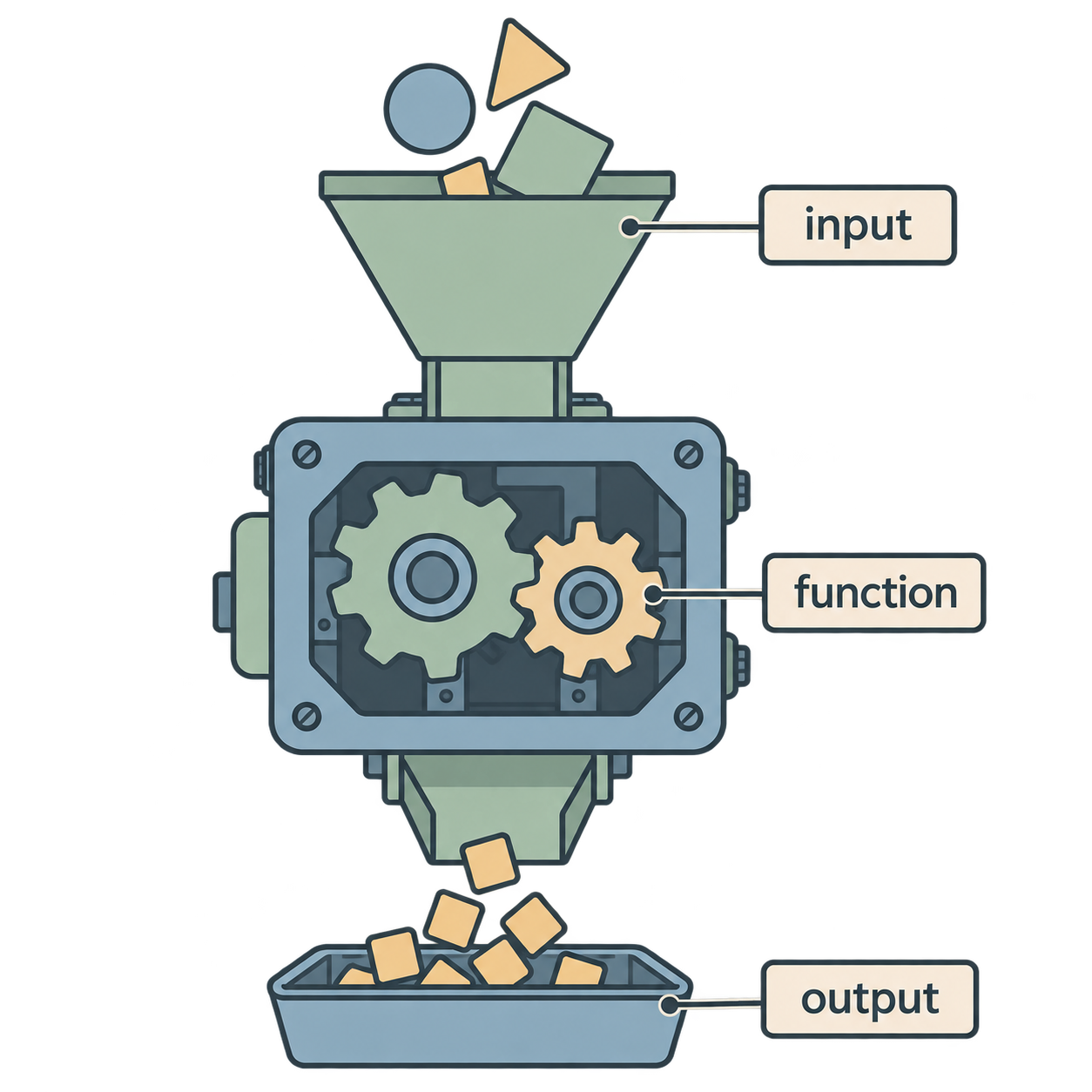
A function is a named block of code that does one job. You write it once and use it many times.
Defining a function
def greet():
    print("Hello! Welcome to Chai Club.")
Read it:
def→ "define a function"greet→ the name of the function()→ brackets (empty for now):→ colon ends the line- The indented block is the body: what the function does
Important: defining a function does not run it. Python just remembers it.
Calling a function
To run it, write its name with brackets:
greet()
greet()
greet()
Output:
Hello! Welcome to Chai Club.
Hello! Welcome to Chai Club.
Hello! Welcome to Chai Club.
Now, if Aman wants to change the message, he changes one line inside the function. Every call updates automatically.
Naming rules
- Use lowercase and underscores:
send_email,calculate_total - Use a verb, because a function does something
- Define a function before you call it
Docstrings
A short description inside triple quotes, right after the def line. VS Code shows it when you hover over the function.
def greet():
    """Print a welcome message."""
    print("Hello! Welcome to Chai Club.")
Practice
- Write a function
say_hi()that prints "Hi there!" and call it twice. - What happens if you write
def greet():with a body but never writegreet()? - Why do we use
defand not just copy-paste the code?
Part 3: Function Parameters and Arguments
Aman's greet() always says the same thing. He wants it to greet different people. For that, a function needs input.
Parameters
A parameter is a variable in the function definition that receives input:
def greet(name):
    print(f"Hello, {name}! Welcome to Chai Club.")
name is the parameter.
Arguments
An argument is the actual value you pass when calling:
greet("Priya")
greet("Rahul")
"Priya" and "Rahul" are arguments.
Simple way to remember: parameter = the empty slot. Argument = the thing you put in the slot.
Multiple parameters
def greet(name, club):
    print(f"Hello, {name}! Welcome to {club}.")

greet("Priya", "Chai Club")
greet("Rahul", "Code Club")
Positional vs keyword arguments
Positional: order matters.
greet("Priya", "Chai Club")   # name="Priya", club="Chai Club"
greet("Chai Club", "Priya")   # wrong! name="Chai Club"
Keyword: you name each one, so order does not matter.
greet(club="Chai Club", name="Priya") # works correctly
Keyword arguments make code easier to read when a function has many parameters.
Default values
You can give a parameter a default. Then it becomes optional.
def greet(name, club="Chai Club"):
    print(f"Hello, {name}! Welcome to {club}.")

greet("Priya")                 # uses default: Chai Club
greet("Rahul", "Code Club")    # overrides the default
Rule: parameters with defaults must come after parameters without defaults.
Type hints (optional but helpful)
def add(a: int, b: int) -> int:
    return a + b
This does not force types. It is a note for humans and for VS Code. In AI projects you will see this style a lot.
Practice
Write
multiply(a, b)that printsa * b. Call it with3and4.Write
order(drink, size="medium")that prints "One medium chai" (or whatever you pass). Call it with and without the size.In
greet("Priya", "Chai Club"), which word is the parameter and which is the argument?What is wrong here?
def greet(club="Chai Club", name):
    ...
Part 4: Global vs Local Variable Scope
Aman writes this and gets confused:
def make_coffee():
    cups = 2
    print(cups)

make_coffee()   # prints 2
print(cups)     # NameError: name 'cups' is not defined
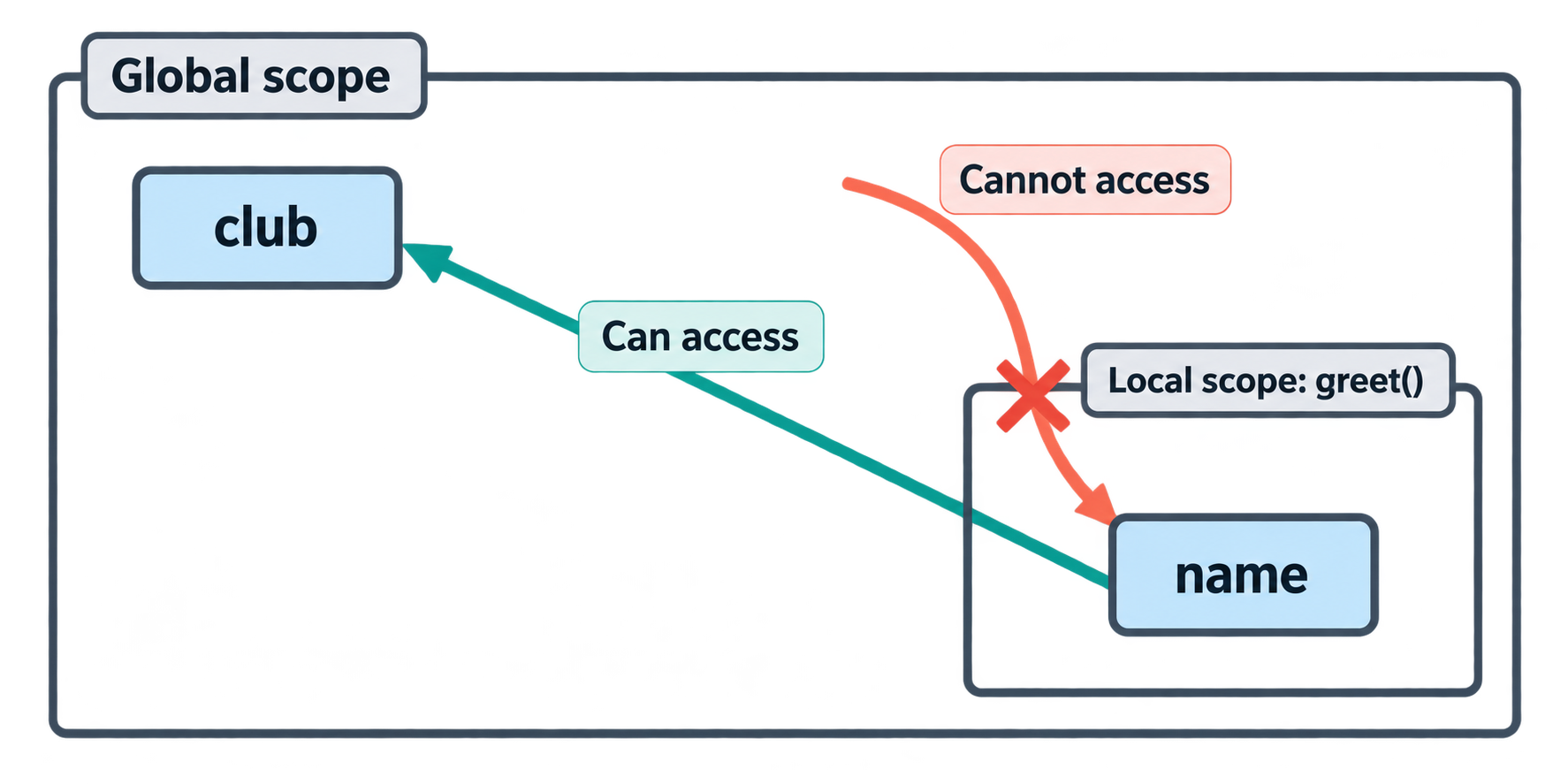
Why is cups not found? Because of scope.
What is scope?
Scope is the area of the program where a variable exists.
- A variable created inside a function is local. It exists only inside that function. When the function ends, it is gone.
- A variable created outside all functions is global. It exists everywhere in the file.
club = "Chai Club"      # global

def greet():
    name = "Priya"      # local
    print(name, club)   # can read both

greet()
print(club)   # fine
print(name)   # NameError
Reading vs changing a global
A function can read a global variable. But if it tries to assign to it, Python creates a new local variable instead:
count = 0

def increase():
    count = count + 1   # UnboundLocalError!

increase()
Python sees count = ... inside the function and decides count is local. But then count + 1 reads a local that does not exist yet. Error.
The global keyword
If you really want to change a global inside a function:
count = 0

def increase():
    global count
    count = count + 1

increase()
print(count)   # 1
Neha's advice
"Avoid global. It makes code hard to understand. Instead, give the function input and get output back with return. That is the next topic."
Practice
What does this print?
x = 10
def show():
    x = 5
    print(x)
show()
print(x)
Why does this fail?
def add_item():
    items.append("chai")
add_item()
(Hint: is
itemsdefined anywhere?)Is a variable created inside a function available after the function finishes?
Part 5: Returning Values from Functions
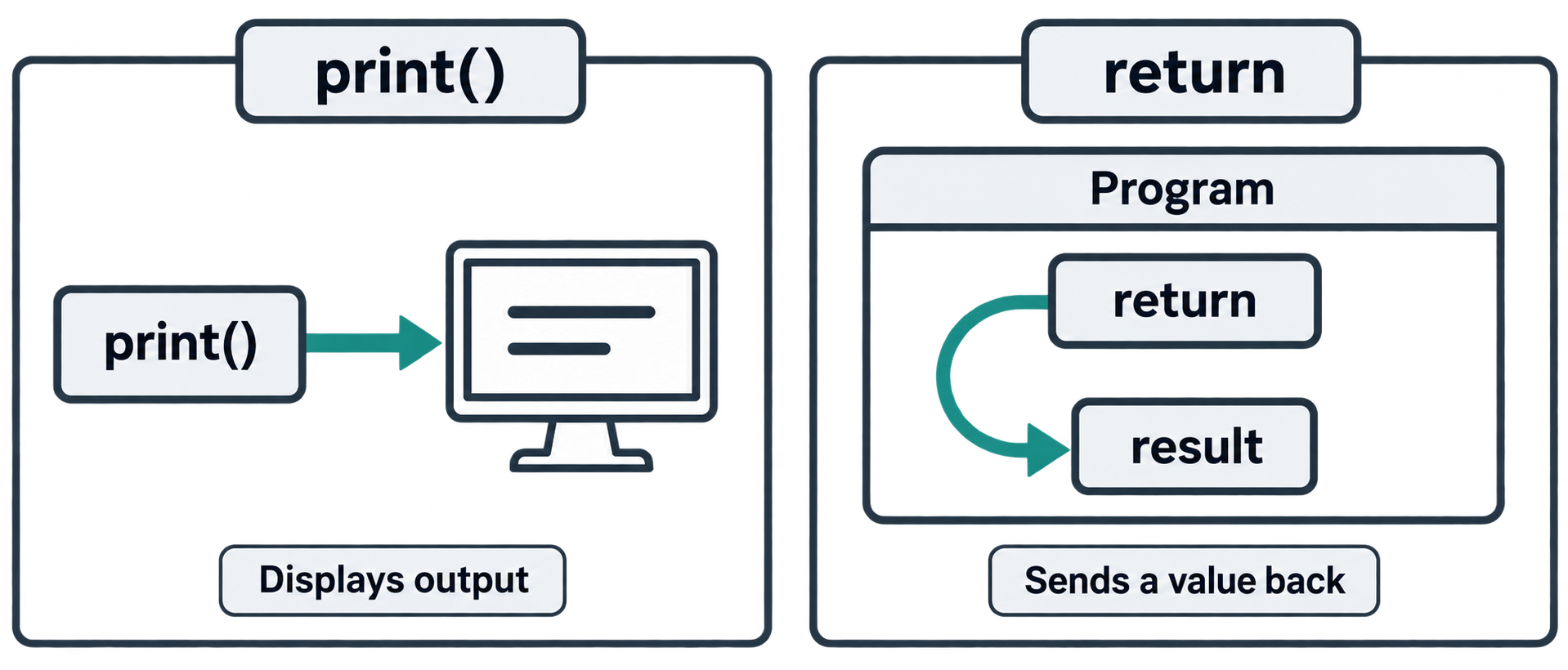
So far, Aman's functions only print. But printing just shows text on the screen. It does not give the result back to the program.
return
return sends a value out of the function.
def add(a, b):
    return a + b

result = add(3, 4)
print(result)   # 7
Now the result is stored in result. Aman can use it later: save it, pass it to another function, do more maths.
print vs return
This is the most common beginner confusion.
print() |
return |
|---|---|
| Shows something on screen | Gives a value back to the caller |
| For humans to see | For the program to use |
Function still returns None |
Function ends here |
def add_print(a, b):
    print(a + b)

def add_return(a, b):
    return a + b

x = add_print(3, 4)    # shows 7, but x is None
y = add_return(3, 4)   # shows nothing, but y is 7
return ends the function
Any code after return does not run:
def check(n):
    if n > 0:
        return "positive"
    return "not positive"
Returning multiple values
def min_max(numbers):
    return min(numbers), max(numbers)

low, high = min_max([4, 9, 1, 7])
print(low, high)   # 1 9
Python packs them into a tuple and unpacks them for you.
Functions that return nothing
If there is no return, the function returns None automatically.
Chaining functions
This is where functions become powerful:
def clean(text):
    return text.strip().lower()

def is_valid_email(email):
    return "@" in email and "." in email

raw = "  Aman@Example.com  "
email = clean(raw)
print(is_valid_email(email))   # True
Small functions, each doing one job, combined together. This is how real programs are built.
Practice
Write
square(n)that returnsn * n. Storesquare(6)in a variable and print it.What is
xafterx = print("hi")?Write
divide(a, b)that returns the quotient and the remainder as two values.What does this return?
def f():
    return 1
    return 2
Part 6: External Tools (Modules and Packages)
Aman now writes many functions. His file is getting long. And he wonders: "Do I have to write everything myself? Like, code to download a web page?"
"No," says Neha. "That is the best part of Python. Other people already wrote it. You just import it."
Three words
- Module: a single
.pyfile with functions and variables inside. Your ownhello.pyis a module. - Package: a folder of modules. Big libraries like
pandasare packages. - Library: a general word for a module or package that you use.
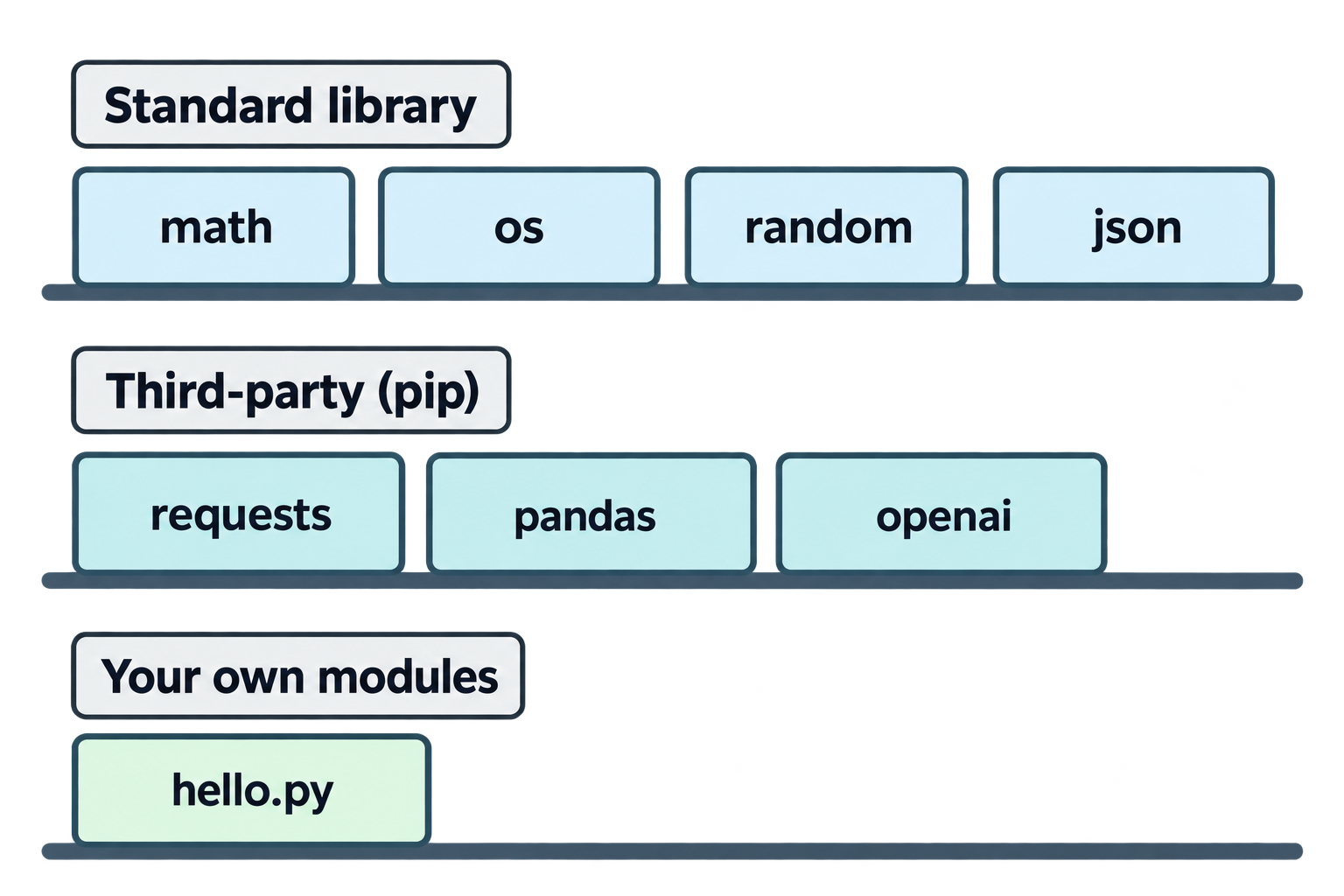
Three sources
- Built-in / standard library: comes with Python.
math,os,random,json,datetime. - Third-party packages: you install with
pip.requests,pandas,openai. - Your own modules: files you write in your project.
Part 7: Importing Modules and Built-ins
import module
import math

print(math.sqrt(25))   # 5.0
print(math.pi)         # 3.141592653589793
You use module.name to reach things inside.
from module import name
from math import sqrt, pi

print(sqrt(25))   # 5.0
print(pi)
Now you use the name directly. Good when you need only a few things.
import module as nickname
import pandas as pd
import matplotlib.pyplot as plt
Very common in data and AI code.
from module import * (avoid)
from math import *
This imports everything. It looks convenient, but you lose track of where names come from. Neha says: "Don't."
Useful standard library modules
import random
print(random.randint(1, 6))        # random dice roll
print(random.choice(["chai", "coffee"]))

import datetime
print(datetime.date.today())       # 2026-10-30

import os
print(os.getcwd())                 # current folder
print(os.listdir("."))             # files in current folder

import json
data = {"name": "Aman", "age": 25}
text = json.dumps(data)            # dict → JSON string
back = json.loads(text)            # JSON string → dict
Importing your own module
Aman creates helpers.py in his project:
# helpers.py
def clean(text):
    return text.strip().lower()
And in main.py:
from helpers import clean

print(clean("  HELLO  "))   # hello
Both files must be in the same folder (or Python must know where to look).
Part 8: Import Methods Summary
| Syntax | How you use it | When |
|---|---|---|
import math |
math.sqrt(4) |
Default, clear |
from math import sqrt |
sqrt(4) |
A few specific names |
import pandas as pd |
pd.read_csv() |
Long names, common nicknames |
from math import * |
sqrt(4) |
Avoid |
Also:
- Put all imports at the top of the file.
- Standard order: built-ins first, third-party second, your own modules last.
Part 9: Installing Packages and requirements.txt
Aman's project now needs requests, pandas, and matplotlib. He installs them (with .venv active):
pip install requests pandas matplotlib
The problem
Neha asks, "If I clone your project tomorrow, how do I know which packages to install?"
The solution: requirements.txt
A simple text file listing the packages:
requests==2.31.0
pandas==2.2.2
matplotlib==3.9.0
Create it
pip freeze > requirements.txt
pip freeze prints all installed packages with exact versions. > saves that output to the file.
Install from it
pip install -r requirements.txt
-r means "read from this file". One command installs everything.
Pin versions or not?
requests==2.31.0→ exactly this version. Safe and repeatable.requests>=2.31.0→ this or newer. More flexible, but may break one day.requests→ any version. Risky for real projects.
For now, pip freeze with exact versions is fine.
Neha's rule: Every project folder has a requirements.txt. Always commit it.
Practice
- Create
requirements.txtfor your project withpip freeze. - What does the
-rinpip install -r requirements.txtmean? - Rewrite using the "nickname" style:
import matplotlib.pyplot→? - What is the difference between a module and a package?
Part 10: Working with APIs (requests Example)
This is where Python stops being a toy. Aman will fetch real data from the internet.
What is an API?
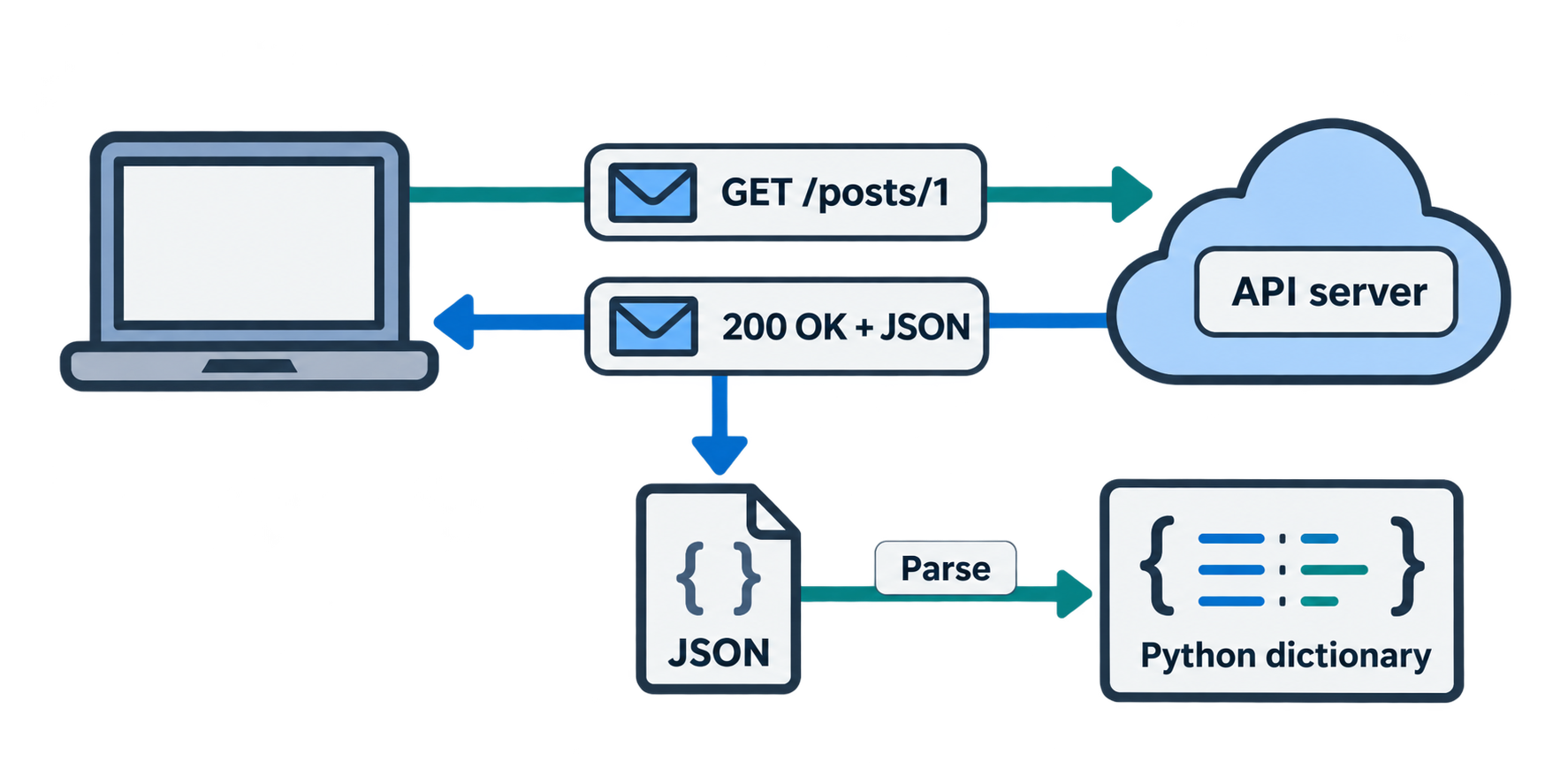
An API (Application Programming Interface) is a way for programs to talk to each other. A web API is a URL that returns data (usually JSON) instead of a web page.
Example: a weather service, a currency rate service, an AI model service.
A simple GET request
Aman uses the free JSONPlaceholder test API:
import requests

url = "https://jsonplaceholder.typicode.com/posts/1"
response = requests.get(url)

print(response.status_code)   # 200
print(response.json())
Output:
200
{'userId': 1, 'id': 1, 'title': 'sunt aut facere ...', 'body': 'quia et suscipit ...'}
Reading the pieces
requests.get(url)→ send a GET requestresponse.status_code→200= OK,404= not found,500= server errorresponse.json()→ convert the JSON text into a Python dictionary
Now it is just a dictionary:
data = response.json()
print(data["title"])
print(data["userId"])
Passing parameters
Many APIs accept query parameters (?key=value):
params = {"userId": 1}
response = requests.get("https://jsonplaceholder.typicode.com/posts", params=params)
posts = response.json()
print(len(posts))   # 10
Looping over results
for post in posts:
    print(post["id"], post["title"])
Always check the status
response = requests.get(url)

if response.status_code == 200:
    data = response.json()
else:
    print("Something went wrong:", response.status_code)
Wrap it in a function
def get_post(post_id):
    url = f"https://jsonplaceholder.typicode.com/posts/{post_id}"
    response = requests.get(url)
    if response.status_code == 200:
        return response.json()
    return None

post = get_post(5)
print(post["title"])
Everything from this article in one place: a function, a parameter, an f-string, an if, a return, and an imported package.
Practice
- Fetch
https://jsonplaceholder.typicode.com/users/1and print the user's name and email. - What does status code
404mean? - What does
response.json()return — a string or a dictionary? - Write
get_user(user_id)that returns the user dictionary orNone.
Part 11: Working with Data (pandas and matplotlib)
Aman's next task: analyse some sales data. For this, two famous packages:
- pandas → tables of data (called DataFrames)
- matplotlib → charts
A DataFrame
import pandas as pd

data = {
    "drink": ["chai", "coffee", "lassi", "juice"],
    "price": [10, 20, 30, 25],
    "sold": [120, 80, 40, 60]
}

df = pd.DataFrame(data)
print(df)
Output:
    drink  price  sold
0    chai     10   120
1  coffee     20    80
2   lassi     30    40
3   juice     25    60
A DataFrame is like a spreadsheet in Python. df is the usual name.
Looking at data
df.head()        # first 5 rows
df.shape         # (4, 3) → 4 rows, 3 columns
df.columns       # column names
df.describe()    # quick statistics
df.info()        # types and missing values
Selecting
df["price"]               # one column
df[["drink", "sold"]]     # several columns
df[df["price"] > 15]      # rows where price > 15
Creating a new column
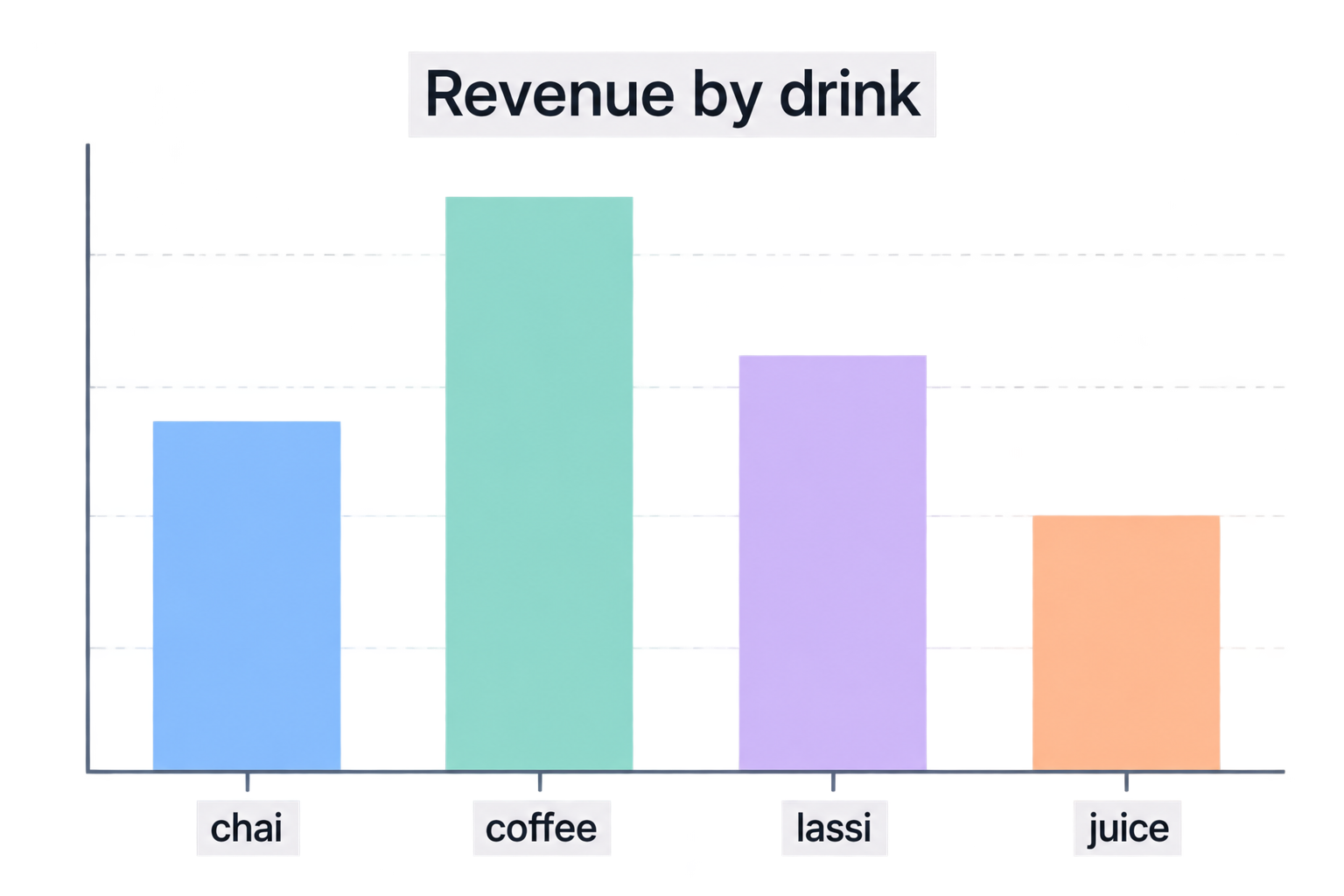
df["revenue"] = df["price"] * df["sold"]
print(df)
    drink  price  sold  revenue
0    chai     10   120     1200
1  coffee     20    80     1600
2   lassi     30    40     1200
3   juice     25    60     1500
Simple statistics
print(df["revenue"].sum())    # 5500
print(df["price"].mean())     # 21.25
print(df.sort_values("revenue", ascending=False))
A chart with matplotlib
import matplotlib.pyplot as plt

plt.bar(df["drink"], df["revenue"])
plt.title("Revenue by drink")
plt.xlabel("Drink")
plt.ylabel("Revenue")
plt.show()
A bar chart window appears. In Jupyter or VS Code interactive mode, it shows inline.
Part 12: Reading and Saving Data Files
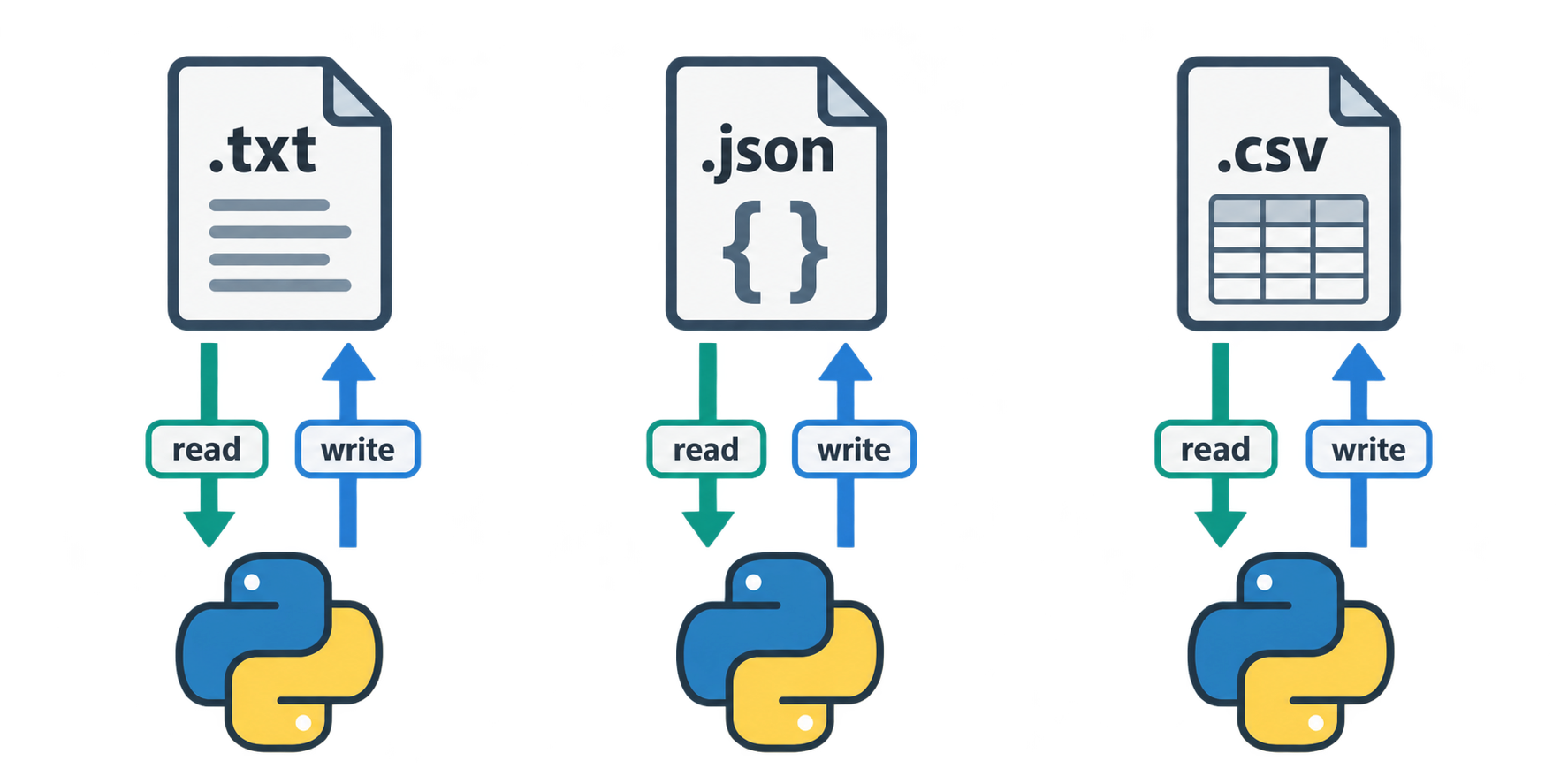
Data usually lives in files. Aman must know how to read and write them.
Plain text files
Writing:
with open("notes.txt", "w") as f:
    f.write("Chai is good.\n")
    f.write("Code is fun.\n")
Reading:
with open("notes.txt", "r") as f:
    content = f.read()
print(content)
Read line by line:
with open("notes.txt") as f:
    for line in f:
        print(line.strip())
Modes
| Mode | Meaning |
|---|---|
"r" |
read (default) |
"w" |
write — deletes existing content |
"a" |
append — add to the end |
Why with?
with open(...) as f: opens the file and closes it automatically when the block ends. Without with, you must call f.close() yourself, and people forget. Always use with.
JSON files
Perfect for dictionaries and lists.
import json

data = {"name": "Aman", "drinks": ["chai", "coffee"]}

# save
with open("data.json", "w") as f:
    json.dump(data, f, indent=2)

# load
with open("data.json") as f:
    loaded = json.load(f)
print(loaded["drinks"])
Note: json.dump / json.load work with files. json.dumps / json.loads work with strings (the s means string).
CSV files with pandas
# save
df.to_csv("sales.csv", index=False)

# load
df2 = pd.read_csv("sales.csv")
print(df2.head())
index=False stops pandas from saving the row numbers as a column.
pandas can also read Excel (pd.read_excel), JSON (pd.read_json), and many more.
File paths
Files are saved relative to the folder where you run Python, which is usually your project folder in VS Code. Keep data in a data/ subfolder:
df.to_csv("data/sales.csv", index=False)
(We will go deeper into paths in the next article.)
Practice
- Write three lines to
todo.txt, then read and print them. - What happens to the old content when you open a file with
"w"? - Save the dictionary
{"city": "Ahmedabad", "temp": 34}toweather.jsonand load it back. - Create a DataFrame with two columns, save it as CSV, and read it back.
- What is the difference between
json.dumpandjson.dumps?
Part 13: Final Quiz
Try without looking back. Answers at the end.
Q1. What is the difference between a parameter and an argument?
Q2. What does this print?
def greet(name, club="Chai Club"):
    return f"{name} → {club}"

print(greet("Priya"))
print(greet("Rahul", club="Code Club"))
Q3. What is result after this?
def show():
    print("hi")

result = show()
Q4. What does this print?
total = 100

def spend():
    total = 20
    return total

print(spend())
print(total)
Q5. Which import style should you avoid, and why?
Q6. What command creates requirements.txt from your current environment?
Q7. In requests.get(url), what does response.json() give you?
Q8. What does df[df["price"] > 15] do?
Q9. Why should you use with open(...) instead of open(...) alone?
Q10. Write a function average(numbers) that returns the mean of a list.
Answers
Part 2: 1.
def say_hi():
    print("Hi there!")
say_hi()
say_hi()
- Nothing. The function is defined but never runs.
- One place to change, less code, fewer bugs, and the name explains what the code does.
Part 3:
def multiply(a, b): print(a * b)→multiply(3, 4)prints12.
def order(drink, size="medium"):
    print(f"One {size} {drink}")
order("chai")            # One medium chai
order("chai", "large")   # One large chai
- In the definition
greet(name, club),nameandclubare parameters."Priya"and"Chai Club"are arguments. - A parameter with a default (
club) comes before one without (name). Python gives aSyntaxError. Swap the order.
Part 4:
5then10. The innerxis local; the outerxis unchanged.itemsis never defined anywhere, soNameError. (Ifitems = []existed globally,.appendwould work because that modifies the list, not reassigns the name.)- No. Local variables disappear when the function ends.
Part 5:
def square(n): return n * n→s = square(6)→36.None.printreturns nothing.def divide(a, b): return a // b, a % b1. The secondreturnnever runs.
Part 9:
pip freeze > requirements.txt- Read the package list from the given file.
import matplotlib.pyplot as plt- A module is one
.pyfile. A package is a folder of modules.
Part 10: 1.
r = requests.get("https://jsonplaceholder.typicode.com/users/1")
user = r.json()
print(user["name"], user["email"])
- Not found — the URL does not exist on the server.
- A dictionary (or a list, depending on the JSON).
def get_user(user_id):
    r = requests.get(f"https://jsonplaceholder.typicode.com/users/{user_id}")
    if r.status_code == 200:
        return r.json()
    return None
Part 12:
- Use
"w"mode andf.write(), then open again with"r"andf.read(). - It is deleted. The file starts empty.
json.dump(data, f)to save;json.load(f)to load.df.to_csv("file.csv", index=False)thenpd.read_csv("file.csv").json.dumpwrites to a file.json.dumpsreturns a string.
Final Quiz:
- A parameter is the placeholder name in the function definition. An argument is the real value passed when calling.
Priya → Chai ClubandRahul → Code Club.None. The function prints but does not return.20then100. The function'stotalis local.from module import *. You cannot tell where names come from, and names can overwrite each other.pip freeze > requirements.txt- The response body converted from JSON into a Python dictionary or list.
- Returns only the rows where the
pricecolumn is greater than 15. withcloses the file automatically, even if an error happens.
def average(numbers):
    return sum(numbers) / len(numbers)
Epilogue
Aman looks at his project folder. There is main.py, helpers.py, requirements.txt, and a data/ folder with a CSV inside. His code calls a real API, turns the result into a table, draws a chart, and saves everything to a file.
Three articles ago, he could print "Hello". Now he can fetch, process, and store real data.
Neha says, "Notice what changed. You stopped writing everything yourself. You write small functions, and you borrow the rest from the Python ecosystem. That is how AI engineers work. The model is just one more package you import."
Comments
Join the discussionNo comments yet. Be the first to comment.