Python 4 - Practical Python: Project Structure, Files, Errors, and Classes
Organise a real project, handle paths and files the safe way, stop crashes with try/except, and learn when a class is better than a function.
Part 1: Aman's Folder Is a Mess
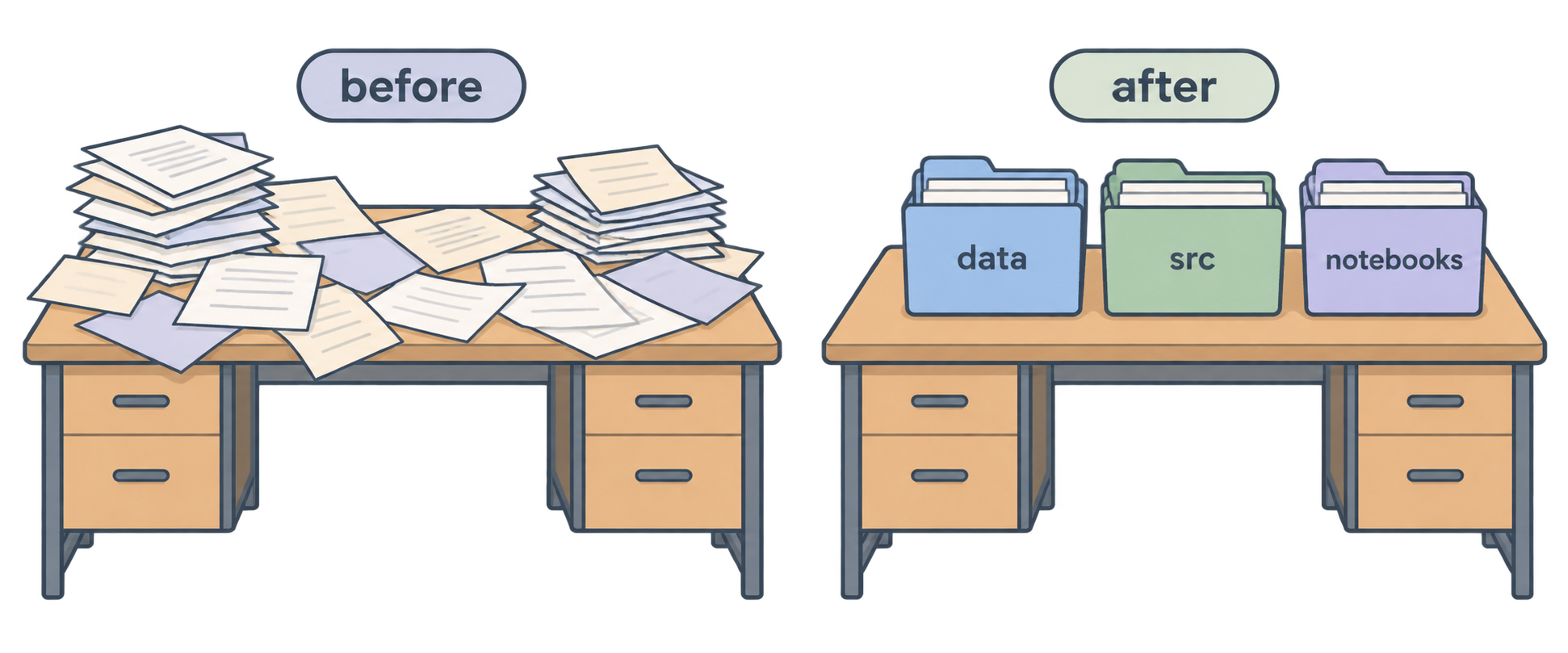
Aman's project works. But Neha opens his folder and sees this:
python-course/
├── main.py
├── main2.py
├── main_final.py
├── test.py
├── sales.csv
├── data.json
├── helpers.py
├── notes.txt
└── output.png
"Which one is the real main?" she asks.
"Uh… main_final.py. I think."
Neha says, "A working program in a messy folder is a problem waiting to happen. Today we make your project practical: clean structure, safe file paths, proper error handling, and classes."
This article covers:
- Project structure and organisation
- File paths (and why they break)
- Working with different file types
- Organising code into modules
- Error handling with
try/except - Classes:
__init__,self, attributes, methods - Class attributes vs instance attributes
- Inheritance
- When to use classes vs functions
Part 2: Project Structure and Organisation
There is no single "correct" structure. But there is a simple one that works for almost every small project:
python-course/
├── .venv/              ← virtual environment (never edit by hand)
├── data/               ← input and output files
│   ├── sales.csv
│   └── users.json
├── src/                ← your Python code
│   ├── main.py
│   ├── helpers.py
│   └── api.py
├── .gitignore          ← files Git should ignore
├── requirements.txt    ← package list
└── README.md           ← what this project is
Why separate folders?
data/: Data files are not code. Keeping them apart makes it clear what is input and what is logic.src/(short for "source"): All your.pyfiles. Some people skip this folder for tiny projects. For anything real, use it.README.md: One paragraph on what the project does and how to run it. Your future self will thank you.
Naming rules
- Folders and files: lowercase, underscores, no spaces →
data_loader.py, notData Loader.py - One file = one purpose
- Delete
main2.pyandmain_final.py. Use Git for versions (next article).
Neha's rule: "If you cannot explain in one sentence why a file is where it is, move it."
Practice
- Reorganise your project into
data/,src/, andnotebooks/folders. - Write a two-line
README.mdfor your project. - Why should data files not sit next to code files?
Part 3: Understanding File Paths
Aman moves sales.csv into data/ and runs his code:
df = pd.read_csv("sales.csv")
FileNotFoundError: [Errno 2] No such file or directory: 'sales.csv'
This is the most common error in beginner Python projects. Let's fix it properly.
What is a path?
A path is the address of a file on your computer.
- Windows:
C:\Users\Aman\projects\python-course\data\sales.csv - Mac/Linux:
/Users/aman/projects/python-course/data/sales.csv
Absolute vs relative
Absolute path: the full address from the root of the disk. Always works, but only on your machine.
Relative path: the address starting from "where you are now". Shorter, and works on any machine if you start from the same place.
"data/sales.csv"       # relative: from the current folder, go into data/
"../data/sales.csv"    # relative: go up one level, then into data/
The hidden problem: "where you are now"
Relative paths are relative to the current working directory, which is the folder where you ran Python, not where the file lives.
import os
print(os.getcwd())
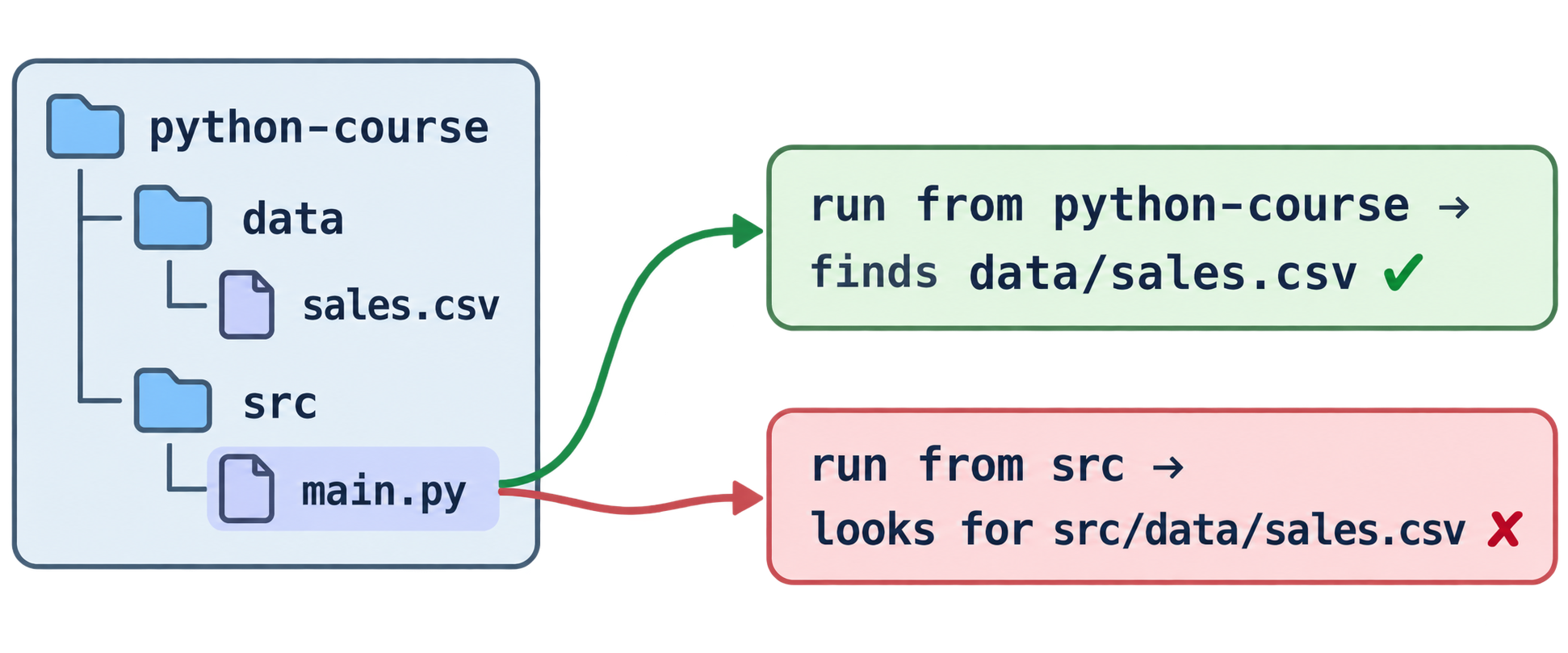
If Aman runs python src/main.py from python-course/, the current directory is python-course/. So "data/sales.csv" works.
But if he runs python main.py from inside src/, the current directory is src/. Now "data/sales.csv" points to src/data/sales.csv, which does not exist. Crash.
The fix: build paths from the file's own location
Use pathlib, the modern way to handle paths in Python.
from pathlib import Path

# the folder where THIS file lives
BASE_DIR = Path(__file__).parent

# go up one level to the project root, then into data/
DATA_DIR = BASE_DIR.parent / "data"

file_path = DATA_DIR / "sales.csv"
print(file_path)
Read it:
__file__→ the path of the current Python file (src/main.py).parent→ the folder that contains it (src/).parentagain → one more level up (python-course/)/ "data"→ join folders. Yes,pathlibuses/to join paths. It works on Windows too.
Now the path is correct no matter where you run the script from.
Useful pathlib tricks
p = Path("data/sales.csv")

p.exists()        # True or False
p.name            # "sales.csv"
p.stem            # "sales"
p.suffix          # ".csv"
p.parent          # Path("data")

Path("data").mkdir(exist_ok=True)   # create folder if missing
list(Path("data").glob("*.csv"))    # all csv files in data/
A simple pattern for every project
Create src/config.py:
from pathlib import Path

BASE_DIR = Path(__file__).parent.parent
DATA_DIR = BASE_DIR / "data"
Then everywhere else:
from config import DATA_DIR
import pandas as pd

df = pd.read_csv(DATA_DIR / "sales.csv")
One place defines paths. Every file reuses them.
Practice
- Print your current working directory with
os.getcwd(). Then run the same script from a different folder. Did it change? - Using
pathlib, build the path todata/users.jsonrelative to your script's location. - What does
Path("data/report.xlsx").suffixreturn? - Why is
Path(__file__).parentsafer than a relative string like"data/file.csv"?
Part 5: Organising Code into Modules
Aman's main.py is 400 lines long. Everything is in there: API calls, data cleaning, file saving, chart drawing.
Neha says, "Split it. One file per responsibility."
Before
src/
└── main.py     (400 lines, does everything)
After
src/
├── main.py       ← runs the program (short!)
├── config.py     ← paths and settings
├── api.py        ← functions that call APIs
├── data.py       ← functions that load and clean data
└── charts.py     ← functions that draw charts
Example
src/api.py:
import requests

def get_posts():
    response = requests.get("https://jsonplaceholder.typicode.com/posts")
    response.raise_for_status()
    return response.json()
src/data.py:
import pandas as pd

def to_dataframe(records):
    return pd.DataFrame(records)

def posts_per_user(df):
    return df["userId"].value_counts()
src/main.py:
from api import get_posts
from data import to_dataframe, posts_per_user

def main():
    posts = get_posts()
    df = to_dataframe(posts)
    print(posts_per_user(df))

if __name__ == "__main__":
    main()
Now main.py reads like a story. You can understand the whole program in five lines.
What is if __name__ == "__main__":?
This line confuses everyone the first time.
- When you run a file directly, Python sets
__name__to"__main__". - When you import a file, Python sets
__name__to the file's name (for example,"api").
So this block runs only when you run the file directly, not when someone imports it. It is the standard way to say "this is the starting point."
Without it, importing main.py from another file would run the whole program by accident.
Rules for good modules
- One module = one topic (API, data, charts)
- Functions in modules should return values, not print them. Let
main.pydecide what to print. - Keep
main.pyshort. It calls, it does not compute.
Practice
- Split a long file you have into two modules: one with functions, one that calls them.
- What does
__name__equal when you runpython main.py? - Why should functions in
data.pyreturn values instead of printing them?
Part 6: Error Handling (try / except)
Aman runs his program while his Wi-Fi is off:
requests.exceptions.ConnectionError: Failed to establish a new connection
The program dies. Nothing is saved. Neha says, "Programs will always meet problems. A good program handles them instead of crashing."
The basic shape
try:
    # code that might fail
    response = requests.get(url)
except Exception as e:
    # what to do if it fails
    print("Something went wrong:", e)
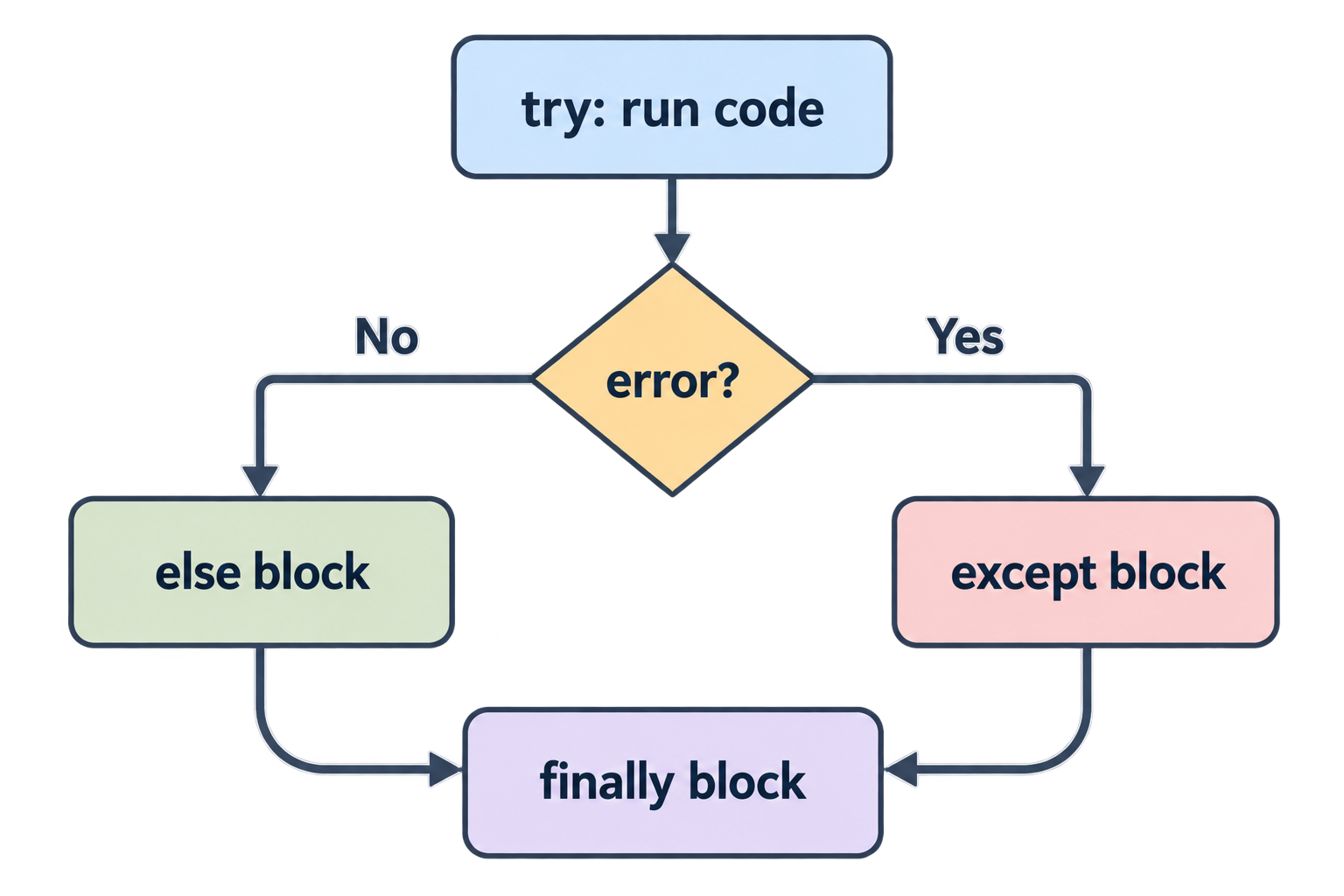
Python tries the first block. If an error happens, it jumps to except instead of crashing.
Catch specific errors
Exception catches everything, which can hide bugs. Better to catch what you expect:
try:
    number = int(input("Enter a number: "))
except ValueError:
    print("That is not a number.")
Common error types:
| Error | When |
|---|---|
ValueError |
wrong value (e.g. int("abc")) |
TypeError |
wrong type (e.g. "a" + 1) |
KeyError |
dictionary key missing |
IndexError |
list index out of range |
FileNotFoundError |
file does not exist |
ZeroDivisionError |
dividing by zero |
requests.exceptions.RequestException |
any network problem |
Multiple except blocks
try:
    with open(DATA_DIR / "sales.csv") as f:
        data = f.read()
    value = int(data)
except FileNotFoundError:
    print("File is missing.")
except ValueError:
    print("File does not contain a number.")
else and finally
try:
    result = 10 / x
except ZeroDivisionError:
    print("Cannot divide by zero.")
else:
    print("Result:", result)     # runs only if no error
finally:
    print("Done.")               # runs always, error or not
finally is useful for cleanup: closing connections, deleting temp files.
Raising your own errors
Sometimes you want to stop with a clear message:
def set_temperature(value):
    if value < 0 or value > 2:
        raise ValueError("temperature must be between 0 and 2")
    return value
A realistic API function
import requests

def get_posts():
    try:
        response = requests.get(
            "https://jsonplaceholder.typicode.com/posts",
            timeout=10
        )
        response.raise_for_status()   # error if status is 4xx or 5xx
        return response.json()
    except requests.exceptions.RequestException as e:
        print("API call failed:", e)
        return []
Now a network problem returns an empty list instead of killing the program.
Neha's rule
"Do not wrap everything in try. Wrap only the line that can fail, catch only the error you expect, and always do something useful in except. Silent except: pass is the worst code you can write."
Practice
- Write code that asks for a number and prints "Invalid" if the user types letters.
- What error does
{"a": 1}["b"]raise? - Write
safe_divide(a, b)that returnsNoneinstead of crashing on division by zero. - When does the
finallyblock run?
Part 7: Introduction to Classes (OOP)
Aman now has many functions for "users": create_user, update_user_email, is_user_active. Each one takes a dictionary and passes it around. It works, but it is getting messy.
Neha says, "You have data about a user, and functions that act on that data. When those two always travel together, you want a class."
What is a class?
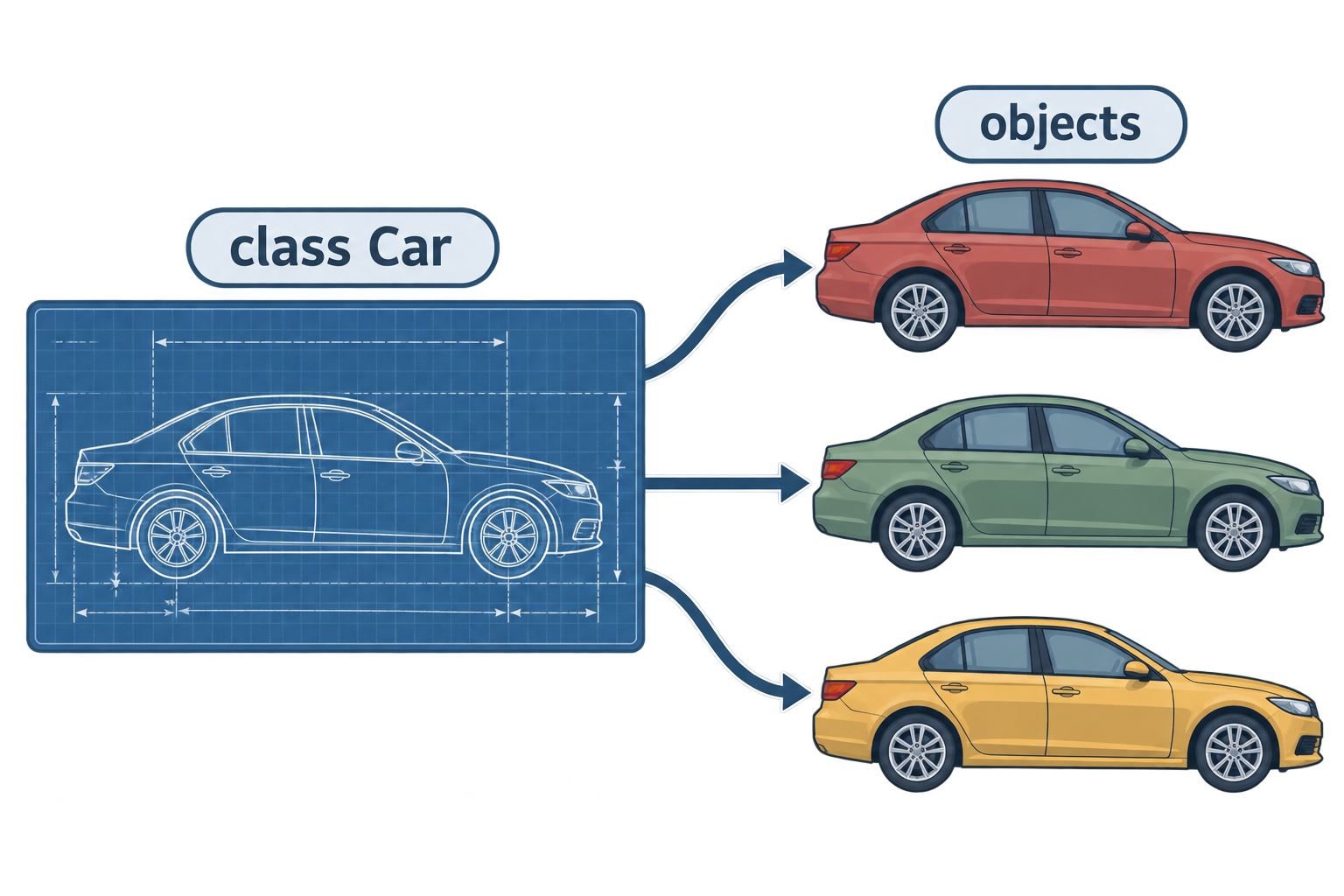
A class is a blueprint. It describes what something has (data) and what it can do (behaviour).
An object (or instance) is one real thing made from the blueprint.
- Class:
Car(the design) - Objects:
my_car,your_car(actual cars)
You already use classes every day. "hello" is an object of class str. [1, 2] is an object of class list. df is an object of class DataFrame. Their methods (.upper(), .append(), .head()) are behaviour defined in the class.
Part 8: Creating Your First Class (__init__, self)
class User:
    def __init__(self, name, email):
        self.name = name
        self.email = email

    def greet(self):
        return f"Hello, {self.name}!"
Let's read this slowly.
class User:
Defines the blueprint. Class names use CapitalCase.
__init__
A special method that runs automatically when you create an object. Its job is to set up the object's starting data. The name is "init" with two underscores on each side (people say "dunder init").
self
self means "this particular object". Every method inside a class takes self as its first parameter. Python fills it in automatically.
self.name = name means: "store name on this object."
Creating objects
u1 = User("Aman", "aman@example.com")
u2 = User("Neha", "neha@example.com")

print(u1.name)       # Aman
print(u2.name)       # Neha
print(u1.greet())    # Hello, Aman!
Notice: you never pass self yourself. User("Aman", ...) calls __init__ and Python passes the new object as self.
Attributes
u1.name and u1.email are attributes: data stored on the object. You can read and change them:
u1.email = "aman@newmail.com"
The function version vs the class version
With functions:
user = {"name": "Aman", "email": "aman@example.com"}

def greet(user):
    return f"Hello, {user['name']}!"

greet(user)
With a class:
u1 = User("Aman", "aman@example.com")
u1.greet()
The class version keeps data and behaviour together, and the code reads more naturally.
Practice
- Create a class
Drinkwith__init__(self, name, price)and a methoddescribe()that returns "chai costs 10". - What does
selfrefer to? - When does
__init__run? - Make two
Drinkobjects and print their descriptions.
Part 9: Class Attributes vs Instance Attributes
There are two kinds of attributes.
Instance attributes
Belong to one object. Set with self. inside __init__. Each object has its own copy.
class User:
    def __init__(self, name):
        self.name = name   # instance attribute
u1.name is "Aman". u2.name is "Neha". Different.
Class attributes
Belong to the class itself. Shared by all objects. Defined directly inside the class, outside any method.
class User:
    platform = "Chai Club"   # class attribute, same for everyone

    def __init__(self, name):
        self.name = name

u1 = User("Aman")
u2 = User("Neha")

print(u1.platform)    # Chai Club
print(u2.platform)    # Chai Club
print(User.platform)  # Chai Club
A common use: counting objects
class User:
    count = 0

    def __init__(self, name):
        self.name = name
        User.count += 1

User("Aman")
User("Neha")
print(User.count)   # 2
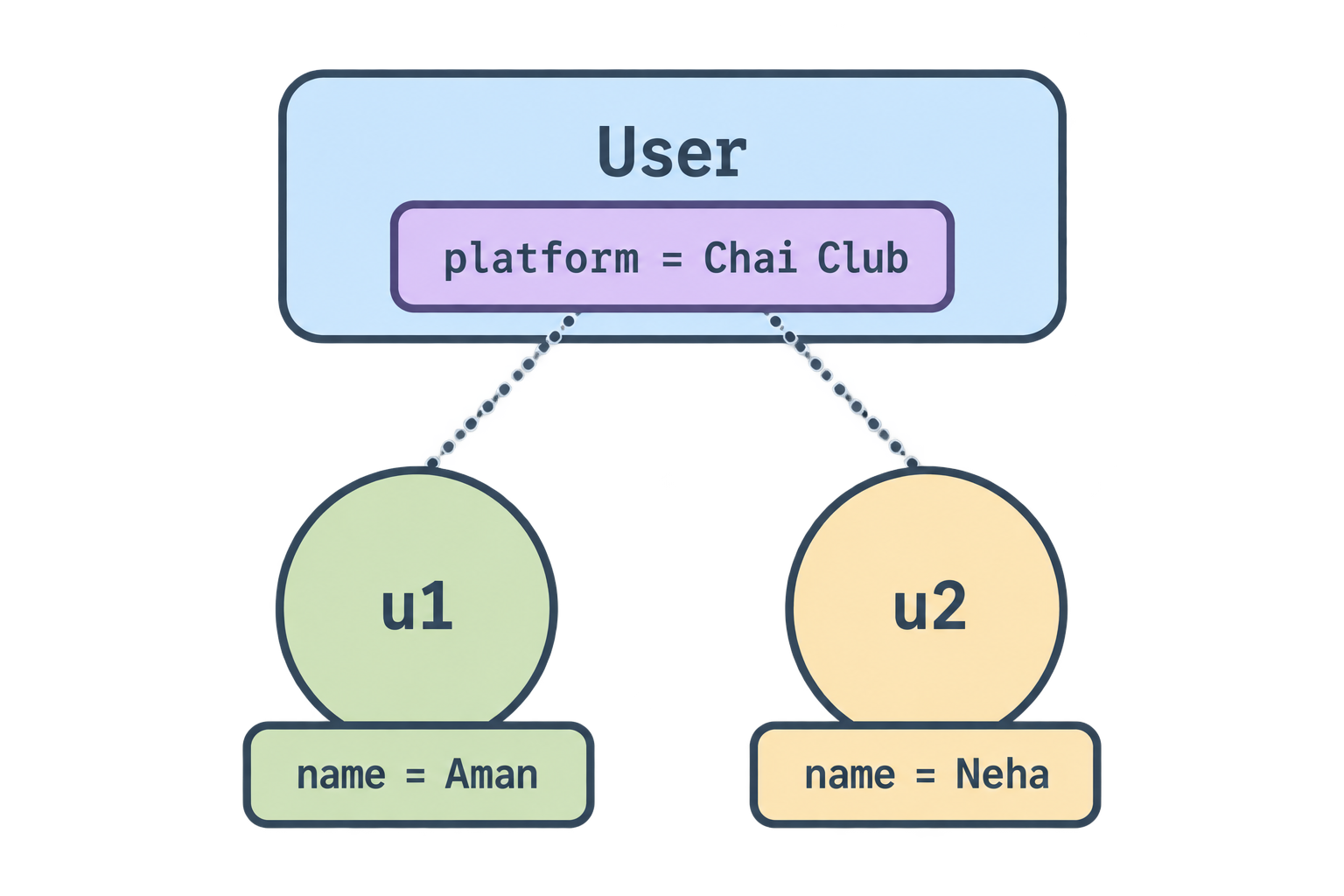
Rule of thumb
- Different for each object → instance attribute (
self.x) - Same for every object → class attribute (
ClassName.x)
Part 10: Class Methods
A method is a function defined inside a class. It always has self first, so it can use the object's data.
class BankAccount:
    def __init__(self, owner, balance=0):
        self.owner = owner
        self.balance = balance

    def deposit(self, amount):
        self.balance += amount
        return self.balance

    def withdraw(self, amount):
        if amount > self.balance:
            raise ValueError("Not enough money")
        self.balance -= amount
        return self.balance

    def summary(self):
        return f"{self.owner}: {self.balance} rupees"
acc = BankAccount("Aman", 100)
acc.deposit(50)
acc.withdraw(30)
print(acc.summary())   # Aman: 120 rupees
Methods can:
- read attributes (
self.balance) - change attributes (
self.balance += amount) - call other methods (
self.summary()) - return values, just like normal functions
__str__: a friendlier print
Right now print(acc) shows something ugly like <__main__.BankAccount object at 0x...>. Add __str__:
    def __str__(self):
        return f"BankAccount({self.owner}, {self.balance})"
Now print(acc) shows BankAccount(Aman, 120).
Practice
- Add a method
apply_interest(self, rate)toBankAccountthat increases the balance byratepercent. - Why does every method start with
self? - Add a
__str__method to yourDrinkclass.
Part 11: Class Inheritance
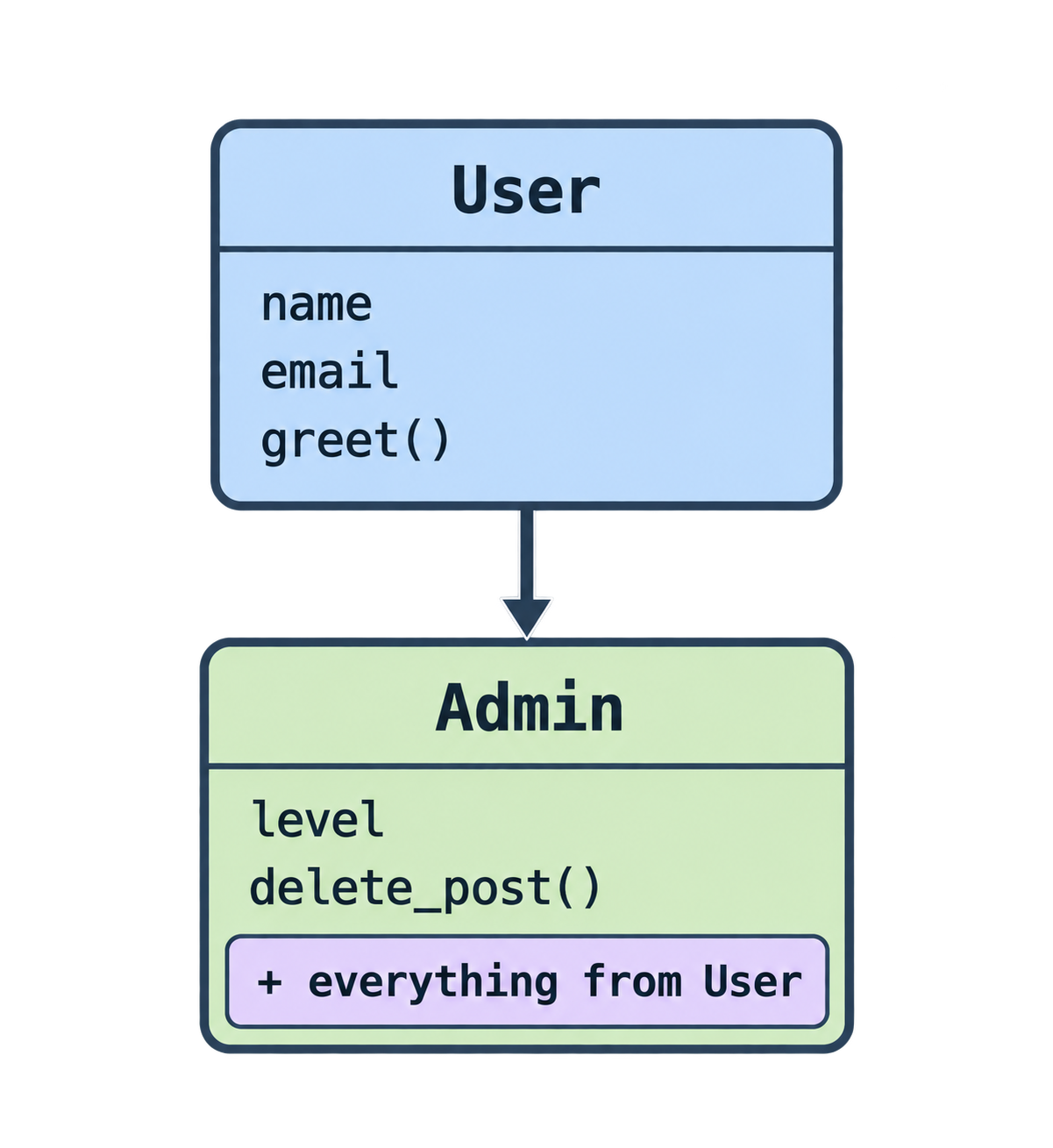
Aman needs two kinds of users: a regular User and an Admin. Admins can do everything users can, plus delete things.
Copying the whole User class would repeat code. Instead, inherit.
class User:
    def __init__(self, name, email):
        self.name = name
        self.email = email

    def greet(self):
        return f"Hello, {self.name}!"


class Admin(User):
    def __init__(self, name, email, level):
        super().__init__(name, email)   # reuse the parent's setup
        self.level = level

    def delete_post(self, post_id):
        return f"{self.name} deleted post {post_id}"
Read it:
class Admin(User):→Admininherits fromUser.Useris the parent (or base) class.Adminis the child.super().__init__(...)→ call the parent's__init__sonameandemailare set up as usual.Admingetsgreet()for free, and addsdelete_post().
a = Admin("Neha", "neha@example.com", level=3)
print(a.greet())            # Hello, Neha!   ← from User
print(a.delete_post(42))    # Neha deleted post 42   ← from Admin
print(a.level)              # 3
Overriding
A child can replace a parent method:
class Admin(User):
    ...
    def greet(self):
        return f"Hello, Admin {self.name}!"
Now a.greet() uses the Admin version.
Checking types
isinstance(a, Admin)   # True
isinstance(a, User)    # True  (an Admin is also a User)
Where you will see this
Many libraries ask you to inherit:
class MyModel(BaseModel):in Pydantic (very common in AI apps)class MyAgent(Agent):in agent frameworksclass MyError(Exception):for custom errors
Understanding inheritance lets you read those examples without fear.
Practice
- Create
class Coffee(Drink)that adds an attributesizeand usessuper().__init__. - What does
super()do? - If
Coffeedoes not definedescribe(), what happens when you callc.describe()?
Part 12: When to Use Classes vs Functions
Aman asks the question everyone asks: "Should I turn everything into a class now?"
Neha: "No. That is a common mistake. Functions are the default. Classes are a tool for a specific situation."
Use a function when…
- You take input and give output, and that is it
- There is no state to remember between calls
- The job is small and standalone
Examples: clean_text(), calculate_tax(), load_csv()
Use a class when…
- Data and the functions that work on that data always go together
- You need to remember state across many calls (a balance, a connection, a conversation history)
- You will create many similar things (many users, many accounts, many chat sessions)
- A library you use requires it (Pydantic models, custom exceptions)
Examples: BankAccount, User, ChatSession, Config
Side by side
| Question | Function | Class |
|---|---|---|
| Just transform input to output? | ✅ | |
| Needs to remember things over time? | ✅ | |
| Many objects of the same kind? | ✅ | |
| Simple script, one-off task? | ✅ | |
| Library asks for it? | ✅ |
A middle way: dataclasses
When you mainly want to group data (and not much behaviour), Python's dataclass writes __init__ and __str__ for you:
from dataclasses import dataclass

@dataclass
class User:
    name: str
    email: str
    active: bool = True

u = User("Aman", "aman@example.com")
print(u)   # User(name='Aman', email='aman@example.com', active=True)
Very popular in modern Python and AI code.
Neha's final rule: "Start with functions. When you find yourself passing the same dictionary to five functions, make a class."
Practice
- Function or class? "Convert a temperature from Celsius to Fahrenheit."
- Function or class? "A shopping cart that items are added to, then checked out."
- Function or class? "A chatbot session that remembers the last 10 messages."
- Rewrite your
Drinkclass as a@dataclass.
Part 13: Final Quiz
Try without looking back. Answers at the end.
Q1. Name three folders a small Python project should have.
Q2. What is the difference between an absolute path and a relative path?
Q3. What does Path(__file__).parent give you?
Q4. Which tool reads a .yaml file, and which reads a .csv file?
Q5. What does if __name__ == "__main__": do?
Q6. What is printed?
try:
    x = int("abc")
except ValueError:
    print("bad value")
finally:
    print("done")
Q7. In a class, what is self?
Q8. What is the difference between a class attribute and an instance attribute?
Q9. What does super().__init__() do in a child class?
Q10. Function or class: "A connection to a database that must stay open and remember login details."
Answers
Part 2:
- Done in your editor.
- Example: "Fetches posts from an API, turns them into a table, and draws a chart. Run with
python src/main.py." - So it is clear what is input/output and what is logic, and so code folders stay clean.
Part 3:
- Yes. The working directory is where you ran Python, not where the file is.
Path(__file__).parent.parent / "data" / "users.json"(adjust.parentcount to your structure)".xlsx"- It is based on the script's own location, so it works no matter which folder you run from.
Part 4:
pandasfor.csv;jsonmodule for.json.json.dump(d, f, indent=2)andyaml.dump(d, f).- Because APIs, including AI model APIs, send and receive data in JSON.
Part 5:
- Done in your editor.
"__main__"- So
main.py(or any caller) decides what to do with the result: print it, save it, or pass it on.
Part 6: 1.
try:
    n = int(input("Number: "))
except ValueError:
    print("Invalid")
KeyError
def safe_divide(a, b):
    try:
        return a / b
    except ZeroDivisionError:
        return None
- Always, whether there was an error or not.
Part 8: 1.
class Drink:
    def __init__(self, name, price):
        self.name = name
        self.price = price
    def describe(self):
        return f"{self.name} costs {self.price}"
- The current object (the specific instance the method is called on).
- Automatically, when you create an object with
ClassName(...). Drink("chai", 10).describe()→chai costs 10
Part 10:
def apply_interest(self, rate): self.balance += self.balance * rate / 100- So the method can access and change that object's own attributes.
def __str__(self): return f"Drink({self.name}, {self.price})"
Part 11: 1.
class Coffee(Drink):
    def __init__(self, name, price, size):
        super().__init__(name, price)
        self.size = size
- Gives access to the parent class so you can reuse its methods (usually
__init__). - Python uses the parent's
describe()fromDrink.
Part 12:
- Function.
- Class (remembers items over time).
- Class (state across calls).
@dataclass
class Drink:
    name: str
    price: float
Final Quiz:
data/,src/,notebooks/(also.venv/, plusrequirements.txtandREADME.mdfiles).- Absolute starts from the disk root and is complete. Relative starts from the current working directory.
- The folder that contains the current Python file.
pyyaml(yaml.safe_load) for YAML;pandas(pd.read_csv) for CSV.- Runs the block only when the file is executed directly, not when it is imported.
bad valuethendone.- The specific object the method is being called on.
- Class attribute is shared by all objects and defined in the class body. Instance attribute belongs to one object and is set with
self.. - Calls the parent class's
__init__so the parent's attributes are set up. - Class.
Epilogue
Aman's folder now looks like this:
python-course/
├── data/
├── src/
│   ├── main.py
│   ├── config.py
│   ├── api.py
│   ├── data.py
│   └── models.py
├── notebooks/
├── requirements.txt
└── README.md
main.py is twelve lines. Paths never break. A failed API call prints a message instead of crashing. And his User and Admin classes keep data and behaviour together.
Neha says, "You have gone from writing code that runs to writing code that lasts. That is the difference between a script and a project."
Comments
Join the discussionNo comments yet. Be the first to comment.