Python 1 - How Python Works Inside: Install, Shell, Memory, and Data Types
Part 1: The Student Who Wanted to See Inside
Meet Aman. He is a second-year college student. He has written small Python programs before. He can print "Hello" and add two numbers. But one day his senior, Neha, asks him a simple question:
"When you run
python hello.py, what actually happens inside the computer?"
Aman has no answer. He only knows that the output appears. He does not know how.
Neha smiles and says, "Then let's start from the beginning. Install Python the right way, and then I will show you what happens under the hood."
This article is that journey. By the end of it, you will understand:
- The best way to install Python
- How Python runs your code (bytecode and the virtual machine)
- How to use the Python shell
- What "mutable" and "immutable" mean
- The big picture of Python data types
- How Python manages memory with references
Let's begin.

Part 2: The Best Way to Install Python
Aman already has Python on his laptop. But Neha asks, "Which Python? How did you install it?"
"I don't remember," he says. "Maybe Anaconda? Maybe something else."
This is the first lesson. Many beginners install Python three or four times in different ways and then get confused. Let's keep it clean.
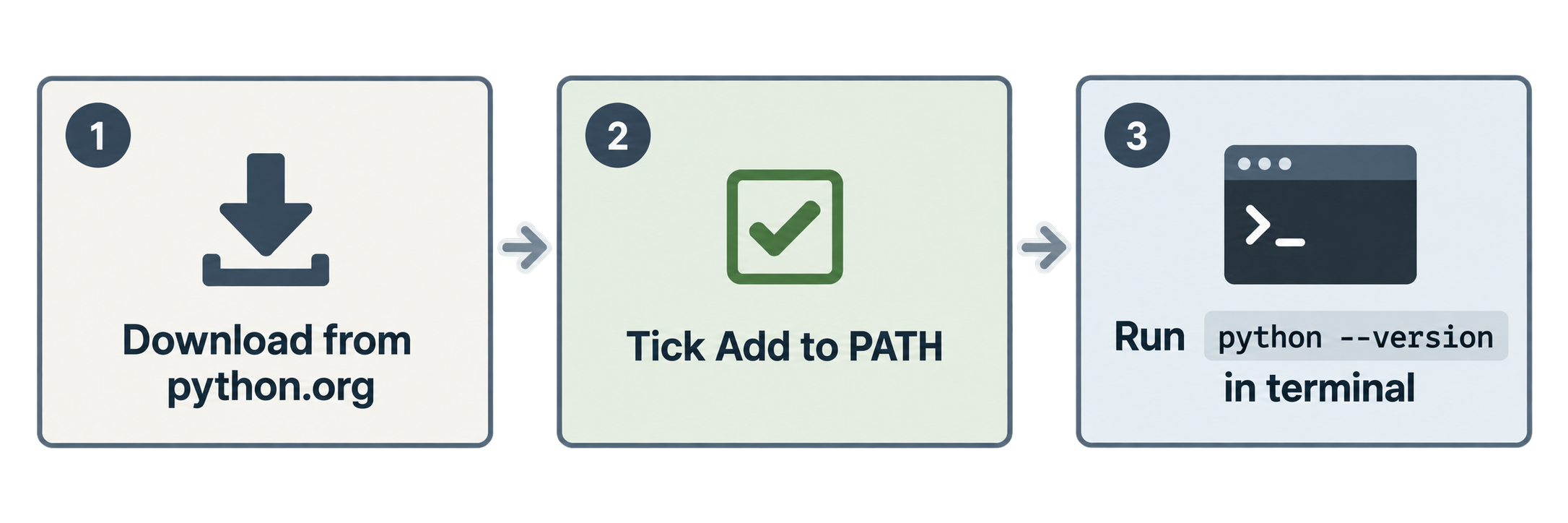
Step 1: Go to the official website
The best place is the official site: python.org. Go to the Downloads page. It will show the latest stable version for your operating system (Windows, macOS, or Linux).
Download it and run the installer.
Step 2: One important checkbox on Windows
On Windows, the installer has a checkbox that says "Add Python to PATH". Tick this box.
Why? Because PATH tells your computer where to find the python command. If you skip this, you will type python in the terminal and get an error like "python is not recognized."
Step 3: Check the installation
Open your terminal (Command Prompt or PowerShell on Windows, Terminal on Mac/Linux) and type:
python --version
On Mac and Linux, you may need to type:
python3 --version
You should see something like Python 3.12.1. If you see this, Python is installed correctly.
"Why not Anaconda?"
Aman asks the question many people ask. Neha explains:
- Anaconda is a large package. It installs Python plus hundreds of data science libraries. It is heavy (several GB).
- It is great if you are doing data science right now.
- But if you are learning Python, it adds confusion. You have two Pythons, two package managers (pip and conda), and two sets of settings.
Her advice: Start with plain Python from python.org. You can always add Anaconda later when you need it.
What about pyenv, Homebrew, and other tools?
You may hear about tools like pyenv (to manage many Python versions) or brew install python on Mac. These are good tools for professionals. For a beginner, they are one more thing to learn. Keep it simple at first.
A good code editor
Neha also suggests installing Visual Studio Code (VS Code) and adding its Python extension. It gives you syntax colors, auto-complete, and a built-in terminal.
Quick summary
| Choice | Good for | Beginner advice |
|---|---|---|
| python.org installer | Everyone | ✅ Start here |
| Anaconda | Data science | Later, if needed |
| pyenv / Homebrew | Managing many versions | Later |
| VS Code + Python extension | Writing code | ✅ Install |
Practice
- Open your terminal and run
python --version(orpython3 --version). Write down the version you see. - Why should you tick "Add Python to PATH" on Windows?
- True or False: Anaconda is the best way for a beginner to learn Python.
Part 3: Python Inner Working (What Happens When You Run a File)
Now comes the question that started everything. Aman writes a small file:
# hello.py
print("Hello, chai!")
He runs it:
python hello.py
The output appears. But what happened in between?
Myth: "Python is an interpreted language"
Most people say Python is an interpreted language. Neha says, "That is only half true."
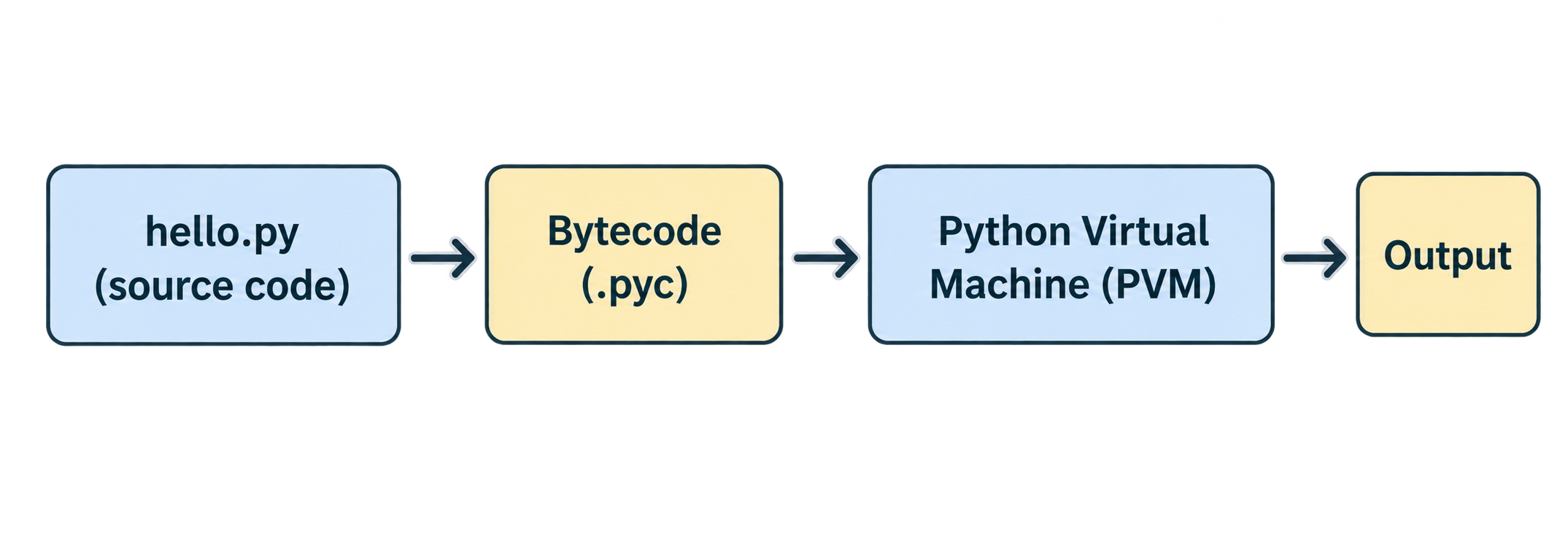
Here is the real picture. When you run a Python file, there are two steps:
Step 1: Compile to bytecode
Python first converts your source code (hello.py) into something called bytecode.
- Bytecode is a low-level form of your code.
- It is not machine code. Your CPU cannot run it directly.
- It is platform independent. The same bytecode works on Windows, Mac, and Linux.
- It is faster for Python to work with than your original text.
So yes, Python does compile. But it compiles to bytecode, not to machine code like C or C++.
Step 2: Run the bytecode on the Python Virtual Machine (PVM)
The bytecode is then given to the Python Virtual Machine, also called the PVM.
The PVM is the runtime engine of Python. Think of it as a big loop. It reads one bytecode instruction, does it, reads the next one, does it, and so on, until the program ends.
This is the "interpreter" part. So the truth is:
Python compiles your code to bytecode, and then interprets that bytecode.
Where is the bytecode saved? The __pycache__ folder
Aman notices something. After he imports one file into another, a new folder appears: __pycache__.
Inside it is a file like:
hello.cpython-312.pyc
Let's read this name:
hello→ the name of your filecpython→ the Python implementation used (more on this below)312→ Python version 3.12.pyc→ "Python compiled" bytecode file
Python saves bytecode here so that next time, it does not need to compile again. This makes imports faster.
Two important rules:
- The
.pycfile is made only for imported modules. The main file you run directly (the "top-level" file) is compiled in memory but its.pycis not saved. - Python checks if the source changed. If you edit
hello.py, Python sees the file's time has changed, and it compiles again. If the Python version changes, it also compiles again.
You can delete the __pycache__ folder any time. Python will simply make it again.
Does bytecode make Python fast?
Not really. Bytecode is only an optimisation of the loading step. Your code does not run faster because of bytecode. The PVM still runs it instruction by instruction.
Different "Pythons": CPython, Jython, PyPy
Here Aman learns something surprising. "Python" is a language. The thing that runs Python is an implementation. There are several:
| Implementation | What it is |
|---|---|
| CPython | The standard, original one. Written in C. This is what you download from python.org. |
| Jython | Runs Python on the Java Virtual Machine. |
| IronPython | Runs Python on Microsoft's .NET. |
| PyPy | Uses a JIT (Just-In-Time) compiler. Often faster for long-running programs. |
| Stackless Python | Focused on concurrency. |
When people say "Python", they almost always mean CPython. That is why the .pyc file name contains "cpython".
Practice
- Fill in the blanks: Python first converts source code into ______, and then the ______ runs it.
- Is bytecode the same as machine code? Yes or No?
- What does the
312inhello.cpython-312.pycmean? - You run
python main.pydirectly. Will Python createmain.cpython-312.pycin__pycache__? Why or why not?
Part 4: Python in the Shell
Neha opens the terminal and types just one word:
python3
Something new appears:
Python 3.12.1 (main, Dec  8 2023, 14:22:05)
Type "help", "copyright", "credits" or "license" for more information.
>>>
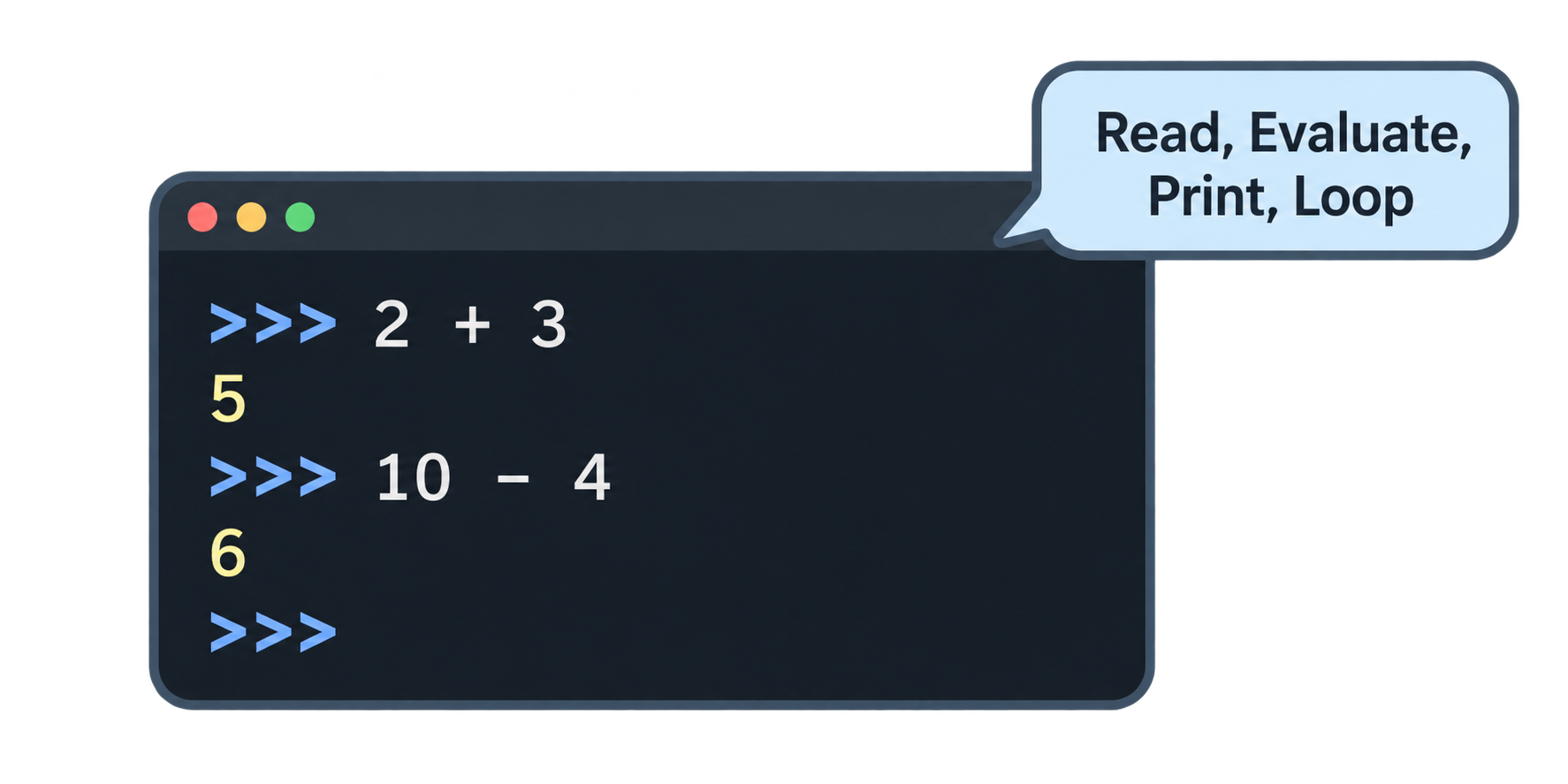
This is the Python shell, also called the REPL (Read, Evaluate, Print, Loop).
- Read → it reads what you type
- Evaluate → it runs it
- Print → it shows the result
- Loop → it waits for your next line
The >>> symbol is called the prompt. It means "Python is ready. Type something."
Why use the shell?
The shell is a playground. You do not need to create a file. You type, you see the answer immediately.
>>> 2 + 3
5
>>> "chai" + " code"
'chai code'
>>> name = "Aman"
>>> name
'Aman'
>>> len(name)
4
Notice: in the shell, you do not even need print(). If you type an expression, the shell shows its value.
Exploring with the shell
Neha shows Aman a few useful tricks.
Find the current folder:
>>> import os
>>> os.getcwd()
'/Users/aman/python-practice'
See what a thing can do:
>>> dir("hello")
This prints a long list of all methods a string has (upper, lower, split, and many more).
Read help:
>>> help(len)
This shows the documentation for len.
Exit the shell:
>>> exit()
Script vs shell
| Shell | Script file |
|---|---|
| Good for quick tests and learning | Good for real programs |
| Code disappears when you close it | Code is saved in a .py file |
| Shows results automatically | You must use print() |
Neha's rule: "Not sure how something works? Try it in the shell first."
Practice
- What does REPL stand for?
- Open the Python shell and type
10 * 10. What do you see? - In the shell, type
import osand thenos.getcwd(). What does it show? - Why do you not need
print()in the shell for2 + 3?
Part 5: Immutable and Mutable in Python
This is the part where Aman's mental model changes forever.
Everything is an object
In Python, everything is an object. The number 10 is an object. The string "chai" is an object. A list is an object. Even a function is an object.
Each object lives somewhere in memory and has:
- a type (int, str, list, ...)
- a value (10, "chai", ...)
- a reference count (how many names are pointing to it — more on this later)
Variables are labels, not boxes
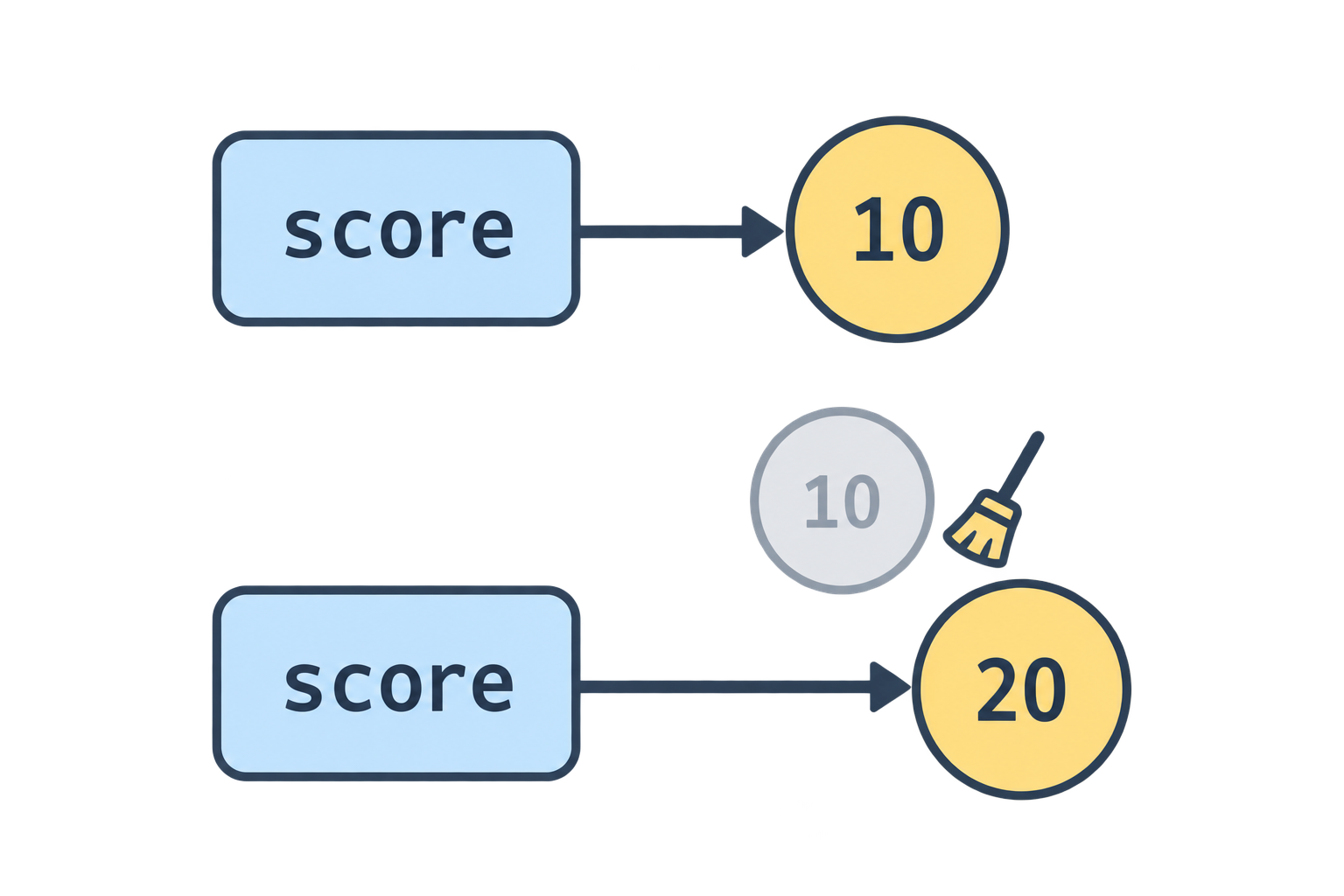
Many beginners think a variable is a box that holds a value. Neha says, "No. A variable is a label (a name tag) that points to an object."
Look at this:
score = 10
What happens:
- Python creates an integer object
10in memory. - Python creates the name
score. - Python makes
scorepoint to10.
Now:
score = 20
Python does not change the 10 into 20. It creates a new object 20, and moves the label score to point at it. The old 10 now has no label pointing to it, so Python can clean it up.
Immutable: cannot be changed
Some objects cannot be changed after they are created. These are immutable.
Immutable types in Python:
int(numbers like 10)float(like 3.14)str(strings)bool(True / False)tuple
Try to change a string:
>>> drink = "chai"
>>> drink[0] = "C"
TypeError: 'str' object does not support item assignment
Python refuses. The string object "chai" cannot be edited in place.
"But wait," Aman says, "I can do this:"
>>> drink = "chai"
>>> drink = "coffee"
Yes! But that is not changing the string. That is moving the label to a new string object. The old "chai" is still "chai". It is just not used anymore.
This is the key difference:
Reassignment = move the label to a new object. Mutation = change the object itself.
Immutable objects allow reassignment but not mutation.
Mutable: can be changed
Some objects can be changed in place. These are mutable.
Mutable types:
listdictset
Example:
>>> fruits = ["apple", "banana"]
>>> fruits[0] = "mango"
>>> fruits
['mango', 'banana']
No error. The same list object was modified. The label fruits did not move. The object changed.
Why does this matter?
Aman asks, "Why should I care?"
Neha gives one example that will make sense fully in Part 7:
>>> a = [1, 2, 3]
>>> b = a
>>> a[0] = 100
>>> b
[100, 2, 3]
b changed, even though Aman only touched a! This happens because lists are mutable and a and b point to the same object. We will explore this in detail in Part 7.
Practice
Which of these are immutable?
int,list,str,dict,tupleWhat will happen here?
name = "python"
name[0] = "P"
Is this reassignment or mutation?
x = 5
x = 6
Is this reassignment or mutation?
nums = [1, 2]
nums.append(3)
Part 6: Python Data Types — The Big Picture
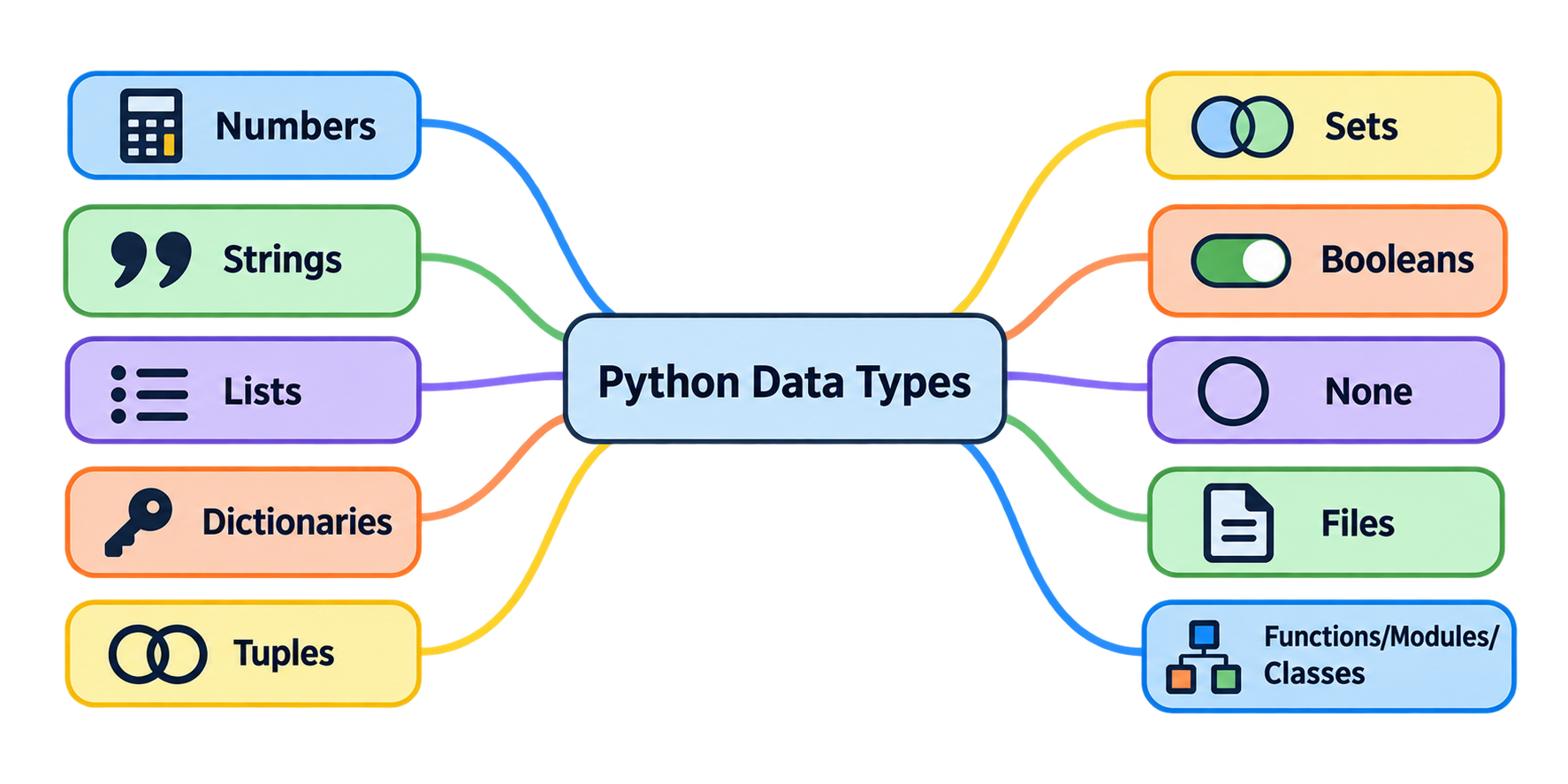
Before going deeper, Neha draws the full map of Python's built-in types on a whiteboard. "You don't need to master all of these today," she says. "Just know they exist."
1. Numbers
age = 25          # int
price = 99.5      # float
z = 3 + 4j        # complex
Python also has Decimal and Fraction for very precise maths (you import them when needed).
2. Strings
name = "chai aur code"
Text inside quotes. Single '...' or double "..." both work.
3. Lists
drinks = ["chai", "coffee", "lassi"]
An ordered collection. You can add, remove, and change items. Mutable.
4. Dictionaries
menu = {"chai": 10, "coffee": 20}
Key–value pairs. Like a real dictionary: word → meaning. Mutable.
5. Tuples
point = (3, 4)
Like a list, but immutable. Once created, cannot be changed.
6. Sets
unique_ids = {1, 2, 3}
A collection with no duplicates and no fixed order. Mutable.
7. Booleans
is_hot = True
Only two values: True and False.
8. None
result = None
A special value that means "nothing" or "no value yet".
9. Files
f = open("notes.txt")
Files are also objects in Python.
10. Program unit types
Neha points at the last group: functions, modules, and classes. These are also objects. You can pass a function to another function. You can store a class in a variable. This idea becomes powerful later.
11. Advanced types (for later)
Things like decorators, generators, iterators, and metaclasses. Ignore them for now. They come in future articles.
Python is dynamically typed
One more big idea. In languages like C or Java, you must declare the type:
int age = 25;
In Python, you don't:
age = 25
Python looks at the value and decides the type itself. This is called dynamic typing. You can even check:
>>> type(age)
<class 'int'>
>>> age = "twenty five"
>>> type(age)
<class 'str'>
The same name age first pointed to an int, then to a string. The name has no type. The object has the type.
Quick table
| Type | Example | Mutable? |
|---|---|---|
| int, float | 10, 3.5 |
No |
| str | "chai" |
No |
| bool | True |
No |
| tuple | (1, 2) |
No |
| list | [1, 2] |
Yes |
| dict | {"a": 1} |
Yes |
| set | {1, 2} |
Yes |
| None | None |
No |
Practice
- What type is each of these?
42,"42",42.0,[42],(42,),{"n": 42} - What is the difference between a list and a tuple?
- What will
type(True)print? - Can a set contain the same value twice?
Part 7: Internal Working of Python (References and Memory)
Now Neha brings everything together. "You have seen the pieces. Let's see how Python manages objects in memory."
Shared references
Go back to the example that surprised Aman:
>>> a = [1, 2, 3]
>>> b = a
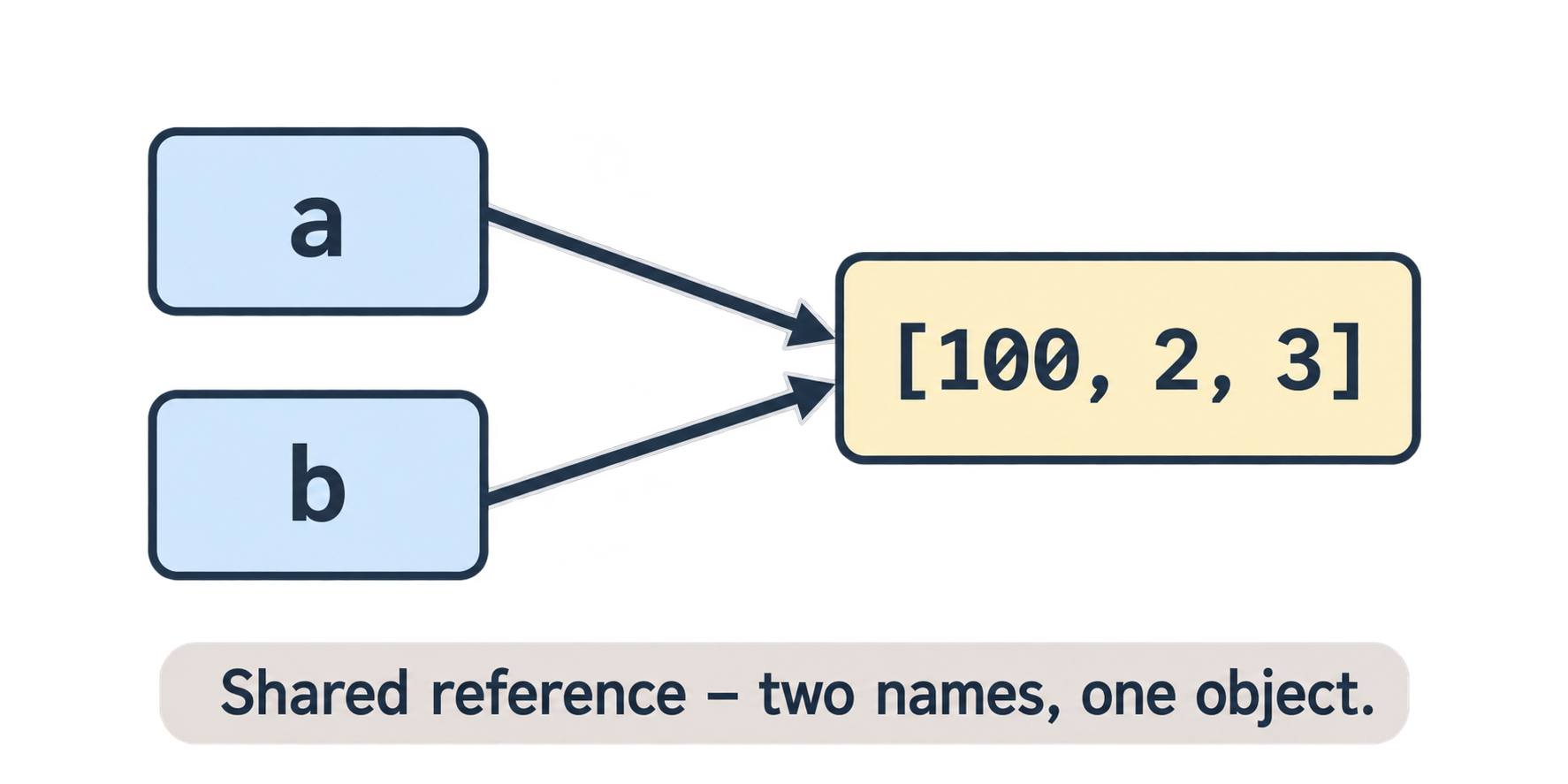
What does b = a do? It does not copy the list. It makes b point to the same list object that a points to. Now there are two labels on one object. This is called a shared reference.
a ──┐
    ├──> [1, 2, 3]
b ──┘
Now:
>>> a[0] = 100
>>> a
[100, 2, 3]
>>> b
[100, 2, 3]
Both show 100, because there is only one list. You changed it through a, and b sees the same change.
Now the same thing with an immutable type
>>> x = 10
>>> y = x
>>> x = 20
>>> y
10
Here y is still 10. Why? Because x = 20 does not change the object 10. It makes a new object 20 and moves the label x. The label y still points to 10.
This is why Part 5 matters. With immutable objects, shared references are safe. With mutable objects, you must be careful.
How to make a real copy
If Aman wants b to be a separate list, he must copy it:
>>> a = [1, 2, 3]
>>> b = a[:]          # slice copy
>>> b = a.copy()      # or this
>>> b = list(a)       # or this

>>> a[0] = 100
>>> b
[1, 2, 3]
Now a and b are two different objects. Changing one does not change the other.
(For lists inside lists, you need copy.deepcopy() from the copy module. That is a topic for another day.)
== vs is
Two questions you can ask about objects:
==asks: Do they have the same value?isasks: Are they the exact same object in memory?
>>> a = [1, 2, 3]
>>> b = a
>>> c = [1, 2, 3]

>>> a == b
True
>>> a is b
True        # same object

>>> a == c
True        # same value
>>> a is c
False       # different objects
Neha's tip: use == almost always. Use is only for None (if x is None:).
The id() function
Every object has a unique identity number (its address in memory). You can see it:
>>> a = [1, 2, 3]
>>> b = a
>>> id(a)
140234567891200
>>> id(b)
140234567891200    # same!
Same id means same object.
Reference count and garbage collection
Remember that each object has a reference count: how many names point to it.
>>> drink = "lassi"     # count = 1
>>> other = drink       # count = 2
>>> drink = "chai"      # "lassi" count = 1
>>> other = "coffee"    # "lassi" count = 0
When the count becomes zero, no one can reach that object anymore. Python's garbage collector removes it from memory automatically. You never have to free memory yourself.
You can even check a reference count (though the number includes a temporary reference from the function call itself, so it looks one higher):
>>> import sys
>>> drink = "lassi"
>>> sys.getrefcount(drink)
A small surprise: Python reuses small numbers
Try this:
>>> a = 10
>>> b = 10
>>> a is b
True
True? Aman did not write b = a. He wrote b = 10 separately. Why is it the same object?
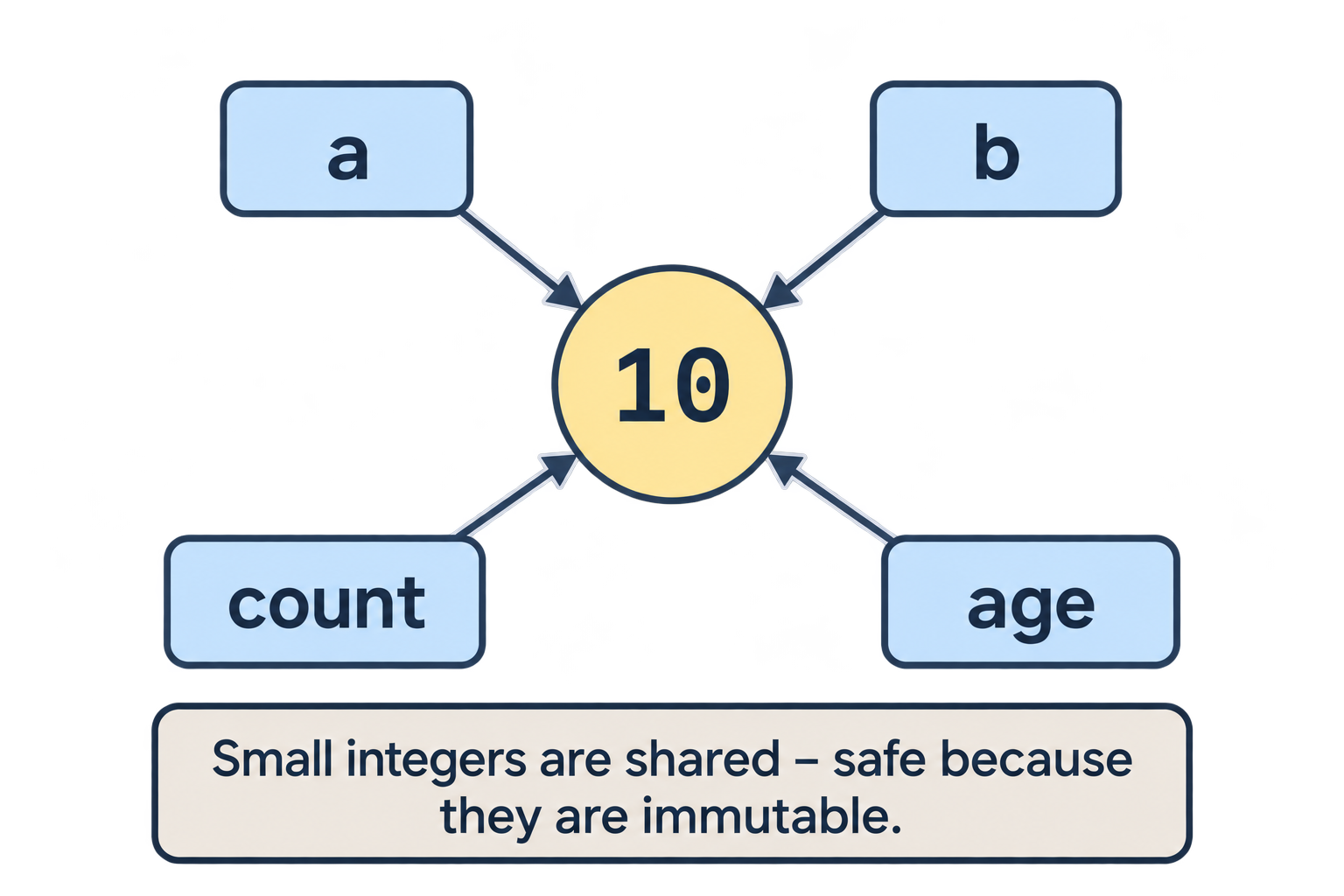
Because Python caches small integers (roughly from -5 to 256) and short strings. When you write 10, Python reuses the existing 10 object instead of making a new one. This saves memory.
This is safe only because integers are immutable. Nobody can change 10 into 11, so sharing it causes no harm. This is the reason immutability matters so much in Python's design.
Putting the whole picture together
Here is what Aman now understands when he runs python hello.py:
- Python compiles
hello.pyinto bytecode. - The PVM runs the bytecode, one instruction at a time.
- Each value in the program becomes an object in memory.
- Variable names are labels that point to these objects.
- Immutable objects are never changed; labels just move.
- Mutable objects can be changed, and all labels pointing to them see the change.
- When no label points to an object, the garbage collector removes it.
Practice
What is printed?
a = [1, 2]
b = a
b.append(3)
print(a)
What is printed?
a = "hello"
b = a
a = "world"
print(b)
Fix the code so that
bdoes not change whenachanges:a = [1, 2, 3] b = a a[0] = 99What is the difference between
==andis?True or False:
a = 5; b = 5; a is bgivesTruein CPython.
Part 8: Final Quiz
Test yourself. Answers are at the bottom. Try first without looking!
Q1. Which website should a beginner use to install Python?
Q2. Python converts source code into ______ before running it.
Q3. What is the full form of PVM?
Q4. What folder stores compiled .pyc files?
Q5. Which symbol is the Python shell prompt?
Q6. Name three immutable types and three mutable types.
Q7. What does this print?
x = (1, 2, 3)
x[0] = 10
Q8. What does this print?
menu = {"chai": 10}
copy_menu = menu
copy_menu["coffee"] = 20
print(menu)
Q9. How does Python know when an object can be removed from memory?
Q10. Which of these is the standard Python implementation: Jython, CPython, PyPy, IronPython?
Answers
Part 2:
- Your own version (for example,
Python 3.12.x). - So the terminal can find the
pythoncommand from any folder. - False. Plain Python from python.org is better for learning.
Part 3:
- bytecode, Python Virtual Machine (PVM).
- No. Bytecode is platform-independent and needs the PVM to run.
- Python version 3.12.
- No.
.pycfiles are saved only for imported modules, not the main file you run directly.
Part 4:
- Read, Evaluate, Print, Loop.
100.- The path of your current folder.
- The shell automatically shows the value of any expression you type.
Part 5:
int,str,tupleare immutable.list,dictare mutable.TypeError— strings cannot be changed in place.- Reassignment.
- Mutation.
Part 6:
int,str,float,list,tuple,dict.- A list is mutable; a tuple is immutable.
<class 'bool'>.- No. Sets automatically remove duplicates.
Part 7:
[1, 2, 3]—aandbshare the same list.hello— strings are immutable;a = "world"only moves the labela.- Use
b = a[:]orb = a.copy()instead ofb = a. ==compares values;ischecks if both names point to the same object.- True (because of small integer caching).
Final Quiz:
- python.org
- bytecode
- Python Virtual Machine
__pycache__>>>- Immutable: int, str, tuple (also float, bool). Mutable: list, dict, set.
TypeError— tuples are immutable.{'chai': 10, 'coffee': 20}— both names point to the same dict.- When its reference count becomes zero, the garbage collector removes it.
- CPython.
Epilogue
A week later, Neha asks Aman the same question: "What happens when you run python hello.py?"
This time Aman draws it on paper. Source code becomes bytecode. The PVM runs it. Objects are created in memory. Names point to objects. Immutable objects never change; mutable ones do. When nothing points to an object, it is cleaned up.
Neha nods. "Now you don't just use Python. You understand it."
Comments
Join the discussionNo comments yet. Be the first to comment.