Python 7 - Serving Real Data: JSON, Status Codes, and Path Parameters
Load students from a file, return one student by ID, and answer correctly when something goes wrong.
Where StudyDesk is now
studydesk/
└── src/
    └── studydesk/
        └── __init__.py     ← app with 5 preview routes that only return messages
By the end of this article, GET /students returns real students from a JSON file, GET /students/{id} returns one student, and the API answers with proper status codes when a student does not exist or the ID is invalid.
Part 1: The API That Always Says Yes
Aman shows Neha his five preview routes. She opens /docs, clicks GET /students, and gets:
{"message": "This will return all students"}
"That is a promise, not data," she says. "And try this." She types /students/999 into the browser.
The API happily returns the same message. There is no student 999. There is no student at all. But the API says everything is fine.
"A real API has two jobs," Neha explains. "Return the right data when things go well. And return the right error when they don't. Today we do both."

Part 2: Creating the Data File
Until Article 7 (PostgreSQL), StudyDesk keeps its students in a JSON file. This is enough to learn every FastAPI concept, and we will swap it for a real database later without changing the API's shape.
Create a data folder inside the package, and a file in it.
src/studydesk/data/students.json
[
  {
    "id": 1,
    "name": "Priya Sharma",
    "email": "priya@example.com",
    "age": 17,
    "city": "Ahmedabad",
    "marks": 88,
    "grade": "A"
  },
  {
    "id": 2,
    "name": "Rahul Verma",
    "email": "rahul@example.com",
    "age": 18,
    "city": "Surat",
    "marks": 72,
    "grade": "B"
  },
  {
    "id": 3,
    "name": "Sneha Patel",
    "email": "sneha@example.com",
    "age": 16,
    "city": "Ahmedabad",
    "marks": 95,
    "grade": "A"
  },
  {
    "id": 4,
    "name": "Arjun Mehta",
    "email": "arjun@example.com",
    "age": 17,
    "city": "Vadodara",
    "marks": 58,
    "grade": "C"
  },
  {
    "id": 5,
    "name": "Kavya Nair",
    "email": "kavya@example.com",
    "age": 18,
    "city": "Rajkot",
    "marks": 81,
    "grade": "B"
  },
  {
    "id": 6,
    "name": "Dev Joshi",
    "email": "dev@example.com",
    "age": 16,
    "city": "Surat",
    "marks": 45,
    "grade": "D"
  },
  {
    "id": 7,
    "name": "Ananya Desai",
    "email": "ananya@example.com",
    "age": 17,
    "city": "Ahmedabad",
    "marks": 90,
    "grade": "A"
  },
  {
    "id": 8,
    "name": "Rohan Shah",
    "email": "rohan@example.com",
    "age": 18,
    "city": "Vadodara",
    "marks": 67,
    "grade": "C"
  },
  {
    "id": 9,
    "name": "Meera Iyer",
    "email": "meera@example.com",
    "age": 17,
    "city": "Rajkot",
    "marks": 76,
    "grade": "B"
  },
  {
    "id": 10,
    "name": "Yash Trivedi",
    "email": "yash@example.com",
    "age": 16,
    "city": "Surat",
    "marks": 84,
    "grade": "B"
  }
]
A JSON list of ten student objects. Each has the same seven keys. The grade follows a simple rule we will automate in Article 4: A for 85 and above, B for 70–84, C for 50–69, D below 50.
Your folder now:
src/studydesk/
├── __init__.py
└── data/
    └── students.json
Part 3: Loading JSON with a Helper Function
Aman could write open("students.json") inside every route. Neha stops him: "The file will be read in five different routes. Write it once."
Create a new file next to __init__.py.
src/studydesk/utils.py
import json
from pathlib import Path

DATA_FILE = Path(__file__).parent / "data" / "students.json"


def load_students() -> list[dict]:
    """Read all students from the JSON file."""
    with open(DATA_FILE, "r", encoding="utf-8") as f:
        return json.load(f)
Reading it
Path(__file__).parent / "data" / "students.json" From the Python series: __file__ is this file's path (utils.py), .parent is its folder (studydesk/), and we join data/students.json. This works no matter which folder you start the server from.
-> list[dict] A type hint. The function returns a list of dictionaries. This is only a note for readers and VS Code, but in FastAPI type hints become important, so we start the habit now.
json.load(f) Converts the file's JSON text into a Python list of dictionaries.
Why a separate utils.py?
- Routes stay short and readable.
- When we switch to PostgreSQL in Article 7, we change
utils.py, and the routes barely notice. - This is the "one module per responsibility" rule from the Python series.
Part 4: GET /students — Return Everyone
Now the real route. Replace __init__.py with this. The preview POST, PUT, and DELETE routes are removed; we will build them properly in Article 5.
src/studydesk/__init__.py
import uvicorn
from fastapi import FastAPI

from .utils import load_students

app = FastAPI(
    title="StudyDesk API",
    description="Student records API for a coaching institute.",
    version="0.1.0",
)


@app.get("/")
def home():
    return {"message": "Welcome to StudyDesk API"}


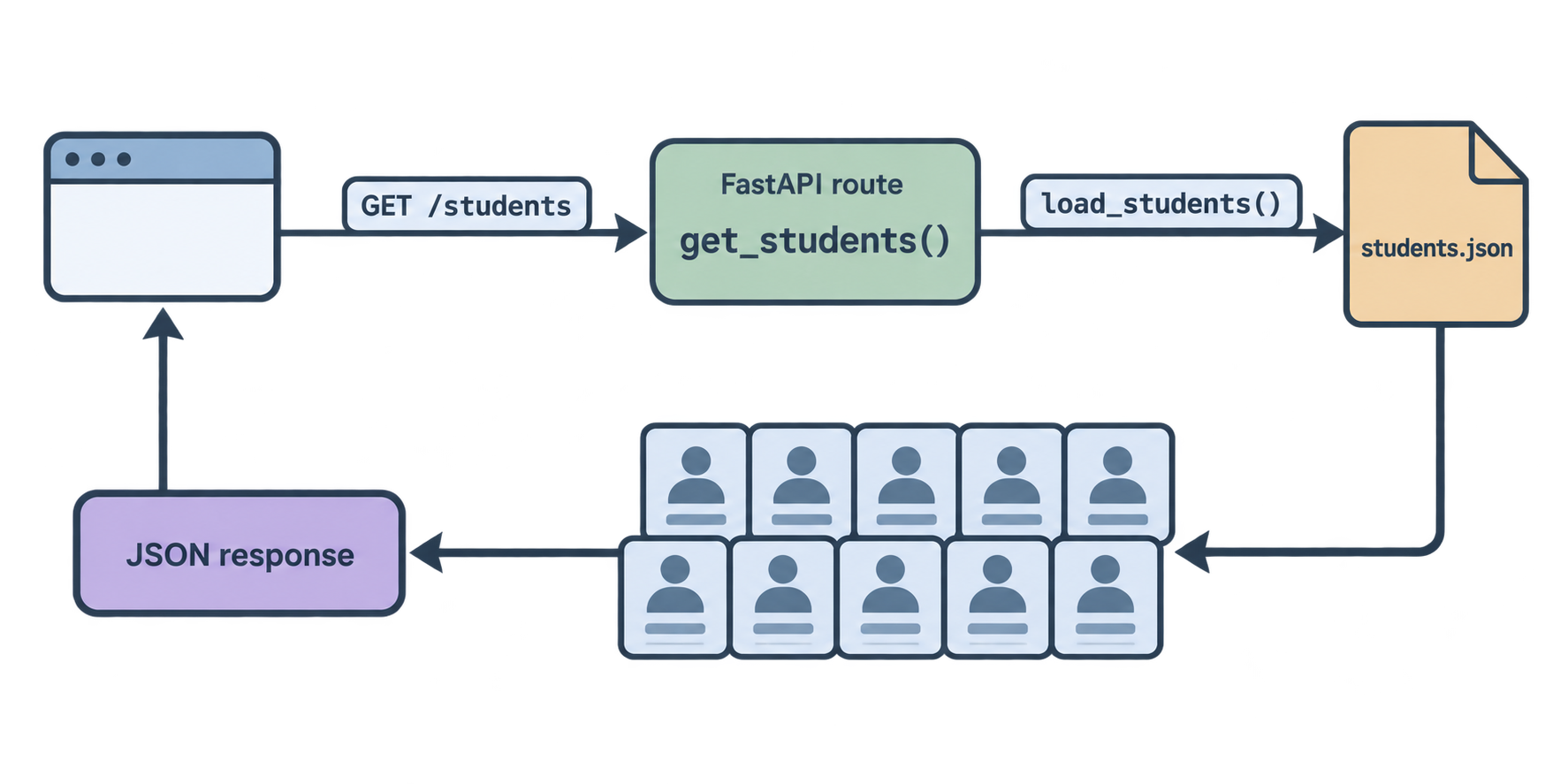
@app.get("/students")
def get_students():
    students = load_students()
    return {"count": len(students), "students": students}


def main() -> None:
    """Start the development server."""
    uvicorn.run("studydesk:app", host="127.0.0.1", port=8000, reload=True)
The new line: from .utils import load_students
The dot means "from the same package". utils.py sits next to __init__.py inside studydesk/, so .utils finds it. This is called a relative import, and it is the normal way to import between files inside one package.
Run and test
uv run studydesk
Open http://127.0.0.1:8000/students:
{
  "count": 10,
  "students": [
    {
      "id": 1,
      "name": "Priya Sharma",
      "email": "priya@example.com",
      "age": 17,
      "city": "Ahmedabad",
      "marks": 88,
      "grade": "A"
    },
    ...
  ]
}
Real data. Aman wraps the list in a dictionary with count so clients know how many students they got without counting. This is a common, friendly habit.
Part 5: Understanding HTTP Status Codes
Before building the "one student" route, Aman needs to understand how an API says "something went wrong."
Every HTTP response has two parts: a body (the JSON) and a status code (a three-digit number). The body is for the data. The status code is for the outcome. Clients read the status code first.
The five families
| Range | Meaning | Who is "at fault" |
|---|---|---|
| 1xx | Information | (rare, ignore for now) |
| 2xx | Success | Nobody. It worked. |
| 3xx | Redirect | Nobody. Look elsewhere. |
| 4xx | Client error | The client sent something wrong. |
| 5xx | Server error | The server broke. |
The codes you will use in StudyDesk
| Code | Name | When |
|---|---|---|
| 200 | OK | A GET or PUT worked |
| 201 | Created | A POST created something new |
| 204 | No Content | A DELETE worked, nothing to return |
| 400 | Bad Request | The request makes no sense |
| 401 | Unauthorized | Not logged in (Article 10) |
| 403 | Forbidden | Logged in, but not allowed (Article 10) |
| 404 | Not Found | The thing does not exist |
| 409 | Conflict | Already exists (duplicate email, etc.) |
| 422 | Unprocessable Entity | Data was readable but invalid (FastAPI sends this automatically) |
| 500 | Internal Server Error | Your code crashed |
Why not just return {"error": "not found"} with 200?
Because clients and tools look at the status code, not inside the JSON:
- A mobile app checks
if response.status_code == 200before parsing. - Monitoring tools count 4xx and 5xx to alert you.
- Browsers and caches behave differently for 404 vs 200.
A 200 that contains an error is a lie. It will cause silent bugs in every client.
The one to remember
If a human can fix it by changing the request, it is 4xx. If only you can fix it by changing the server, it is 5xx.

Part 6: Path Parameters and HTTPException
A path parameter is a variable part of the URL. In /students/5, the 5 is the parameter. Different IDs, same route.
The route
src/studydesk/__init__.py
import uvicorn
from fastapi import FastAPI, HTTPException

from .utils import load_students

app = FastAPI(
    title="StudyDesk API",
    description="Student records API for a coaching institute.",
    version="0.1.0",
)


@app.get("/")
def home():
    return {"message": "Welcome to StudyDesk API"}


@app.get("/students")
def get_students():
    students = load_students()
    return {"count": len(students), "students": students}


@app.get("/students/{student_id}")
def get_student(student_id: int):
    students = load_students()
    for student in students:
        if student["id"] == student_id:
            return student
    raise HTTPException(status_code=404, detail=f"Student with id {student_id} not found")


def main() -> None:
    """Start the development server."""
    uvicorn.run("studydesk:app", host="127.0.0.1", port=8000, reload=True)
Reading the new route
@app.get("/students/{student_id}") The curly braces mark a path parameter named student_id.
def get_student(student_id: int): The function must have a parameter with the same name. FastAPI pulls the value from the URL and passes it in. The type hint int does two jobs: it converts the text "5" into the number 5, and it rejects anything that is not a number.
The loop Go through all students. If one has a matching ID, return it. FastAPI sends it with status 200 automatically.
raise HTTPException(status_code=404, detail=...) If the loop finishes without finding anyone, we raise an HTTPException. This is how a FastAPI route says "stop, and send this error." FastAPI catches it and sends a response with status 404 and the body:
{"detail": "Student with id 999 not found"}
Note that it is raise, not return. An HTTPException is an exception, like ValueError from the Python series. Raising it stops the function immediately.
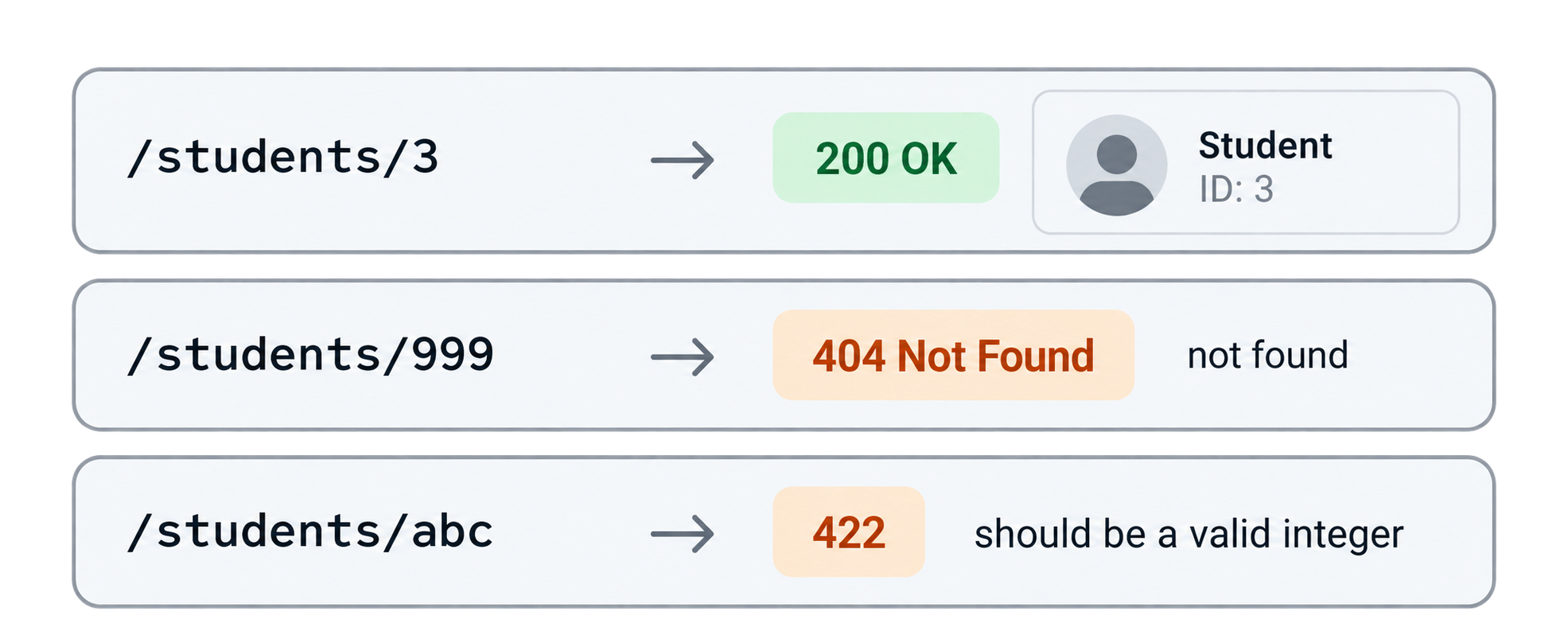
Test the three cases
A valid ID — http://127.0.0.1:8000/students/3
{
  "id": 3,
  "name": "Sneha Patel",
  "email": "sneha@example.com",
  "age": 16,
  "city": "Ahmedabad",
  "marks": 95,
  "grade": "A"
}
Status: 200.
An ID that does not exist — http://127.0.0.1:8000/students/999
{"detail": "Student with id 999 not found"}
Status: 404. Our HTTPException.
Not a number at all — http://127.0.0.1:8000/students/abc
{
  "detail": [
    {
      "type": "int_parsing",
      "loc": ["path", "student_id"],
      "msg": "Input should be a valid integer, unable to parse string as an integer",
      "input": "abc"
    }
  ]
}
Status: 422. We wrote no code for this. The int type hint did it. FastAPI explains exactly where the problem is (loc: the path parameter student_id) and what was received (abc).
Three outcomes, three correct status codes. Open /docs and you will see all of this documented automatically, including the student_id input box.
Using named constants for status codes
Typing 404 works, but FastAPI provides named constants that make code easier to read:
from fastapi import status

raise HTTPException(status_code=status.HTTP_404_NOT_FOUND, detail="...")
We will use this style from now on. It also makes VS Code autocomplete all codes for you.
Part 7: Customizing Path Parameters (Descriptions and Validation)
The route works, but two things can be better:
/students/0and/students/-5are accepted and then return 404. IDs are never zero or negative, so we should reject them before reading the file.- In
/docs,student_idhas no explanation.
FastAPI's Path() fixes both.
src/studydesk/__init__.py
from typing import Annotated

import uvicorn
from fastapi import FastAPI, HTTPException, Path, status

from .utils import load_students

app = FastAPI(
    title="StudyDesk API",
    description="Student records API for a coaching institute.",
    version="0.1.0",
)


@app.get("/", tags=["General"])
def home():
    return {"message": "Welcome to StudyDesk API"}


@app.get("/students", tags=["Students"], summary="Get all students")
def get_students():
    students = load_students()
    return {"count": len(students), "students": students}


@app.get("/students/{student_id}", tags=["Students"], summary="Get one student by ID")
def get_student(
    student_id: Annotated[
        int,
        Path(
            title="Student ID",
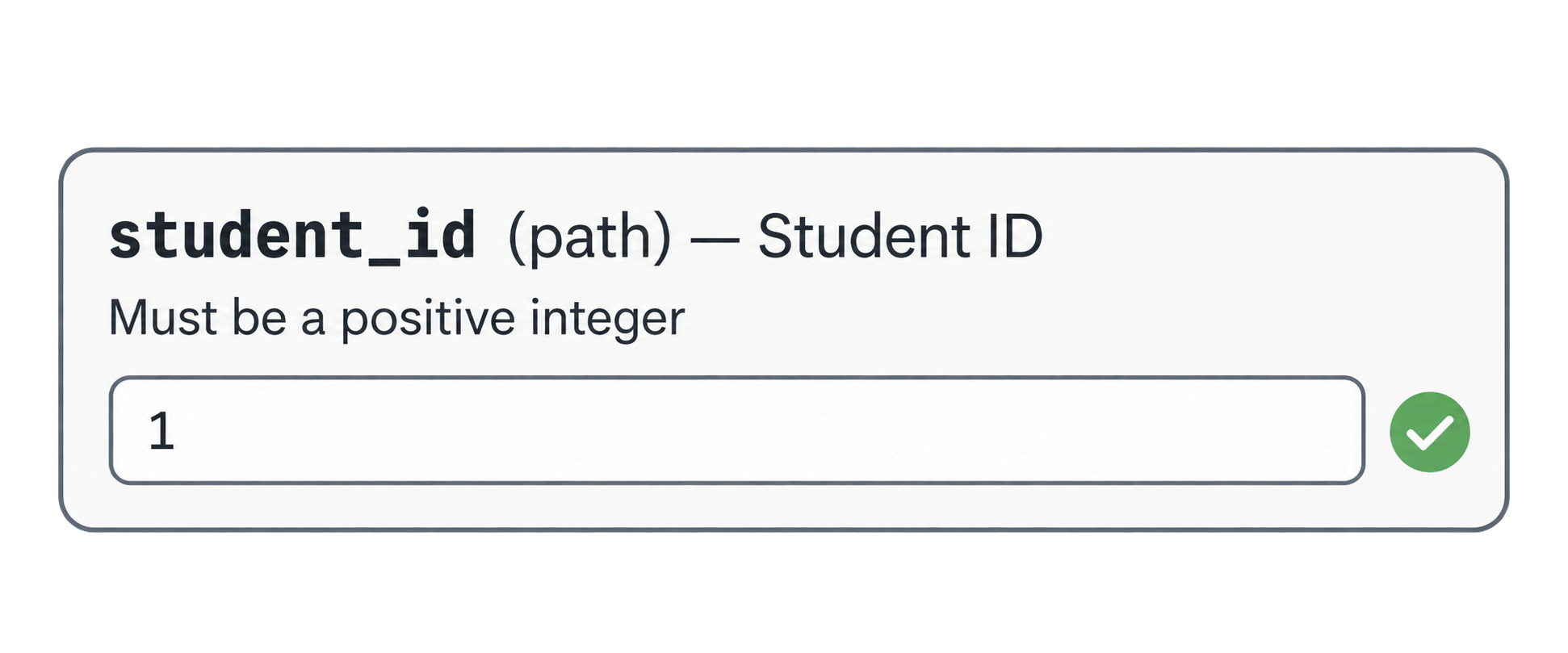
            description="The unique ID of the student. Must be a positive integer.",
            gt=0,
            examples=[1],
        ),
    ],
):
    students = load_students()
    for student in students:
        if student["id"] == student_id:
            return student
    raise HTTPException(
        status_code=status.HTTP_404_NOT_FOUND,
        detail=f"Student with id {student_id} not found",
    )


def main() -> None:
    """Start the development server."""
    uvicorn.run("studydesk:app", host="127.0.0.1", port=8000, reload=True)
What changed
Annotated[int, Path(...)] Annotated is from Python's typing module. It lets you attach extra information to a type hint. Here: "this is an int, and here are the rules for it as a path parameter." This is the modern FastAPI style and the one the official docs recommend.
Path(...) options
| Option | What it does |
|---|---|
title |
Short label in /docs |
description |
Longer explanation in /docs |
gt=0 |
Greater than 0. Zero and negatives are rejected with 422 |
examples=[1] |
Pre-fills the "Try it out" box |
Other validation options you can use: ge (greater than or equal), lt (less than), le (less than or equal). For string path parameters: min_length, max_length, pattern (a regex).
tags=[...] Groups routes in /docs under a heading. Now "General" and "Students" appear as separate sections. As StudyDesk grows (auth, courses), tags keep the docs page tidy.
summary="..." A one-line description shown next to each route in /docs, instead of the function name.
Test
http://127.0.0.1:8000/students/0
{
  "detail": [
    {
      "type": "greater_than",
      "loc": ["path", "student_id"],
      "msg": "Input should be greater than 0",
      "input": "0",
      "ctx": {"gt": 0}
    }
  ]
}
Status 422, and the file was never opened. Validation happens before the function body runs.
Open /docs. The student_id field now shows the title, the description, and the example. Click Try it out and the box already contains 1.
Where StudyDesk is after this article
studydesk/
├── .venv/
├── src/
│   └── studydesk/
│       ├── __init__.py          ← app, GET /, GET /students, GET /students/{id}
│       ├── utils.py             ← load_students()
│       └── data/
│           └── students.json    ← 10 students
├── .gitignore
├── .python-version
├── pyproject.toml
├── README.md
└── uv.lock
Run:
uv run studydesk
| Request | Status | Result |
|---|---|---|
GET /students |
200 | All 10 students with a count |
GET /students/3 |
200 | Sneha Patel |
GET /students/999 |
404 | {"detail": "Student with id 999 not found"} |
GET /students/abc |
422 | Automatic "not an integer" error |
GET /students/0 |
422 | Automatic "greater than 0" error |
Concept Quiz
Answers are below. No coding needed.
Q1. Why do we put file reading in utils.py instead of inside each route?
Q2. What does the dot mean in from .utils import load_students?
Q3. In /students/{student_id}, what must be true about the function's parameter name?
Q4. What two jobs does the type hint student_id: int do?
Q5. What is the difference between returning a dictionary and raising HTTPException?
Q6. Which status code means "the thing does not exist"? Which means "the data was invalid"?
Q7. Why is returning {"error": "not found"} with status 200 a bad idea?
Q8. If a client sends /students/abc, who produces the 422 error: your code or FastAPI?
Q9. What does gt=0 in Path() do, and when does the check run?
Q10. What is Annotated used for in FastAPI?
Answers
- One place to change. When we switch to a database, only
utils.pychanges. Routes stay short and readable. - "From the same package." It is a relative import: look for
utils.pynext to this file insidestudydesk/. - It must exactly match the name inside the curly braces:
student_id. - It converts the URL text
"5"to the integer5, and it rejects non-numbers with a 422 error. - Returning sends a 200 response with that data. Raising
HTTPExceptionstops the function immediately and sends an error response with the status code you choose. - 404 Not Found; 422 Unprocessable Entity.
- Clients and monitoring tools read the status code, not the body. A 200 that contains an error hides the problem and causes silent bugs.
- FastAPI, automatically, because of the
inttype hint. Your code never runs. - Rejects values that are not greater than 0 with a 422. It runs before the function body, so the file is never opened for bad IDs.
- To attach extra rules and documentation (
Path(...), laterQuery(...)andBody(...)) to a parameter's type hint.
Epilogue
Aman refreshes /docs. Two grouped sections. Descriptions on every parameter. He types 999 and gets a clean 404. He types abc and gets a clean 422. He types 3 and gets Sneha.
Neha nods. "The API tells the truth now. But a client still has to download all ten students to find the ones from Ahmedabad. With 300 students, that's wasteful."
In the next article: query parameters — filtering by city and grade, sorting by marks, and paginating with offset and limit.
Comments
Join the discussionNo comments yet. Be the first to comment.