Let clients ask for exactly the students they need, in the order they want, one page at a time.
Where StudyDesk is now
src/studydesk/
├── __init__.py          ← GET /, GET /students, GET /students/{id}
├── utils.py             ← load_students()
└── data/students.json   ← 10 students
By the end of this article, GET /students understands requests like:
/students?city=Ahmedabad&grade=A&sort_by=marks&order=desc&offset=0&limit=5
Part 1: The Mobile App Developer Complains
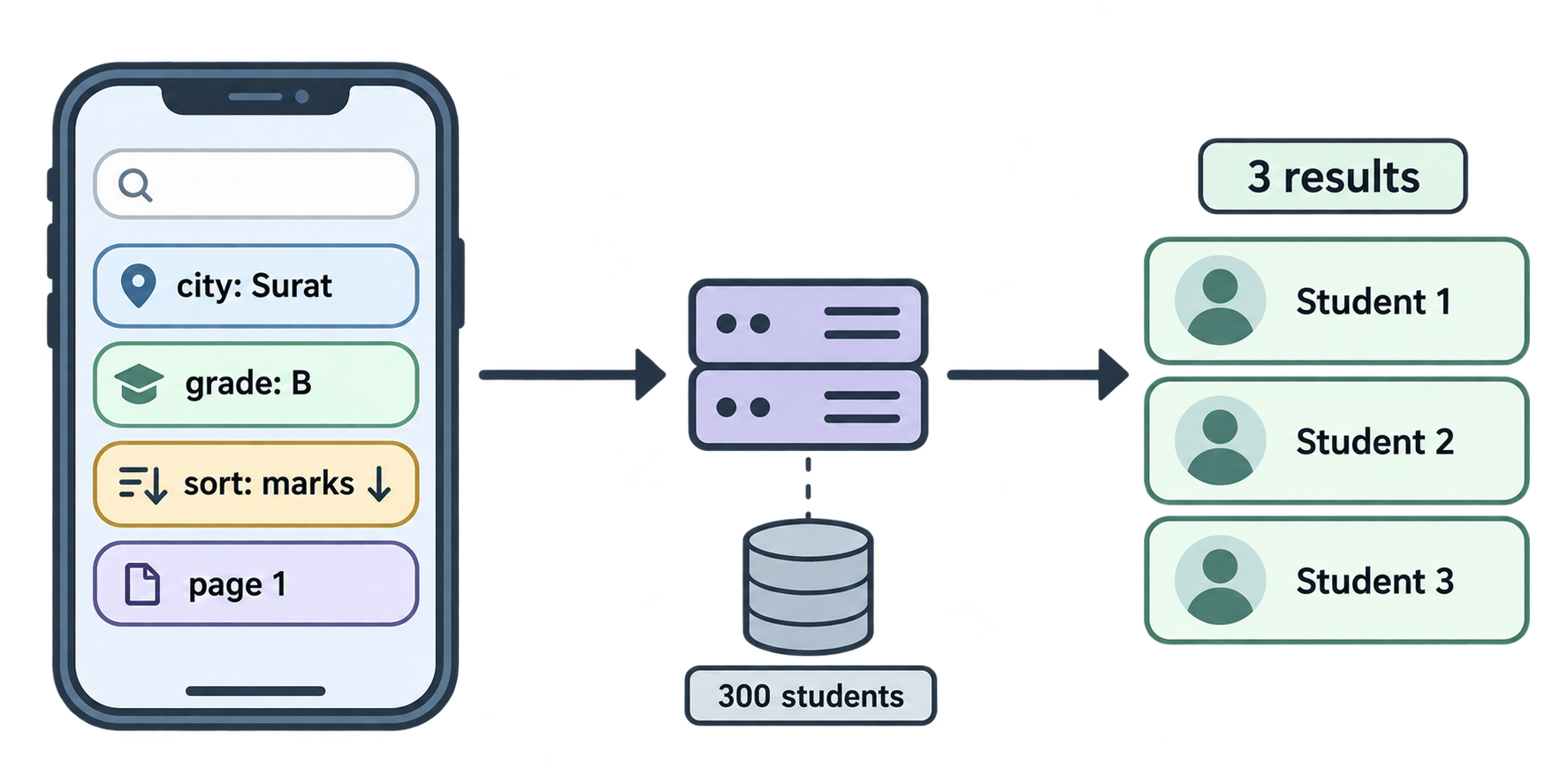
The institute's mobile app developer, Karan, messages Aman:
"Your
/studentsendpoint returns everyone. I only need students from Surat with grade B, sorted by marks, ten at a time. Right now I download all of them and filter on the phone. That's slow and wastes data."
Aman thinks about adding routes: /students/surat, /students/grade-b, /students/surat/grade-b/sorted… that explodes quickly.
Neha says, "You don't make new routes. You let the client describe what it wants on the same route. That's what query parameters are for."
Part 2: Introduction to Query Parameters
A query parameter is a key=value pair that comes after a ? in the URL. Several are joined with &.
/students?city=Surat&grade=B
          ↑          ↑
          first      second
Path parameter vs query parameter
| Path parameter | Query parameter | |
|---|---|---|
| Looks like | /students/5 |
/students?city=Surat |
| Used for | Identifying one thing | Describing how to search or shape results |
| Required? | Always | Usually optional |
| Example | "give me student 5" | "give me students, but only from Surat" |
Rule of thumb: if removing it changes which resource you mean, it's a path parameter. If removing it only changes the view of a resource, it's a query parameter.
How FastAPI knows
In the last article, a function parameter whose name matched {student_id} became a path parameter. Any function parameter that does not match a path placeholder becomes a query parameter automatically.
A first query parameter
src/studydesk/__init__.py
from typing import Annotated

import uvicorn
from fastapi import FastAPI, HTTPException, Path, status

from .utils import load_students

app = FastAPI(
    title="StudyDesk API",
    description="Student records API for a coaching institute.",
    version="0.1.0",
)


@app.get("/", tags=["General"])
def home():
    return {"message": "Welcome to StudyDesk API"}


@app.get("/students", tags=["Students"], summary="Get all students")
def get_students(city: str | None = None):
    students = load_students()

    if city:
        students = [s for s in students if s["city"].lower() == city.lower()]

    return {"count": len(students), "students": students}


@app.get("/students/{student_id}", tags=["Students"], summary="Get one student by ID")
def get_student(
    student_id: Annotated[
        int,
        Path(
            title="Student ID",
            description="The unique ID of the student. Must be a positive integer.",
            gt=0,
            examples=[1],
        ),
    ],
):
    students = load_students()
    for student in students:
        if student["id"] == student_id:
            return student
    raise HTTPException(
        status_code=status.HTTP_404_NOT_FOUND,
        detail=f"Student with id {student_id} not found",
    )


def main() -> None:
    """Start the development server."""
    uvicorn.run("studydesk:app", host="127.0.0.1", port=8000, reload=True)
Reading the new part
city: str | None = None city is not in the path, so it is a query parameter. str | None means "a string, or nothing". = None is the default, which makes it optional. If the client does not send ?city=..., city is None.
if city: Only filter when a city was given.
The list comprehension Keep only students whose city matches. .lower() on both sides makes surat, Surat, and SURAT all work.
Test
| URL | Result |
|---|---|
/students |
all 10 |
/students?city=Surat |
Rahul, Dev, Yash |
/students?city=surat |
same 3 (case does not matter) |
/students?city=Mumbai |
{"count": 0, "students": []} |
A zero-result search is not an error. The request was valid; there simply was nothing to return. Status stays 200.
Open /docs. city appears as an optional input box on GET /students. FastAPI documented it from the type hint alone.
Part 3: Filtering with Multiple Query Parameters
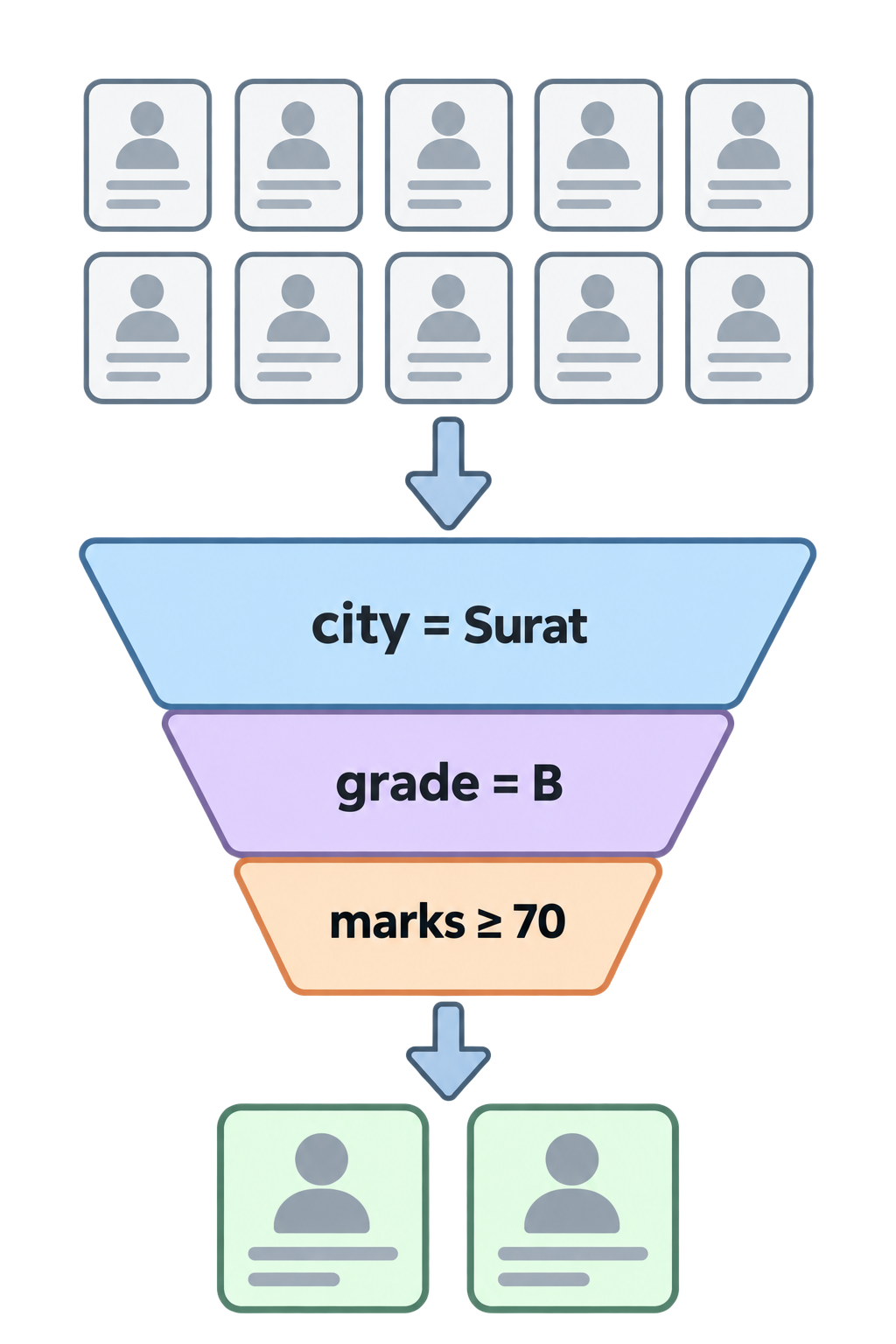
One filter is nice. Real clients combine several. Let's add grade and min_marks, and use Query() to document and validate them, the same way Path() worked in Article 2.
src/studydesk/__init__.py
from typing import Annotated

import uvicorn
from fastapi import FastAPI, HTTPException, Path, Query, status

from .utils import load_students

app = FastAPI(
    title="StudyDesk API",
    description="Student records API for a coaching institute.",
    version="0.1.0",
)


@app.get("/", tags=["General"])
def home():
    return {"message": "Welcome to StudyDesk API"}


@app.get("/students", tags=["Students"], summary="Get all students")
def get_students(
    city: Annotated[
        str | None,
        Query(description="Filter by city (case-insensitive).", examples=["Ahmedabad"]),
    ] = None,
    grade: Annotated[
        str | None,
        Query(
            description="Filter by grade: A, B, C, or D.",
            pattern="^[ABCD]$",
            examples=["A"],
        ),
    ] = None,
    min_marks: Annotated[
        int | None,
        Query(description="Only students with marks >= this value.", ge=0, le=100),
    ] = None,
):
    students = load_students()

    if city:
        students = [s for s in students if s["city"].lower() == city.lower()]

    if grade:
        students = [s for s in students if s["grade"] == grade.upper()]

    if min_marks is not None:
        students = [s for s in students if s["marks"] >= min_marks]

    return {"count": len(students), "students": students}


@app.get("/students/{student_id}", tags=["Students"], summary="Get one student by ID")
def get_student(
    student_id: Annotated[
        int,
        Path(
            title="Student ID",
            description="The unique ID of the student. Must be a positive integer.",
            gt=0,
            examples=[1],
        ),
    ],
):
    students = load_students()
    for student in students:
        if student["id"] == student_id:
            return student
    raise HTTPException(
        status_code=status.HTTP_404_NOT_FOUND,
        detail=f"Student with id {student_id} not found",
    )


def main() -> None:
    """Start the development server."""
    uvicorn.run("studydesk:app", host="127.0.0.1", port=8000, reload=True)
Reading the new parts
Query(...) The twin of Path(). Same options: description, examples, ge, le, gt, lt, min_length, max_length, pattern.
pattern="^[ABCD]$" A regular expression. ^ start, [ABCD] exactly one of these letters, $ end. Anything else (like grade=Z or grade=AB) gets an automatic 422.
ge=0, le=100 Marks are between 0 and 100. min_marks=150 is rejected with 422.
if min_marks is not None: Careful here. min_marks=0 is a valid request ("everyone with at least 0 marks"). But if min_marks: would treat 0 as False and skip the filter. From the Python series: 0 is falsy. So we check is not None instead. This is a classic bug; remember it.
Filters stack Each if narrows the list further. The client can send any combination.
Test
| URL | Result |
|---|---|
/students?grade=A |
Priya, Sneha, Ananya |
/students?city=Ahmedabad&grade=A |
Priya, Sneha, Ananya (all three happen to be from Ahmedabad) |
/students?min_marks=80 |
Priya, Sneha, Kavya, Ananya, Yash |
/students?city=Surat&min_marks=80 |
Yash |
/students?grade=Z |
422, "String should match pattern" |
/students?min_marks=150 |
422, "Input should be less than or equal to 100" |
Part 4: Sorting (Sort By and Order Logic)
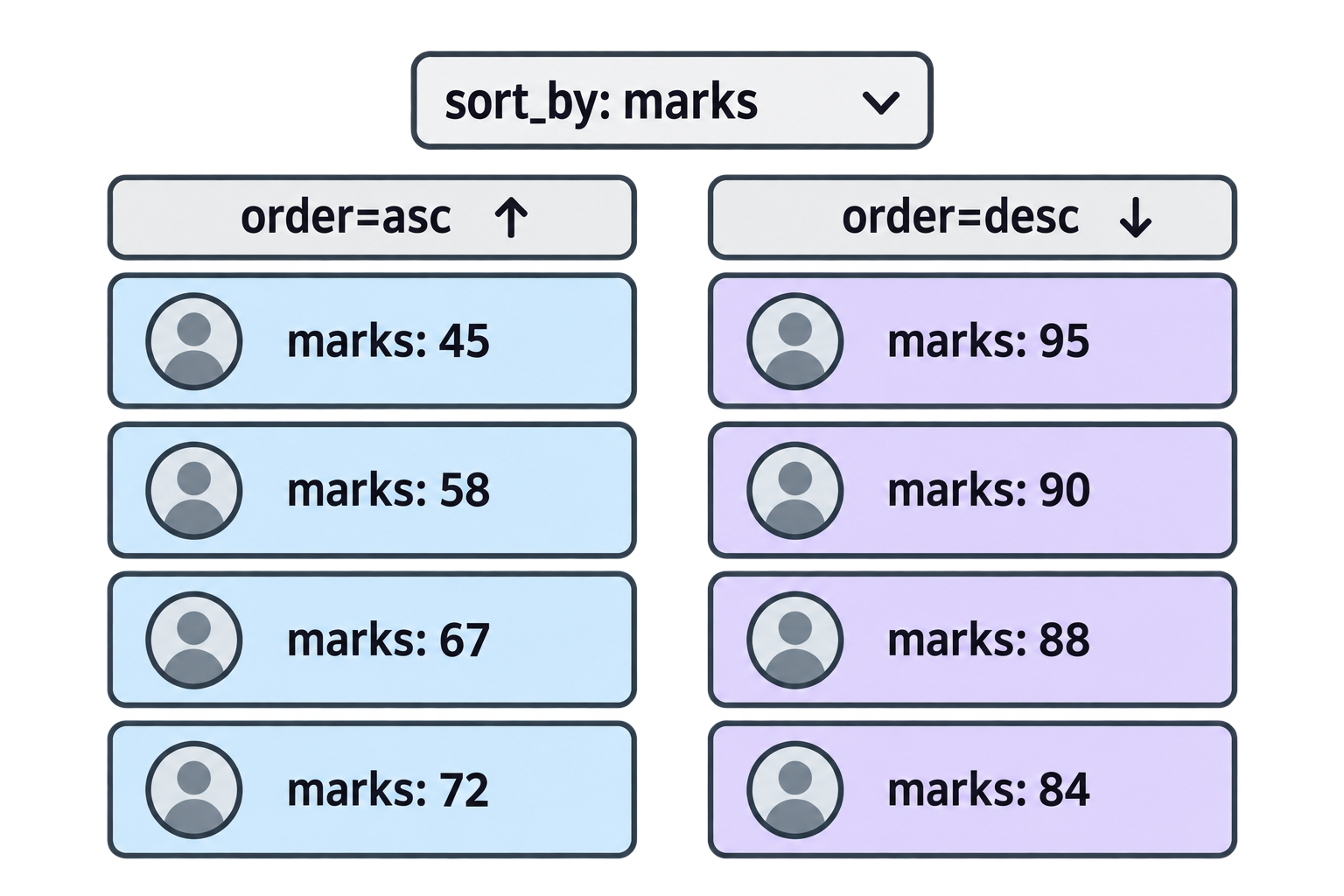
Karan wants students sorted by marks, highest first. We add two query parameters:
sort_by— which field to sort onorder—asc(ascending, small to large) ordesc(descending, large to small)
Only allow safe values
If we accept any string for sort_by, a client could send sort_by=password or a typo like sort_by=mark, and we'd crash with a KeyError. Instead we restrict the allowed values with Literal.
src/studydesk/__init__.py
from typing import Annotated, Literal

import uvicorn
from fastapi import FastAPI, HTTPException, Path, Query, status

from .utils import load_students

app = FastAPI(
    title="StudyDesk API",
    description="Student records API for a coaching institute.",
    version="0.1.0",
)


@app.get("/", tags=["General"])
def home():
    return {"message": "Welcome to StudyDesk API"}


@app.get("/students", tags=["Students"], summary="Get all students")
def get_students(
    city: Annotated[
        str | None,
        Query(description="Filter by city (case-insensitive).", examples=["Ahmedabad"]),
    ] = None,
    grade: Annotated[
        str | None,
        Query(
            description="Filter by grade: A, B, C, or D.",
            pattern="^[ABCD]$",
            examples=["A"],
        ),
    ] = None,
    min_marks: Annotated[
        int | None,
        Query(description="Only students with marks >= this value.", ge=0, le=100),
    ] = None,
    sort_by: Annotated[
        Literal["id", "name", "age", "marks"],
        Query(description="Field to sort by."),
    ] = "id",
    order: Annotated[
        Literal["asc", "desc"],
        Query(description="Sort direction: asc or desc."),
    ] = "asc",
):
    students = load_students()

    # --- filtering ---
    if city:
        students = [s for s in students if s["city"].lower() == city.lower()]

    if grade:
        students = [s for s in students if s["grade"] == grade.upper()]

    if min_marks is not None:
        students = [s for s in students if s["marks"] >= min_marks]

    # --- sorting ---
    students = sorted(students, key=lambda s: s[sort_by], reverse=(order == "desc"))

    return {"count": len(students), "students": students}


@app.get("/students/{student_id}", tags=["Students"], summary="Get one student by ID")
def get_student(
    student_id: Annotated[
        int,
        Path(
            title="Student ID",
            description="The unique ID of the student. Must be a positive integer.",
            gt=0,
            examples=[1],
        ),
    ],
):
    students = load_students()
    for student in students:
        if student["id"] == student_id:
            return student
    raise HTTPException(
        status_code=status.HTTP_404_NOT_FOUND,
        detail=f"Student with id {student_id} not found",
    )


def main() -> None:
    """Start the development server."""
    uvicorn.run("studydesk:app", host="127.0.0.1", port=8000, reload=True)
Reading the new parts
Literal["id", "name", "age", "marks"] "This parameter can only be one of these exact strings." FastAPI rejects anything else with a 422, and /docs shows a dropdown instead of a text box. No typos, no crashes.
= "id" and = "asc" Defaults. If the client sends nothing, we sort by ID ascending, which is the natural order of the file.
sorted(students, key=lambda s: s[sort_by], reverse=(order == "desc"))
This one line has three new ideas. Let's take them one at a time.
1. sorted() — sort a list
sorted() is a built-in Python function. It takes a list and returns a new list, in order. The original list is not changed.
numbers = [5, 2, 9, 1]
result = sorted(numbers)
print(result)    # [1, 2, 5, 9]
print(numbers)   # [5, 2, 9, 1]  ← unchanged
For numbers it sorts small to large. For strings it sorts alphabetically.
names = ["Rahul", "Ananya", "Dev"]
print(sorted(names))   # ['Ananya', 'Dev', 'Rahul']
2. The key argument — sort by what?
Our students are dictionaries, not numbers. Python does not know how to compare two dictionaries. If you try sorted(students), you get an error:
TypeError: '<' not supported between instances of 'dict' and 'dict'
So we must tell Python which value inside each dictionary to compare. That is the job of key. You give key a function. Python calls that function on every student, uses the returned value for sorting, and returns the students in that order.
Written the long way, with a normal function:
def get_marks(student):
    return student["marks"]

students = sorted(students, key=get_marks)
Python calls get_marks on each student, gets 88, 72, 95, and so on, and orders the students by those numbers. The students themselves come back whole; key only decides the order.
3. lambda — a function without a name
Writing a separate def get_marks(...) for one line of logic is a bit much. Python has a shortcut: lambda.
lambda student: student["marks"]
This is exactly the same as get_marks above, but written in one line with no name. The pattern is:
lambda <input>: <what to return>
studentis the input (you can call it anything; we usesfor short)student["marks"]is what it returns
So these two are identical:
# long way
def get_marks(s):
    return s["marks"]
sorted(students, key=get_marks)

# short way
sorted(students, key=lambda s: s["marks"])
Use lambda when the function is tiny and used only once. Use def when it is longer or reused.
4. Putting the field name in a variable
In our route, the field to sort by comes from the client as sort_by. So instead of hard-coding s["marks"], we write s[sort_by]:
key=lambda s: s[sort_by]
If the client sent sort_by=marks, this becomes s["marks"]. If they sent sort_by=name, it becomes s["name"]. One line handles every allowed field. (And because of Literal, sort_by can only ever be one of the four safe field names.)
5. reverse — which direction?
By default sorted() goes small to large (ascending). reverse=True flips it to large to small (descending).
sorted([5, 2, 9, 1], reverse=True) # [9, 5, 2, 1]
The client sends order=asc or order=desc. We need reverse to be True only for desc. The expression order == "desc" is a comparison that gives True or False, so we pass it straight in:
reverse=(order == "desc")
orderis"desc"→order == "desc"isTrue→reverse=True→ descendingorderis"asc"→order == "desc"isFalse→reverse=False→ ascending
The brackets around order == "desc" are not required, but they make it clear that the whole comparison is the value being passed.
The full line again
students = sorted(students, key=lambda s: s[sort_by], reverse=(order == "desc"))
Read it in English: "Make a new sorted list of students. To decide the order, look at the sort_by field of each student. Sort descending if the client asked for desc, otherwise ascending."
Order of operations Filter first, then sort. Sorting fewer records is cheaper, and the result is the same.
Test
| URL | Result |
|---|---|
/students?sort_by=marks&order=desc |
Sneha 95, Ananya 90, Priya 88, Yash 84, … |
/students?sort_by=name |
Ananya, Arjun, Dev, Kavya, … |
/students?city=Surat&sort_by=marks&order=desc |
Yash 84, Rahul 72, Dev 45 |
/students?sort_by=email |
422, "Input should be 'id', 'name', 'age' or 'marks'" |
Part 5: Implementing Pagination (Offset, Limit, and Calculation)
StudyDesk has 10 students. The real institute has 300. A future version may have 30,000. Returning all of them in one response is slow for the server, slow for the network, and useless for a phone screen that shows 10 at a time.
Pagination splits results into pages.
The two numbers
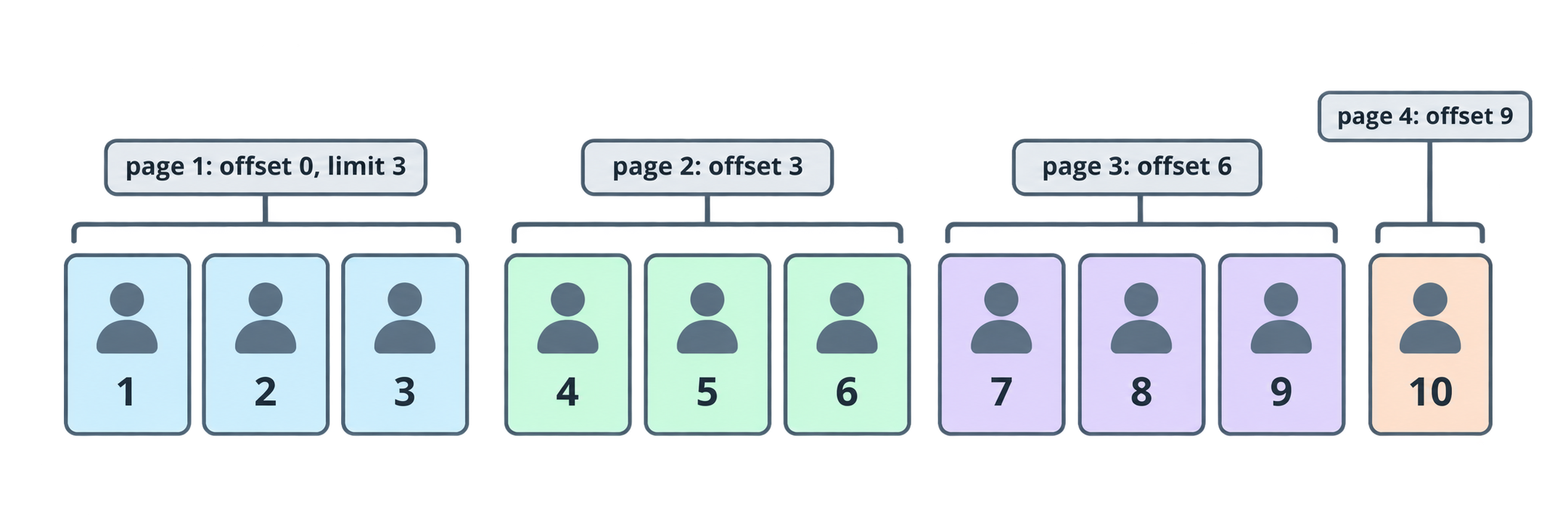
limit— how many students per page. Example: 10.offset— how many students to skip before starting. Example: 20.
| Page | offset | limit | Students returned |
|---|---|---|---|
| 1 | 0 | 10 | 1–10 |
| 2 | 10 | 10 | 11–20 |
| 3 | 20 | 10 | 21–30 |
The formula clients use: offset = (page − 1) × limit.
Slicing in Python
students[offset : offset + limit]
With offset=3, limit=2 → students[3:5] → the 4th and 5th students. (Remember: slice end is exclusive.)
Returning useful metadata
A good paginated response tells the client where it is:
total— how many matched the filters (before slicing)offset,limit— echoed backtotal_pages— so the UI can draw page buttons
The total_pages calculation is ceiling division: 23 students ÷ 10 per page = 3 pages, not 2.3. Python trick: (total + limit - 1) // limit. For 23 and 10: (23 + 9) // 10 = 32 // 10 = 3. For 20 and 10: 29 // 10 = 2. Correct both times.
src/studydesk/__init__.py
from typing import Annotated, Literal

import uvicorn
from fastapi import FastAPI, HTTPException, Path, Query, status

from .utils import load_students

app = FastAPI(
    title="StudyDesk API",
    description="Student records API for a coaching institute.",
    version="0.1.0",
)


@app.get("/", tags=["General"])
def home():
    return {"message": "Welcome to StudyDesk API"}


@app.get("/students", tags=["Students"], summary="Get all students")
def get_students(
    city: Annotated[
        str | None,
        Query(description="Filter by city (case-insensitive).", examples=["Ahmedabad"]),
    ] = None,
    grade: Annotated[
        str | None,
        Query(
            description="Filter by grade: A, B, C, or D.",
            pattern="^[ABCD]$",
            examples=["A"],
        ),
    ] = None,
    min_marks: Annotated[
        int | None,
        Query(description="Only students with marks >= this value.", ge=0, le=100),
    ] = None,
    sort_by: Annotated[
        Literal["id", "name", "age", "marks"],
        Query(description="Field to sort by."),
    ] = "id",
    order: Annotated[
        Literal["asc", "desc"],
        Query(description="Sort direction: asc or desc."),
    ] = "asc",
    offset: Annotated[
        int,
        Query(description="Number of students to skip.", ge=0),
    ] = 0,
    limit: Annotated[
        int,
        Query(description="Maximum number of students to return (1-100).", ge=1, le=100),
    ] = 10,
):
    students = load_students()

    # --- filtering ---
    if city:
        students = [s for s in students if s["city"].lower() == city.lower()]

    if grade:
        students = [s for s in students if s["grade"] == grade.upper()]

    if min_marks is not None:
        students = [s for s in students if s["marks"] >= min_marks]

    # --- sorting ---
    students = sorted(students, key=lambda s: s[sort_by], reverse=(order == "desc"))

    # --- pagination ---
    total = len(students)
    total_pages = (total + limit - 1) // limit if total > 0 else 0
    page = students[offset : offset + limit]

    return {
        "total": total,
        "total_pages": total_pages,
        "offset": offset,
        "limit": limit,
        "count": len(page),
        "students": page,
    }


@app.get("/students/{student_id}", tags=["Students"], summary="Get one student by ID")
def get_student(
    student_id: Annotated[
        int,
        Path(
            title="Student ID",
            description="The unique ID of the student. Must be a positive integer.",
            gt=0,
            examples=[1],
        ),
    ],
):
    students = load_students()
    for student in students:
        if student["id"] == student_id:
            return student
    raise HTTPException(
        status_code=status.HTTP_404_NOT_FOUND,
        detail=f"Student with id {student_id} not found",
    )


def main() -> None:
    """Start the development server."""
    uvicorn.run("studydesk:app", host="127.0.0.1", port=8000, reload=True)
Reading the new parts
offset ... ge=0 You cannot skip a negative number of students.
limit ... ge=1, le=100 At least one, at most 100. The upper limit protects your server: without it, a client could send limit=1000000 and pull the whole database. Choose a cap that fits your app.
= 10 Default page size. If the client sends nothing, they get the first 10.
total is computed before slicing So the client knows how many matched, not just how many came back in this page.
if total > 0 else 0 Avoids reporting total_pages: 1 for an empty result.
count vs total count is how many are in this response. total is how many exist overall. On the last page, count is usually smaller than limit.
Test
/students?limit=3
{
  "total": 10,
  "total_pages": 4,
  "offset": 0,
  "limit": 3,
  "count": 3,
  "students": [ ...ids 1, 2, 3... ]
}
/students?limit=3&offset=9
{
  "total": 10,
  "total_pages": 4,
  "offset": 9,
  "limit": 3,
  "count": 1,
  "students": [ ...id 10... ]
}
Last page: only one student left, count is 1.
/students?grade=B&sort_by=marks&order=desc&limit=2
{
  "total": 4,
  "total_pages": 2,
  "offset": 0,
  "limit": 2,
  "count": 2,
  "students": [ Yash 84, Kavya 81 ]
}
Filter, sort, and page working together on one route. This is exactly what Karan asked for.
/students?limit=0 → 422. /students?offset=-1 → 422.
The order matters: filter → sort → paginate
Always this order. If you paginate first and then filter, page 1 might end up empty while page 3 has results. Filter to find the matching set, sort it, then cut a page from it.
Where StudyDesk is after this article
studydesk/
└── src/
    └── studydesk/
        ├── __init__.py          ← GET /students with filter, sort, pagination
        ├── utils.py
        └── data/students.json
GET /students now accepts:
| Parameter | Type | Default | Rules |
|---|---|---|---|
city |
string | none | case-insensitive |
grade |
string | none | A, B, C, or D |
min_marks |
int | none | 0–100 |
sort_by |
choice | id |
id, name, age, marks |
order |
choice | asc |
asc, desc |
offset |
int | 0 |
≥ 0 |
limit |
int | 10 |
1–100 |
Everything is documented and testable in /docs, with dropdowns for sort_by and order.
Concept Quiz
Answers are below. No coding needed.
Q1. How does FastAPI decide whether a function parameter is a path parameter or a query parameter?
Q2. What does city: str | None = None mean, piece by piece?
Q3. Why do we write if min_marks is not None: instead of if min_marks:?
Q4. What does Literal["asc", "desc"] give us that str does not?
Q5. Why is /students?city=Mumbai a 200 with an empty list, not a 404?
Q6. What is the correct order of the three operations, and why?
Q7. A client wants page 4 with 25 students per page. What offset and limit should it send?
Q8. Why do we put le=100 on limit?
Q9. What is the difference between count and total in the response?
Q10. For 47 matching students and limit=10, what is total_pages? Show the calculation.
Answers
- If the parameter name matches a
{placeholder}in the path, it is a path parameter. Otherwise, it is a query parameter. cityis the parameter name;str | Nonemeans it can be a string or nothing;= Noneis the default, which makes it optional.0is a valid value formin_marks, but0is falsy in Python, soif min_marks:would skip the filter.is not Nonechecks whether a value was sent at all.- Only those exact values are accepted; anything else gets an automatic 422.
/docsshows a dropdown, and our code can never receive an unexpected field name. - The request was valid and the server handled it correctly. There was simply nothing to return. 404 is for a resource that does not exist, not for an empty search.
- Filter → sort → paginate. Filtering first finds the matching set; sorting orders that set; paginating cuts a page from the ordered set. Any other order gives wrong or inconsistent pages.
offset = (4 − 1) × 25 = 75,limit = 25.- To protect the server. Without a cap, a client could request all records at once, which is slow and expensive.
countis how many students are in this response.totalis how many matched the filters across all pages.(47 + 10 − 1) // 10 = 56 // 10 = 5pages.
Epilogue
Karan tests /students?city=Surat&grade=B&sort_by=marks&order=desc&limit=10 from the mobile app. One request, exactly the students he needs, already sorted. His app no longer downloads everything.
Neha looks at the code and says, "Reading is solid. But right now anyone can send marks: "ninety" or an email like hello once we add create routes, and the JSON file will happily store the garbage."
In the next article: Pydantic — defining what a valid student is, so bad data is rejected before it ever reaches your code.
Comments
Join the discussionNo comments yet. Be the first to comment.